Question: Project Tasks The project manager for the development of a bioterrorism response plan has created the WBS for the project, estimated the number of workdays
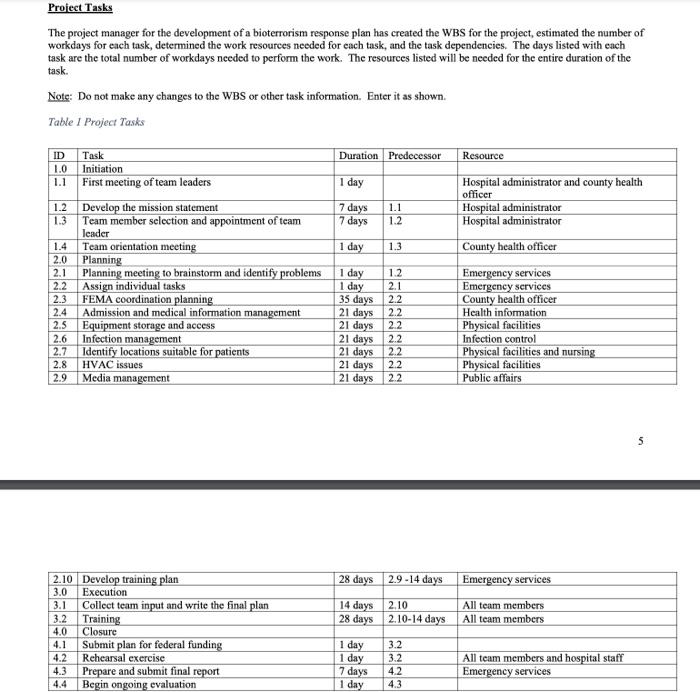
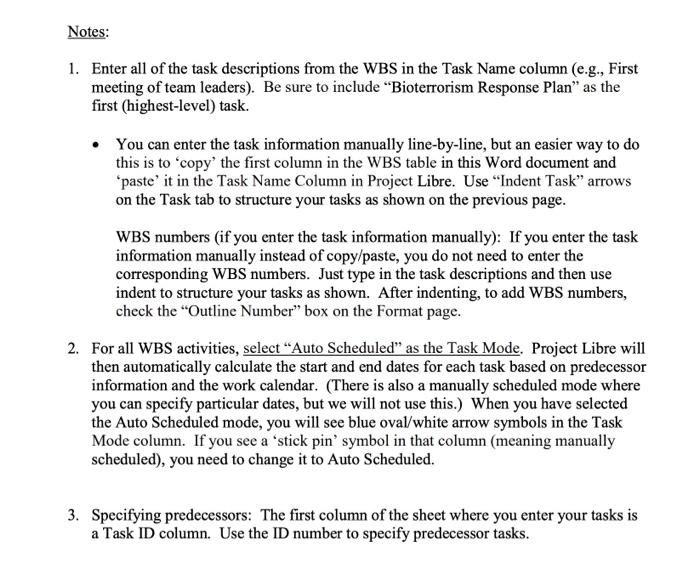
Project Tasks The project manager for the development of a bioterrorism response plan has created the WBS for the project, estimated the number of workdays for each task, determined the work resources needed for each task, and the task dependencies. The days listed with each task are the total number of workdays needed to perform the work. The resources listed will be needed for the entire duration of the task. Note: Do not make any changes to the WBS or other task information. Enter it as shown. Table 1 Project Tasks ID Task Duration Predecessor Resource 1.0 Initiation 1.1 First meeting of team leaders 1 day Hospital administrator and county health officer 1.2 1.1 Develop the mission statement 7 days Hospital administrator 1.3 7 days Hospital administrator Team member selection and appointment of team leader 1.4 Team orientation meeting 1 day County health officer 2.0 Planning 2.1 1 day Planning meeting to brainstorm and identify problems Assign individual tasks 2.2 1 day 2.3 FEMA coordination planning 35 days Emergency services Emergency services County health officer Health information Physical facilities Infection control 2.4 Admission and medical information management 21 days 2.5 Equipment storage and access 21 days 2.6 Infection management 21 days 2.7 Identify locations suitable for patients 21 days Physical facilities and nursing HVAC issues 21 days 2.8 Physical facilities 2.9 Media management 21 days Public affairs 2.10 Develop training plan 28 days 2.9-14 days Emergency services 3.0 Execution 3.1 Collect team input and write the final plan 14 days 2.10 All team members Training 28 days days All team members 3.2 4.0 Closure 4.1 Submit plan for federal funding 1 day 4.2 Rehearsal exercise 1 day All team members and hospital staff Emergency services 7 days 4.3 Prepare and submit final report Begin ongoing evaluation 4.4 1 day BE 1.2 1.3 1.2 2.1 -~~~~~~222 NNNN 2.10-14 3344 2223 5 Notes: 1. Enter all of the task descriptions from the WBS in the Task Name column (e.g., First meeting of team leaders). Be sure to include "Bioterrorism Response Plan" as the first (highest-level) task. You can enter the task information manually line-by-line, but an easier way to do this is to 'copy' the first column in the WBS table in this Word document and 'paste' it in the Task Name Column in Project Libre. Use "Indent Task" arrows on the Task tab to structure your tasks as shown on the previous page. WBS numbers (if you enter the task information manually): If you enter the task information manually instead of copy/paste, you do not need to enter the corresponding WBS numbers. Just type in the task descriptions and then use indent to structure your tasks as shown. After indenting, to add WBS numbers, check the "Outline Number" box on the Format page. 2. For all WBS activities, select "Auto Scheduled" as the Task Mode. Project Libre will then automatically calculate the start and end dates for each task based on predecessor information and the work calendar. (There is also a manually scheduled mode where you can specify particular dates, but we will not use this.) When you have selected the Auto Scheduled mode, you will see blue oval/white arrow symbols in the Task Mode column. If you see a 'stick pin' symbol in that column (meaning manually scheduled), you need to change it to Auto Scheduled. 3. Specifying predecessors: The first column of the sheet where you enter your tasks is a Task ID column. Use the ID number to specify predecessor tasks. Project Tasks The project manager for the development of a bioterrorism response plan has created the WBS for the project, estimated the number of workdays for each task, determined the work resources needed for each task, and the task dependencies. The days listed with each task are the total number of workdays needed to perform the work. The resources listed will be needed for the entire duration of the task. Note: Do not make any changes to the WBS or other task information. Enter it as shown. Table 1 Project Tasks ID Task Duration Predecessor Resource 1.0 Initiation 1.1 First meeting of team leaders 1 day Hospital administrator and county health officer 1.2 1.1 Develop the mission statement 7 days Hospital administrator 1.3 7 days Hospital administrator Team member selection and appointment of team leader 1.4 Team orientation meeting 1 day County health officer 2.0 Planning 2.1 1 day Planning meeting to brainstorm and identify problems Assign individual tasks 2.2 1 day 2.3 FEMA coordination planning 35 days Emergency services Emergency services County health officer Health information Physical facilities Infection control 2.4 Admission and medical information management 21 days 2.5 Equipment storage and access 21 days 2.6 Infection management 21 days 2.7 Identify locations suitable for patients 21 days Physical facilities and nursing HVAC issues 21 days 2.8 Physical facilities 2.9 Media management 21 days Public affairs 2.10 Develop training plan 28 days 2.9-14 days Emergency services 3.0 Execution 3.1 Collect team input and write the final plan 14 days 2.10 All team members Training 28 days days All team members 3.2 4.0 Closure 4.1 Submit plan for federal funding 1 day 4.2 Rehearsal exercise 1 day All team members and hospital staff Emergency services 7 days 4.3 Prepare and submit final report Begin ongoing evaluation 4.4 1 day BE 1.2 1.3 1.2 2.1 -~~~~~~222 NNNN 2.10-14 3344 2223 5 Notes: 1. Enter all of the task descriptions from the WBS in the Task Name column (e.g., First meeting of team leaders). Be sure to include "Bioterrorism Response Plan" as the first (highest-level) task. You can enter the task information manually line-by-line, but an easier way to do this is to 'copy' the first column in the WBS table in this Word document and 'paste' it in the Task Name Column in Project Libre. Use "Indent Task" arrows on the Task tab to structure your tasks as shown on the previous page. WBS numbers (if you enter the task information manually): If you enter the task information manually instead of copy/paste, you do not need to enter the corresponding WBS numbers. Just type in the task descriptions and then use indent to structure your tasks as shown. After indenting, to add WBS numbers, check the "Outline Number" box on the Format page. 2. For all WBS activities, select "Auto Scheduled" as the Task Mode. Project Libre will then automatically calculate the start and end dates for each task based on predecessor information and the work calendar. (There is also a manually scheduled mode where you can specify particular dates, but we will not use this.) When you have selected the Auto Scheduled mode, you will see blue oval/white arrow symbols in the Task Mode column. If you see a 'stick pin' symbol in that column (meaning manually scheduled), you need to change it to Auto Scheduled. 3. Specifying predecessors: The first column of the sheet where you enter your tasks is a Task ID column. Use the ID number to specify predecessor tasks