



Question: Project text: Essentially convert a color image to a greyscale one (ppm to pgm). Your job is to convert a color image in ppm format
Project text:
Essentially convert a color image to a greyscale one (ppm to pgm).
Your job is to convert a color image in ppm format into a grayscale image in pgm format. The pgm format is similar to the ppm format. The magic identifier for the ppm image file to be used in this project is always P2.
Project Details
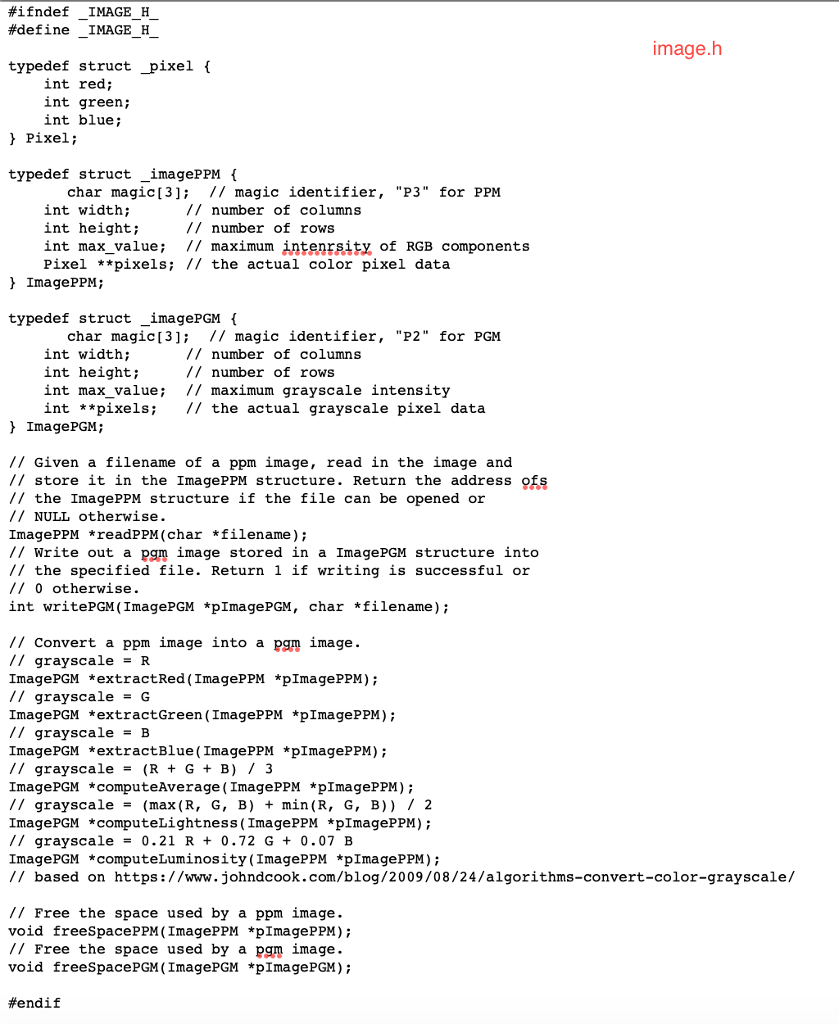
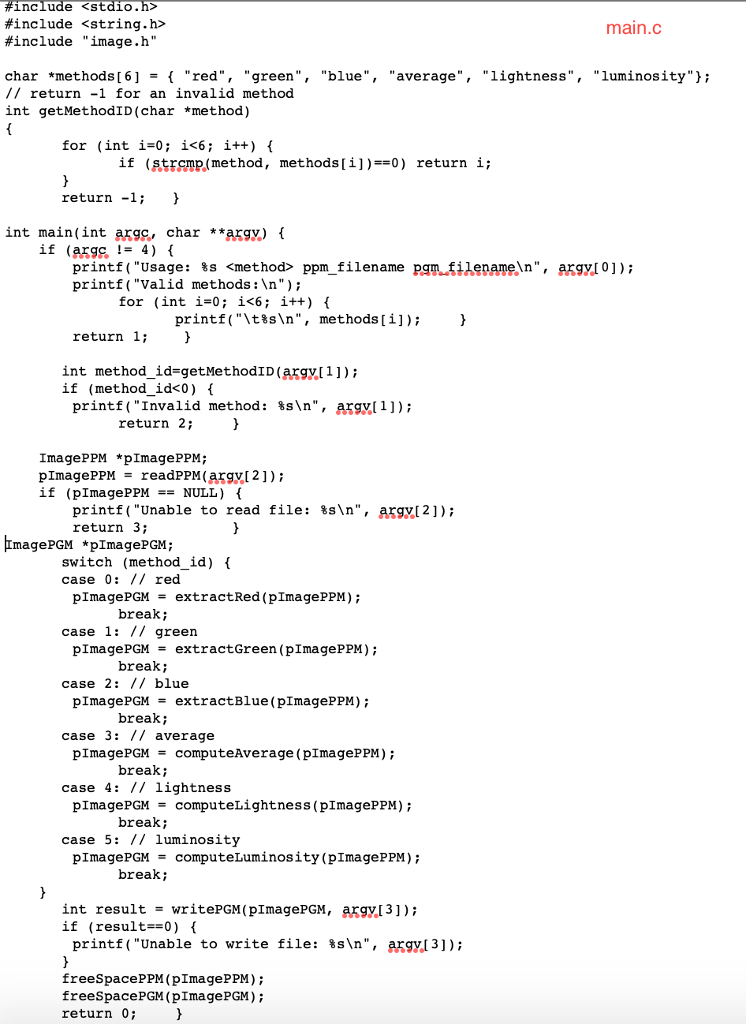
The image.h file lists the signatures of the ten (10) functions you need to implement in the image.c file, as shown below.
ImagePPM *readPPM(char *filename); Given a filename of a ppm image, read in the image and store it in the ImagePPM structure. Return the address of the ImagePPM structure if the file can be opened or NULL otherwise. You can assume the file will be in the ppm format if it can be opened.
int writePGM(ImagePGM *pImagePPM, char *filename); Write out a pgm image stored in a ImagePGM structure into the specified file. Return 1 if writing is successful or 0 otherwise.
ImagePGM *extractRed(ImagePPM *pImagePPM); Convert a ppm image into a pgm image using grayscale = R.
ImagePGM *extractGreen(ImagePPM *pImagePPM); Convert a ppm image into a pgm image using grayscale = G.
ImagePGM *extractBlue(ImagePPM *pImagePPM); Convert a ppm image into a pgm image using grayscale = B.
ImagePGM *computeAverage(ImagePPM *pImagePPM); Convert a ppm image into a pgm image using grayscale = (R + G + B) / 3.
ImagePGM *computeLightness(ImagePPM *pImagePPM); Convert a ppm image into a pgm image using grayscale = (max(R, G, B) + min(R, G, B)) / 2.
ImagePGM *computeLuminosity(ImagePPM *pImagePPM); Convert a ppm image into a pgm image using grayscale = 0.21 R + 0.72 G + 0.07 B.
void freeSpacePPM(ImagePPM *pImagePPM); Free the space used by a ppm image.
void freeSpacePGM(ImagePGM *pImagePGM); Free the space used by a pgm image.
Be sure to use these ten functions. Image.c should essentially be these ten functions needed to complete the code.
#ifndef IMAGE H #define IMAGE H image.h typedef struct _pixel ( int red; int green; int blue; ! Pixel; typedef struct _imagePPM char magic[3 // magic identifier, "P3" for PPM int width; int height; int max_value; // maximum intenrsity of RGB components Pixel **pixels; // the actual color pixel data // number of columns // number of rows l ImagePPM; typedef struct _imagePGM char magic[3 // magic identifier, "P2" for PGM int width; int height; int max value; // maximum grayscale intensity int **pixels / the actual grayscale pixel data // number of columns // number of rows ImagePGM; // Given a filename of a ppm image, read in the image and // store it in the ImagePPM structure. Return the address ofs // the ImagePPM structure if the file can be opened or // NULL otherwise. ImagePPM *readPPM (char *filename); // Write out a pgm image stored in a ImagePGM structure into // the specified file. Return 1 if writing is successful or // 0 otherwise int writePGM (ImagePGM *pImagePGM, char *filename); /1 Convert a ppm image into a pgm image. // grayscaleR ImagePGM *extractRed ( ImagePPM *pImagePPM); // grayscaleG ImagePGM *extractGreen (ImagePP *pImagePPM); // grayscale -B ImagePGM *extractBlue (ImagePPM *pImagePPM); // grayscale = (R + G + B) / 3 ImagePGM *computeAverage (ImagePPM *plmagePPM); // grayscale (max (R, G, B) + min(R, G, B)) / 2 ImagePGM *computeLightness (ImagePPM *pImagePPM) // grayscale 0.21 R + 0.72 G + 0.07 B ImagePGM *computeLuminosity(ImagePPM *pImagePPM); // based on https://www.johndcook.com/blog/2009/08/24/algorithms-convert-color-grayscale/ // Free the space used by a ppm image. void freeSpacePPM (ImagePPM *pImagePPM); // Free the space used by a pgm image. void freeSpacePGM (ImagePGM *pImagePGM); fendi f #ifndef IMAGE H #define IMAGE H image.h typedef struct _pixel ( int red; int green; int blue; ! Pixel; typedef struct _imagePPM char magic[3 // magic identifier, "P3" for PPM int width; int height; int max_value; // maximum intenrsity of RGB components Pixel **pixels; // the actual color pixel data // number of columns // number of rows l ImagePPM; typedef struct _imagePGM char magic[3 // magic identifier, "P2" for PGM int width; int height; int max value; // maximum grayscale intensity int **pixels / the actual grayscale pixel data // number of columns // number of rows ImagePGM; // Given a filename of a ppm image, read in the image and // store it in the ImagePPM structure. Return the address ofs // the ImagePPM structure if the file can be opened or // NULL otherwise. ImagePPM *readPPM (char *filename); // Write out a pgm image stored in a ImagePGM structure into // the specified file. Return 1 if writing is successful or // 0 otherwise int writePGM (ImagePGM *pImagePGM, char *filename); /1 Convert a ppm image into a pgm image. // grayscaleR ImagePGM *extractRed ( ImagePPM *pImagePPM); // grayscaleG ImagePGM *extractGreen (ImagePP *pImagePPM); // grayscale -B ImagePGM *extractBlue (ImagePPM *pImagePPM); // grayscale = (R + G + B) / 3 ImagePGM *computeAverage (ImagePPM *plmagePPM); // grayscale (max (R, G, B) + min(R, G, B)) / 2 ImagePGM *computeLightness (ImagePPM *pImagePPM) // grayscale 0.21 R + 0.72 G + 0.07 B ImagePGM *computeLuminosity(ImagePPM *pImagePPM); // based on https://www.johndcook.com/blog/2009/08/24/algorithms-convert-color-grayscale/ // Free the space used by a ppm image. void freeSpacePPM (ImagePPM *pImagePPM); // Free the space used by a pgm image. void freeSpacePGM (ImagePGM *pImagePGM); fendi f
Step by Step Solution
There are 3 Steps involved in it

Get step-by-step solutions from verified subject matter experts