







Question: Provide answer with way to do in Microsoft access. Provide answer with way to do in Microsoft access. Provide answer with way to do in
Provide answer with way to do in Microsoft access.
Provide answer with way to do in Microsoft access.
Provide answer with way to do in Microsoft access.
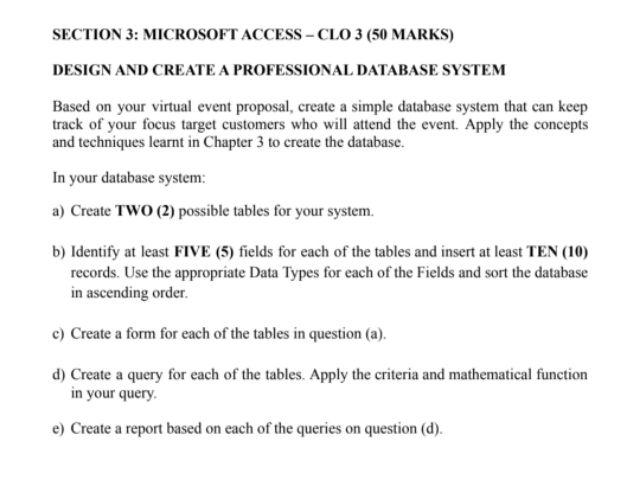
DESIGN AND CREATE A PROFESSIONAL DATABASE SYSTEM Based on your virtual event proposal, create a simple database system that can keep track of your focus target customers who will attend the event. Apply the concepts and techniques learnt in Chapter 3 to create the database. In your database system: a) Create TWO (2) possible tables for your system. b) Identify at least FIVE (5) fields for each of the tables and insert at least TEN (10) records. Use the appropriate Data Types for each of the Fields and sort the database in ascending order. c) Create a form for each of the tables in question (a). d) Create a query for each of the tables. Apply the criteria and mathematical function in your query. e) Create a report based on each of the queries on question (d). DESIGN AND CREATE A PROFESSIONAL DATABASE SYSTEM Based on your virtual event proposal, create a simple database system that can keep track of your focus target customers who will attend the event. Apply the concepts and techniques learnt in Chapter 3 to create the database. In your database system: a) Create TWO (2) possible tables for your system. b) Identify at least FIVE (5) fields for each of the tables and insert at least TEN (10) records. Use the appropriate Data Types for each of the Fields and sort the database in ascending order. c) Create a form for each of the tables in question (a). d) Create a query for each of the tables. Apply the criteria and mathematical function in your query. e) Create a report based on each of the queries on question (d)
Step by Step Solution
There are 3 Steps involved in it

Get step-by-step solutions from verified subject matter experts
 Study Help