







Question: PROVIDE JAVA CODE FOR THUMBS UP, no explanations only, provide code or thumbs down. Basic GUI Design: The Game of Craps Background The rules of
PROVIDE JAVA CODE FOR THUMBS UP, no explanations only, provide code or thumbs down.
Basic GUI Design: The Game of Craps
Background
The rules of the Game of craps are as follows:
A player rolls two dice where each die has six faces in the usual way (values 1 through 6).
After the dice have come to rest the sum of the two upward faces is calculated.
The first roll/throw
If the sum is 7 or 11 on the first throw the roller/player wins.
If the sum is 2, 3 or 12 the roller/player loses, that is the house wins.
If the sum is 4, 5, 6, 8, 9, or 10, that sum becomes the roller/player's 'point'.
Continue rolling given the player's point
Now the player must roll the 'point' total before rolling a 7 in order to win.
If they roll a 7 before rolling the point value they got on the first roll the roller/player loses (the 'house' wins).
Specifications
For our implementation of the game, will we will track how many wins the player has versus how many wins the house does. We will also show the value of each rolled die, the total of the roll, and the point (as necessary). When the player wins/loses a round, this should be reported on the form. Below the program details are screenshots of how you might model your solution (you can change your layout a bit if you wish): Write a program using Java Swing to implement the game of Craps. Include the following items:
A menu that has (at least) the following selections (NOTE: all selections should include some form of keyboard shortcuts)Game Menu with the following sub-menus
Start: This MUST be chosen before the game can begin. It enables the necessary items on the window/frame and initializes any underlying values as necessary
Reset Session: Clears all data including win totals and restarts game
Exit: Exits the application. The user should be asked (via a JOptionPane) if they are sure they want to exit
Help Menu with the following sub-menus
About: Displays a JOptionPane that should include your name, what version the app is, what version of Java the code was written against, and anything else important about the application
Rules: Displays a JOptionPane that describes how the game is played
A button to roll the dice (include a keyboard shortcut to the button)
Should only be enabled when the game has been started and is in process
After a roll, the results should be displayed as appropriate in JLabels for each die, the total, and as necessary, the point
When the game is won/lost, a message should be displayed on the window (perhaps using a JLabel)
A button to play the game again (include a keyboard shortcut to the button)
This button is disabled during gameplay and becomes enabled when the current game is over
Clicking this button should reset current roll information but NOT the win totals
JLabels for die results and win totals (unless you do the extra credit specified below)
JLabels to describe each of the other items on your window as necessary
NOTE: enable and disable buttons and menu items as necessary based on current state of game
e.g. once the game is started the Start option on the game menu should be disabled
NOTE 2: feel free to incorporate other components as you deem necessary. Creativity of design is welcome :-)
Once the above is functional, add to your solution the ability for the user to enter a starting bank account value. The user can then place a bet before starting each game. If the user wins, the bet is doubled and the bank account is updated accordingly. You are welcome to gather user input for starting bank account value and bets in any fashion you wish. You must ensure the user enters valid data (numeric). More specifically, the starting bank account must be non-negative. Furthermore, a bet may never exceed the current bank account. Should the user's bank account reach 0, the entire session is over. Below is a possible representation of your program interface. You are allowed variations on the layout provided the above functionality is in place.
user must set bank account to start game:
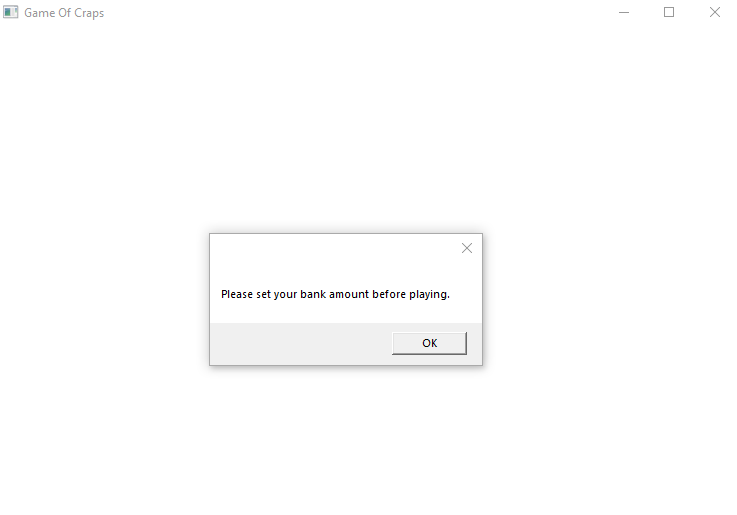
user must click "start" to start the game.
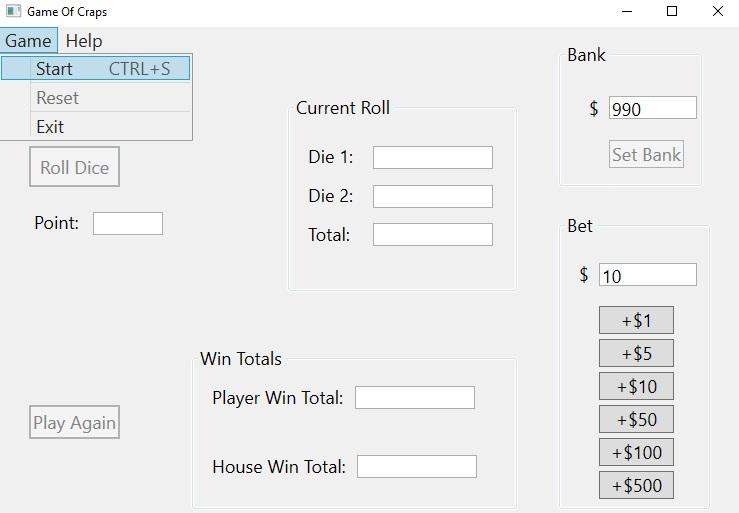
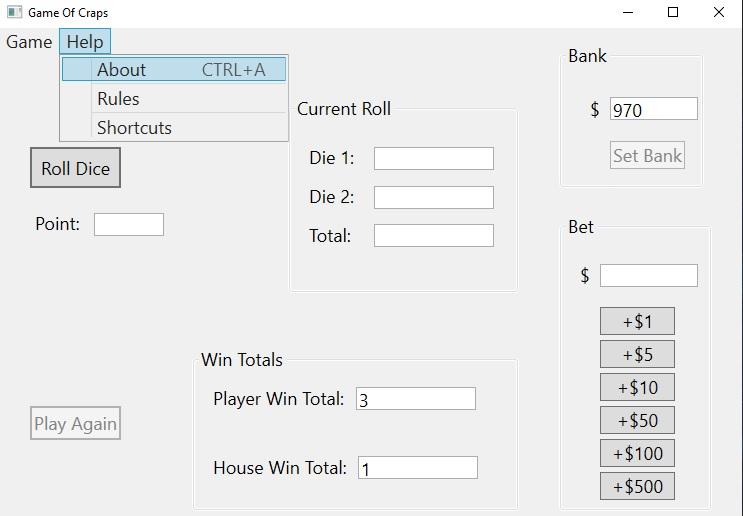
provide code, no explanations without code or thumbs down immediately.
Please set your bank amount before playing. Game Of Craps Game Help \begin{tabular}{l} Start CTRL +S \\ \hline Reset \\ Exit \\ \hline \end{tabular} Bank Current Roll Die 1: Set Bank Roll Dice Die 2: Point: Total: Bet $10 Win Totals Player Win Total: Play Again \begin{tabular}{|r|} \hline+$1 \\ \hline+$5 \\ \hline+$10 \\ \hline+$50 \\ \hline+$100 \\ \hline+$500 \\ \hline \end{tabular} House Win Total
Step by Step Solution
There are 3 Steps involved in it

Get step-by-step solutions from verified subject matter experts
 Study Help