







Question: Public Class frmFutureValue Private Sub btnCalculate_Click(sender As Object, e As EventArgs) Handles btnCalculate.Click Dim monthlyInvestment As Decimal = CDec(txtMonthlyInvestment.Text) Dim yearlyInterestRate As Decimal = CDec(txtYearlyInterestRate.Text)
Public Class frmFutureValue Private Sub btnCalculate_Click(sender As Object, e As EventArgs) Handles btnCalculate.Click Dim monthlyInvestment As Decimal = CDec(txtMonthlyInvestment.Text) Dim yearlyInterestRate As Decimal = CDec(txtYearlyInterestRate.Text) Dim years As Integer = CInt(txtYears.Text) Dim monthlyInterestRate As Decimal = yearlyInterestRate / 12 / 100 Dim months As Integer = years * 12
'get the futureValue by call the function ComputeFutureValue Dim futureValue As Decimal = ComputeFutureValue(monthlyInvestment, monthlyInterestRate, months)
txtFutureValue.Text = FormatCurrency(futureValue) txtMonthlyInvestment.Select() End Sub
Private Sub btnExit_Click(sender As Object, e As EventArgs) Handles btnExit.Click Me.Close() End Sub
'create a procedure which can be used by the class Private Function ComputeFutureValue(ByVal myMonthlyInvestment As Decimal, ByVal myMonthlyInterestRate As Decimal, ByVal myMonths As Integer) As Decimal Dim futureValue As Decimal
'calculate and return future value For i As Integer = 1 To myMonths futureValue = (futureValue + myMonthlyInvestment) * (1 + myMonthlyInterestRate) Next
Return futureValue End Function
'event handle ClearAllBoxes to clear all the text boxes ' this handler handle DoubleClick of form as well as MouseHover of txtFutureValue Private Sub ClearAllBoxes(sender As Object, e As EventArgs) Handles MyBase.DoubleClick, txtFutureValue.MouseHover txtMonthlyInvestment.Text = "" txtYearlyInterestRate.Text = "" txtYears.Text = "" txtFutureValue.Text = "" End Sub
End Class
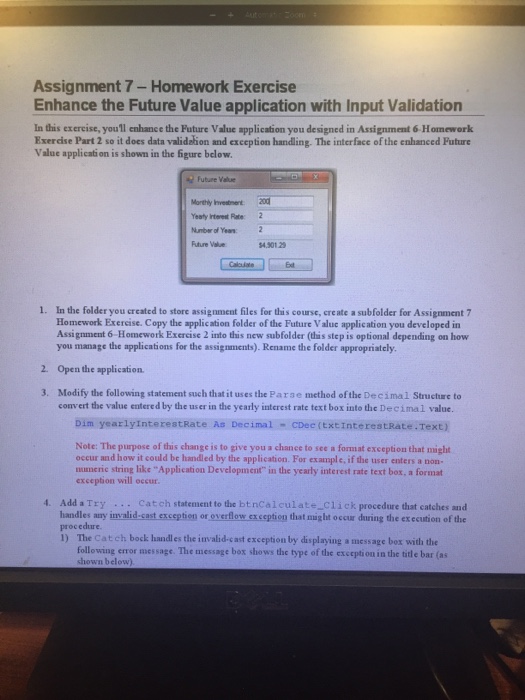
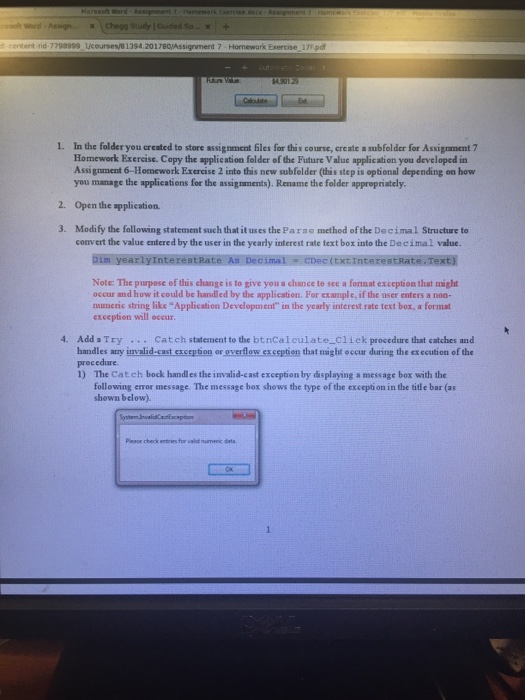
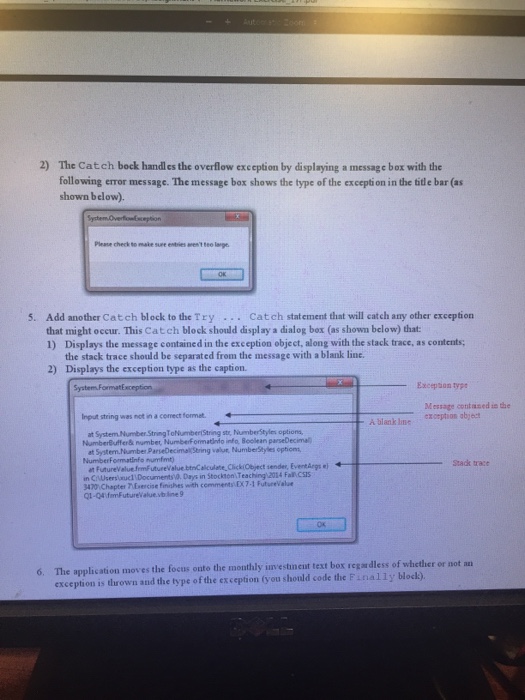
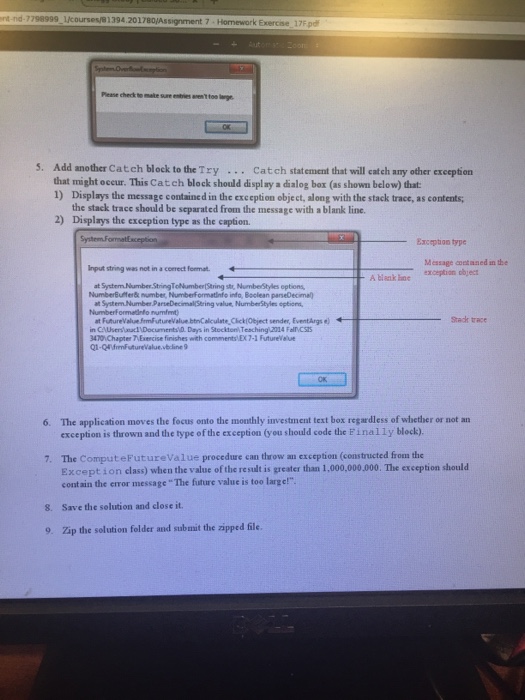
In visual Studio, this is the code at the bottom and the instructions to complete the exercise are the pictures Please be accurate and good in visual studio to provide the correct and best answers the only which has to do is to modify the code by following the instructions in the picture up there. Thank you for your help!!!
Assignment 7 Homework Exercise Enhance the Future Value application with Input Validation In this exercise, you'll enhance the Future Value application you designed in Assignment 6 Homework Exercise Part 2 so it does data validation and exception handling. The interface of the enhanced Future Value applicati on is shown in the figure below. Future Value eaty Irterest Rate 2 Number of Yeas 2 Future Value 4.301 2 Ed In the folder you created to store assignment files for this course, create a subfolder for Assignment 7 Homework Exereise. Copy the application folder of the Future Valuc application you developed in Assignment 6-Homework Exercise 2 into this new subfolder (this step is optional depending on how 1. you manage the applications for the assignments).Rename the folder appropriately 2 Open the application 3. Modify the following statement such that it uses the Parse method of the Decima1 Structure to convert the value entered by the user in the yearly interest rate text box into the Decimal value Dim yearlyInterestRate As Decimal-CDec(txtinterestRate.Text) Note: The purpose of this change is to give you a chance to see a format exception that might occur and how it could be handled by the application. For example, if the user enters a non- numeric string like "Application Development" in the yearly interest rate text box, a format exception will occur 4. AddaTry.. Catch statement to the btnCalculate_click procedure that catches and handles any invalid-cast exception or overflow exception that might occur during the execution of the procedure 1) The Catch bock handles the invalid-cast exception by displaying a message bex with the following error message. The message box shows the type of the exception in the title bar (as shown below
Step by Step Solution
There are 3 Steps involved in it

Get step-by-step solutions from verified subject matter experts
 Study Help