



Question: public void paint(Graphics g){ double theta = 0; int ry=(int)(150 + 40*Math.sin(theta)), rx=(int)(150 + 40*Math.cos(theta)); int diameter=80; Calendar c = Calendar.getInstance(); String s; super.paint(g); //setBackground(java.awt.Color.blue);
public void paint(Graphics g){
double theta = 0;
int ry=(int)(150 + 40*Math.sin(theta)), rx=(int)(150 + 40*Math.cos(theta));
int diameter=80;
Calendar c = Calendar.getInstance();
String s;
super.paint(g);
//setBackground(java.awt.Color.blue);
//if(start){
//s = "The start time is: " + c.get(Calendar.HOUR) + ":" + c.get(Calendar.MINUTE) + ":" + c.get(Calendar.SECOND);
//g.drawString( s, 300, 300);
g.setColor(nowcolor);
//g.drawOval(rx, ry, diameter, diameter);
for(int i = 0; i
//g.setColor(java.awt.Color.lightGray);
g.drawOval(rx, ry, diameter, diameter);
theta += (Math.PI/180)*(360/iterations);
ry = (int)(150 + 40*Math.sin(theta));
rx = (int)(150 + 40*Math.cos(theta));
//g.setColor(java.awt.Color.red);
//g.drawOval(rx, ry, diameter, diameter);
/*try {
Thread.sleep(100);
} catch (InterruptedException e) {
g.drawString("sleep exception", 20, 20);
}*/
}
/*c = Calendar.getInstance();
s = "The stop time is: " + c.get(Calendar.HOUR) + ":" + c.get(Calendar.MINUTE) + ":" + c.get(Calendar.SECOND);
g.drawString(s, 300, 325);*/
//} }
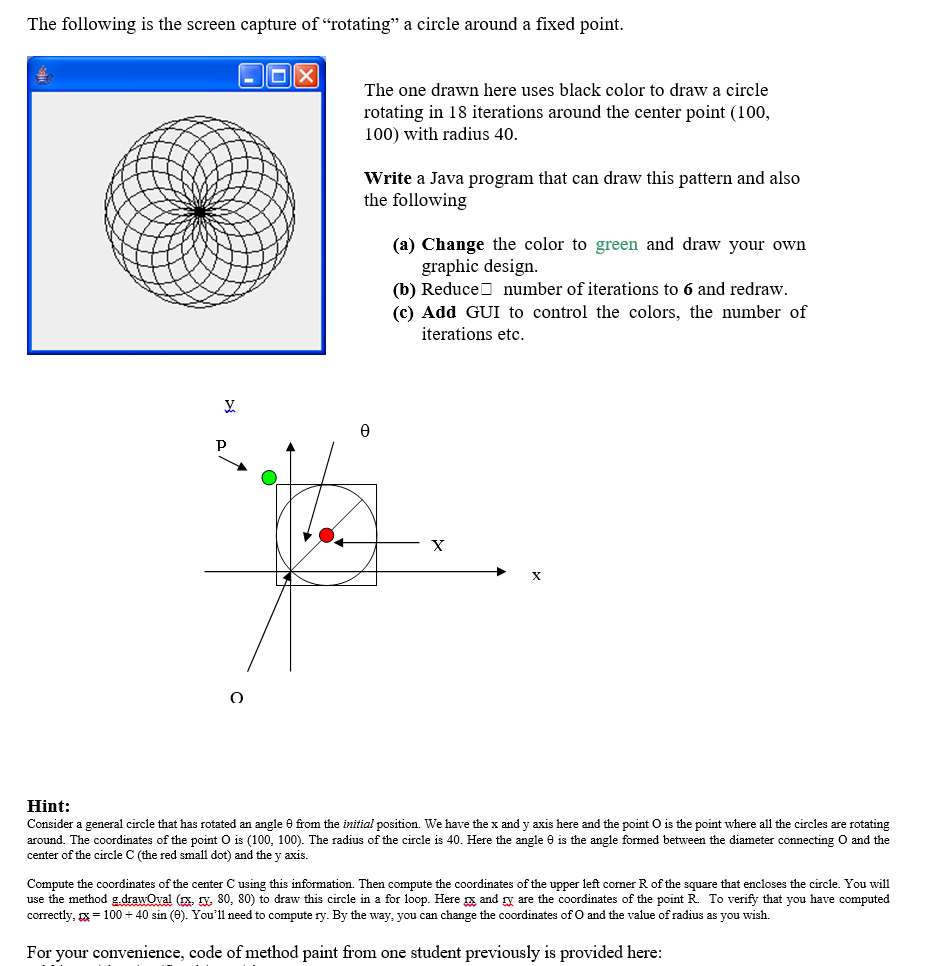
The following is the screen capture of "rotating" a circle around a fixed point The one drawn here uses black color to draw a circle rotating in 18 iterations around the center point (100, 100) with radius 40 Write a Java program that can draw this pattern and also the following (a) Change the color to green and draw your owin graphic design. (b) Reduce number of iterations to 6 and redraw. (c) Add GUI to control the colors, the number of iterations etc Hint: Consider a general circle that has rotated an angle from the initial position. We have the x and y axis here and the point dus the point where all the circles are rotating around. The coordinates of the point O is (100, 100). The radius of the circle is 40. Here the angle is the angle formed between the diameter c center of the circle C (the red small dot) and the y axi:s. O and the Compute the coordinates of the center C using this information. Then compute the coordinates of the upper left corner R of the square that encloses the circle. You will use the method g draw:Oval p 80. 80) to draw this circle in a for loop. Here and r are the coordinates of the point R To verify that you have computed correctly,= 100-40 sin (). You'll need to compute ry. By the way, you can change the coordinates of O and the value of radius as you wish. For your convenience, code of method paint from one student previously is provided here
Step by Step Solution
There are 3 Steps involved in it

Get step-by-step solutions from verified subject matter experts