







Question: Please help me code the following in: JAVA Please use many COMMENTS and read the task THOROUGHLY Full points will be awarded, thanks in advance!
Please help me code the following in: JAVA
Please use many COMMENTS and read the task THOROUGHLY
Full points will be awarded, thanks in advance! 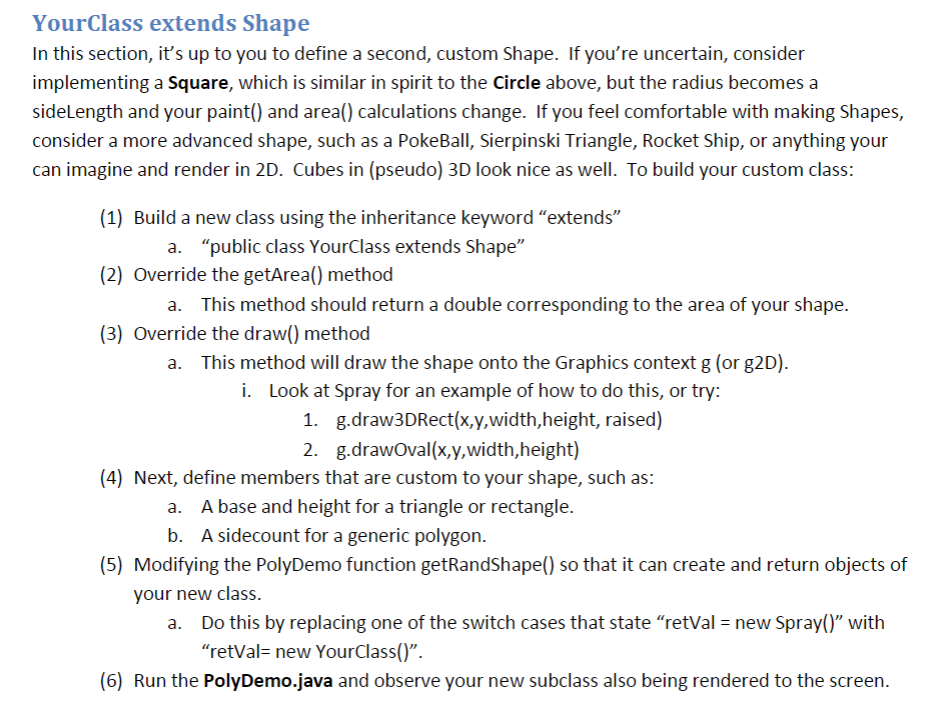 PolyDemo class:
import java.util.*;
import javax.swing.*;
import java.awt.*;
/*
* Class PolyDemo (is a JFrame) and PolyDemoPanel (is a JPanel)
*
*/
class PolyDemo extends JFrame {
public PolyDemo() {
getContentPane().add( new PolyDemoPanel() );
//just some windowing stuff that must happen for all Frames
setSize( 300,300 );
setVisible( true );
setDefaultCloseOperation( JFrame.EXIT_ON_CLOSE );
}
public static void main( String args[] ) {
PolyDemo myApp = new PolyDemo();
}
//this is our first "inner" or internal class
//the purpose of this class is solely to support the JFrame class above, and I don't want it reused in arbitrary contexts, so by nesting this class here
//I can indicate the intent a bit more clearly that this class "goes with" the class above it
//In general, each class is a separate entity that should be contained in a separate file
public class PolyDemoPanel extends JPanel {
Shape[] myShapes= new Shape[20];
public PolyDemoPanel() {
//Shape a = new Shape( getRandInt(), getRandInt());
//Shape b = new Circle( getRandInt(), getRandInt(), getRandInt() );
//a = new Square(getRandInt(), getRandInt(), getRandInt(), getRandInt() );
//a = getRandShape();
//( (Circle) b ).getRadius();
/*********************************************************************************************************************
* Code for populating our myShapes changes minimally when new classes are introduced (only in getRandShape())
*********************************************************************************************************************/
for( int i = 0; i
myShapes[i] = getRandShape();
}
}
/*********************************************************************************************************************
* Code for drawing our shapes doesn't change at all! Since we intended to take advantage of polymorphism, we coded
* this "in general" with respect to the superclass, and not specific to any subclass.
*********************************************************************************************************************/
public void paint( Graphics g ) {
super.paint(g); //don't remove - required for GUI widgets to draw correctly
/************************
* Late Binding Demo
************************/
for( int i = 0; i
//which draw method is invoked here? There are many forms of the method (polymorphic), so which is chosen?
//Java has RTTI about every object, and it uses this info to choose the correct method to invoke!
myShapes[i].draw( g );
}
}
public int getRandInt() {
return ( (int) ( Math.random() * 200 ) );
}
public Shape getRandShape() {
Shape retVal = null;
final int x = getRandInt();
final int y = getRandInt();
/********************************
* Polymorphic extensibility demo
*
*******************************/
switch( ( int )(Math.random() * 4) ) {
case 0: retVal = new Spray( x,y );/ew Square( x, y, getRandInt(), getRandInt() );
break;
case 1: retVal = new Spray( x,y );//Cube( x, y, getRandInt(), getRandInt(), getRandInt() );
break;
case 2: retVal = new Spray( x,y );
break;
case 3: retVal = new Spray( x,y );/ew Circle( x,y,getRandInt() );///ew Cylinder( x,y, getRandInt(), getRandInt() );
break;
}
return retVal;
}
}
}
Shape class:
import java.awt.*;
/* Class Shape
* This is the superclass in a hierarchy of shapes that you have to construct
*/
//the superclass in our inheritance hierarchy
//all "common" features, functions and data should go here
//for example, all shapes in Java2D have a x,y that declares their position
//and many of the shapes exposed have a width and a height (but not all, so we didn't put width and height here)
/ote that this class is mostly empty, as there is no algorithm generic enough to guess an arbitrary shape's area (future subclasses must override getArea() to provide something reasonable)
//also, the draw method is empty too, as we don't know what shape to draw here! (again, our subclasses will need to replace this method with one that actually draws things)
class Shape extends Object {
private int x = 0;
private int y = 0;
public Shape( int a, int b ) {
x=a;
y=b;
}
public double getArea(){ return -1; }
public void draw( Graphics g ){}
public int getX() { return x; }
public int getY() { return y; }
}
YourClass extends Shape In this section, it's up to you to define a second, custom Shape. If you're uncertain, consider implementing a Square, which is similar in spirit to the Circle above, but the radius becomes a sidelength and your paint() and area() calculations change. If you feel c consider a more advanced shape, such as a PokeBall, Sierpinski Triangle, Rocket Ship, or anything your can imagine and render in 2D. Cubes in (pseudo) 3D look nice as well. To build your custom class: omfortable with making Shapes, (1) Build a new class using the inheritance keyword "extends" (2) Override the getArea() method (3) Override the draw() method "public class YourClass extends Shape" This method should return a double corresponding to the area of your shape. This method will draw the shape onto the Graphics context g (or g2D). a. a. a. i. Look at Spray for an example of how to do this, or try 1. g.draw3DRect(x,y,width,height, raised) 2. g.drawovalx y.width,height) (4) Next, define members that are custom to your shape, such as: A base and height for a triangle or rectangle. A sidecount for a generic polygon. a. b. (5) Modifying the PolyDemo function getRandShape) so that it can create and return objects of your new class a. Do this by replacing one of the switch cases that state "retVal-new Spray()" with "retVal- new YourClass()" (6) Run the PolyDemo.java and observe your new subclass also being rendered to the screen
Step by Step Solution
There are 3 Steps involved in it

Get step-by-step solutions from verified subject matter experts
 Study Help