







Question: Purpose of Chapter 21 Excel Activity To create an Excel report from scratch. Using formulas, cell referencing, sizing columns, and formatting Practice using the following
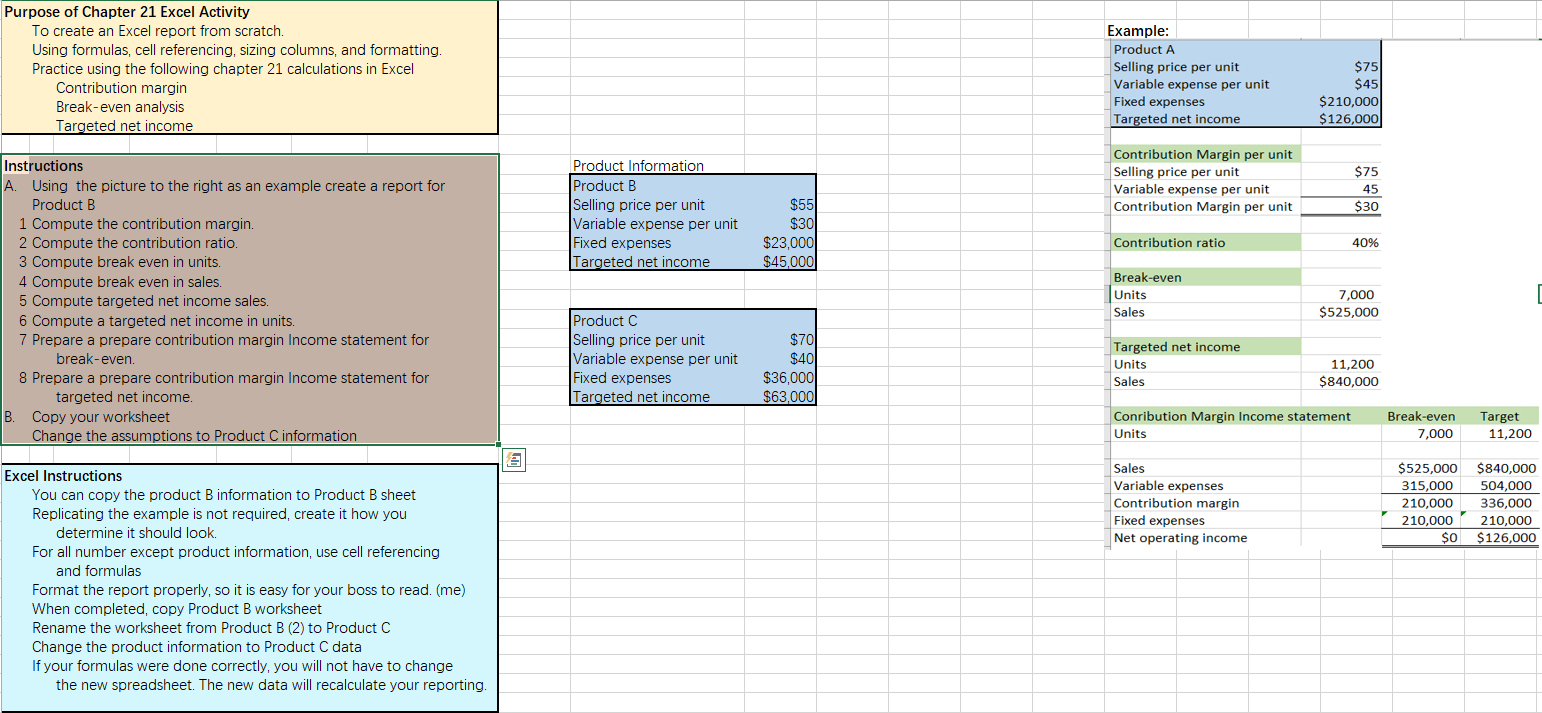
Purpose of Chapter 21 Excel Activity To create an Excel report from scratch. Using formulas, cell referencing, sizing columns, and formatting Practice using the following chapter 21 calculations in Excel Contribution margin Break-even analysis Targeted net income Example: Product A Selling price per unit Variable expense per unit Fixed expenses Targeted net income $75 $45 $210,000 $126,000 $75 Product Information Product B Selling price per unit Variable expense per unit Fixed expenses Targeted net income Contribution Margin per unit Selling price per unit Variable expense per unit Contribution Margin per unit $55 $30 $30 Contribution ratio 40% $23,000 $45,000 el income Instructions A. Using the picture to the right as an example create a report for Product B 1 Compute the contribution margin. 2 Compute the contribution ratio. 3 Compute break even in units. 4 Compute break even in sales. 5 Compute targeted net income sales 6 Compute a targeted net income in units. 7 Prepare a prepare contribution margin Income statement for break-even. 8 Prepare a prepare contribution margin Income statement for targeted net income. B. Copy your worksheet Change the assumptions to Product C information Break-even Units Sales 7,000 $525,000 Product C Selling price per unit Variable expense per unit Fixed expenses Targeted net income $70 $40 $36,000 $63,000 Targeted net income Units Sales 11,200 $840,000 Conribution Margin Income statement Units Break-even 7,000 Target 11,200 Sales Variable expenses Contribution margin Fixed expenses Net operating income 315,000 210,000 210,000 $0 504,000 336,000 210,000 $126,000 Excel Instructions You can copy the product B information to Product B sheet Replicating the example is not required, create it how you determine it should look. For all number except product information, use cell referencing and formulas Format the report properly, so it is easy for your boss to read. (me) When completed, copy Product B worksheet Rename the worksheet from Product B (2) to Product C Change the product information to Product C data If your formulas were done correctly, you will not have to change the new spreadsheet. The new data will recalculate your reporting
Step by Step Solution
There are 3 Steps involved in it

Get step-by-step solutions from verified subject matter experts
 Study Help