







Question: Python 1. Finish the BizzaroGUI implementation. The BizzaroGUI does three things: a. Has a text box you can enter a URL and retrieve the title
Python
1. Finish the BizzaroGUI implementation. The BizzaroGUI does three things: a. Has a text box you can enter a URL and retrieve the title of the web page. b. Enter a folder name and retrieve the depthCount of the folder (recursive function provided for you.) c. Enter a question and have the Magic8Ball answer it for you (Magic8Ball class provided). You need to shake the Magic8Ball each time a user enters a question and clear the Entry field.
import os
def nestingCount(pathname): largest=0 for item in os.listdir(pathname): n = os.path.join(pathname, item) if os.path.isdir(n): depth = nestingCount(n) if depth > largest: largest = depth return 1+largest
from html.parser import HTMLParser from urllib.parse import urljoin from urllib.request import urlopen
class TitleParser(HTMLParser): def __init__(self): HTMLParser.__init__(self) pass def handle_starttag(self, tag, attrs): pass
def handle_endtag(self, tag): pass
def handle_data(self, data): pass def getTitle(self): pass
from random import randrange class Magic8Ball(object):
def __init__(self, q=[]): 'the constructor' if len(q)==0: q.append('It is certain') q.append('It is decidedly so') q.append('Without a doubt') q.append('Yes definitely') q.append('You may rely on it') q.append('As I see it, yes') q.append('Most likely') q.append('Outlook good') q.append('Yes') q.append('Signs point to yes') q.append('Reply hazy try again') q.append('Ask again later') q.append('Better not tell you now') q.append('Cannot predict now') q.append('Concentrate and ask again') q.append("Don't count on it") q.append('My reply is no') q.append('My sources say no') q.append('Outlook not so good') q.append('Very doubtful') self.q = q self.current=randrange(0,len(self.q))
def shake(self): 'get the next answer' self.current=randrange(0,len(self.q))
def get(self): 'get the current answer' return self.q[self.current]
def numAnswers(self): 'get the number of answers in the ball' return len(self.q)
def __iter__(self): 'get the iterator' return iter(self.q)
def __str__(self): 'string representation' return 'I am a Magic 8 Ball with {} answers'.format(len(self.q))
from tkinter import Button, Entry, Label,Tk,TOP,LEFT,RIGHT,END from tkinter.messagebox import showinfo
class BizzaroGUI(Tk): 'Number guessing app' def __init__(self,parent=None): 'constructor' Tk.__init__(self, parent) pass
def getTitle(self): #I left the follwoing line as hint. #content =urlopen(url).read().decode() pass
def getFolderDepth(self): pass
def getAnswer(self): pass
def make_widgets(self): pass
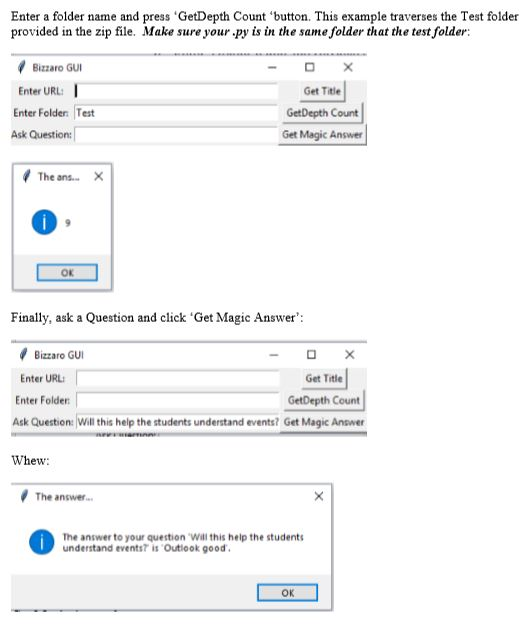
Enter a folder name and press provided in the zip file. Make sure your.py is in the same folder that the test folder: GetDepth Count 'button. This example traverses the Test folder Bizzaro GU Enter URL Get Title GetDepth Count Get Magic Answer Enter Folder: Test Ask Question The ans- ok Finally, ask a Question and click Get Magic Answer Bizzaro G Enter URL: Get Title Enter Folden GetDepth Count Ask Question: Will this help the students understand events? Get Magic Answer Whew The answer The answer to your question Wall this help the students understand eventst is Outlook good OK Enter a folder name and press provided in the zip file. Make sure your.py is in the same folder that the test folder: GetDepth Count 'button. This example traverses the Test folder Bizzaro GU Enter URL Get Title GetDepth Count Get Magic Answer Enter Folder: Test Ask Question The ans- ok Finally, ask a Question and click Get Magic Answer Bizzaro G Enter URL: Get Title Enter Folden GetDepth Count Ask Question: Will this help the students understand events? Get Magic Answer Whew The answer The answer to your question Wall this help the students understand eventst is Outlook good OK
Step by Step Solution
There are 3 Steps involved in it

Get step-by-step solutions from verified subject matter experts
 Study Help