







Question: Python 3 Please show the answer in Pyhcarm. I appreciate it. Preliminaries For this lab you will be working with regular expressions in Python. Various
Python 3
Please show the answer in Pyhcarm. I appreciate it.
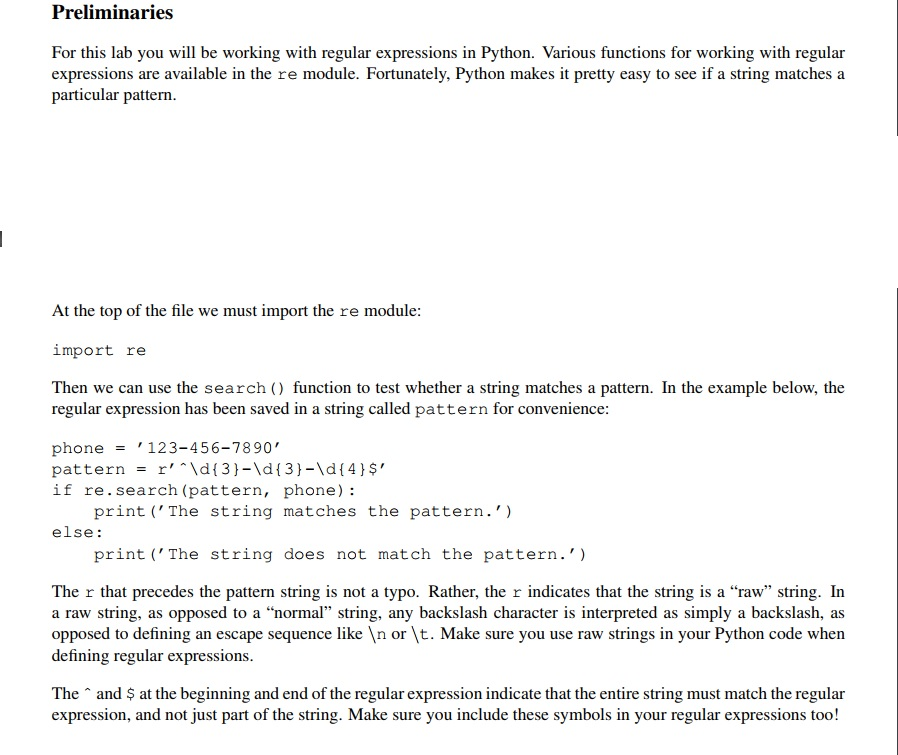
Preliminaries For this lab you will be working with regular expressions in Python. Various functions for working with regular expressions are available in the re module. Fortunately, Python makes it pretty easy to see if a string matches a particular pattern. At the top of the file we must import the re module: import re Then we can use the search () function to test whether a string matches a pattern. In the example below, the regular expression has been saved in a string called pattern for convenience: phone = , 123-456-7890, pattern r'^\d(3)-\d(3)-\d(4)$, if re.search (pattern, phone): print (' The string matches the pattern.') else: print ('The string does not match the pattern.') The r that precedes the pattern string is not a typo. Rather, the r indicates that the string is a "raw" string. In a raw string, as opposed to a "normal" string, any backslash character is interpreted as simply a backslash, as opposed to defining an escape sequence like or t. Make sure you use raw strings in your Python code when defining regular expressions The and $ at the beginning and end of the regular expression indicate that the entire string must match the regular expression, and not just part of the string. Make sure you include these symbols in your regular expressions too
Step by Step Solution
There are 3 Steps involved in it

Get step-by-step solutions from verified subject matter experts
 Study Help