







Question: python 3.6 filter_chars: Write the definition for the filter_chars function. It accepts a message as the first argument (call it msg), and an optional argument
python 3.6
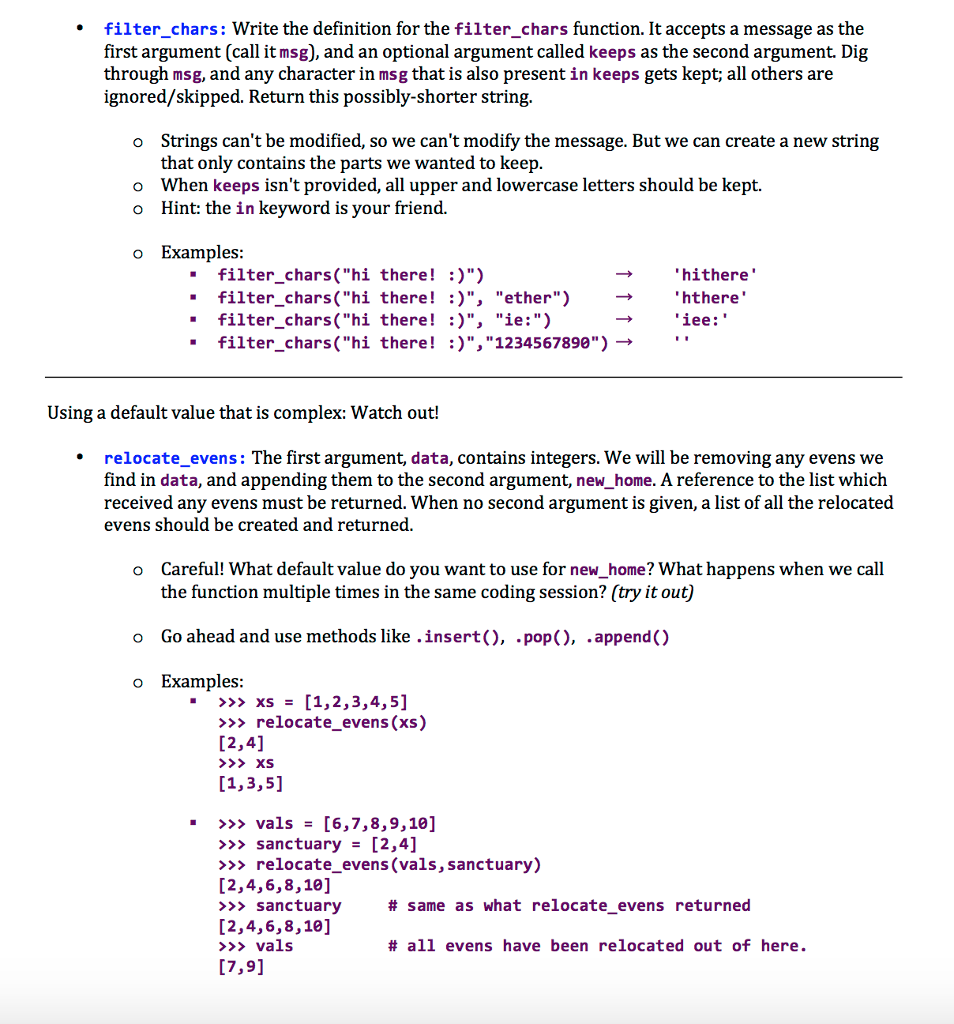
filter_chars: Write the definition for the filter_chars function. It accepts a message as the first argument (call it msg), and an optional argument called keeps as the second argument. Dig through msg, and any character in msg that is also present in keeps gets kept; all others are ignored/skipped. Return this possibly-shorter string, Strings can't be modified, so we can't modify the message. But we can create a new string that only contains the parts we wanted to keep When keeps isn't provided, all upper and lowercase letters should be kept. Hint: the in keyword is your friend. o o o o Examples: -filter_chars("hi there! )") . filter-chars("hi there! :)", . filter chars("hi there ! :)", "ether") "ie:") hithere 'hthere' iee: filter. Chars("hi there! :)","1234567890") '. Using a default value that is complex: Watch out! relocate_evens: The first argument, data, contains integers. We will be removing any evens we find in data, and appending them to the second argument, new_home. A reference to the list which received any evens must be returned. When no second argument is given, a list of all the relocated evens should be created and returned o Careful! What default value do you want to use for new_home? What happens when we call the function multiple times in the same coding session? (try it out) Go ahead and use methods like .insert(), .pop), .append() Examples: o o >>> xs [1,2,3,4,5] >relocate evens (xs) [2,4] . >>> vals = [6,7,8,9,10] >>> sanctuary [2,4] >> relocate_evens (vals, sanctuary) [2,4,6,8,10] >>sanctuary [2,4,6,8,10] >>>vals 17,91 # same as what relocate evens returned # all evens have been relocated out of here
Step by Step Solution
There are 3 Steps involved in it

Get step-by-step solutions from verified subject matter experts
 Study Help