







Question: Python assignment Getting started on your registration page: Here is a start of a registration function that creates a connection to the database and inserts
Python assignment
Getting started on your registration page:
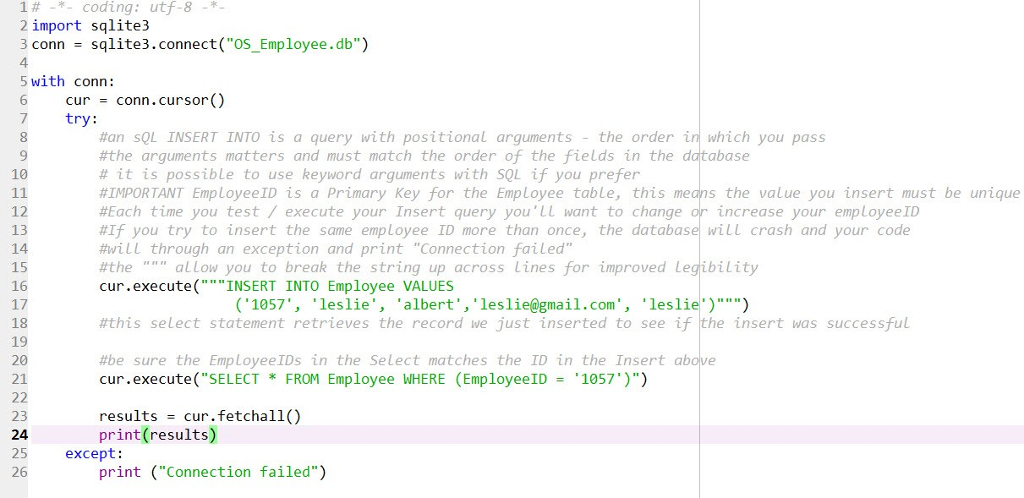
Here is a start of a registration function that creates a connection to the database and inserts specific values into the DB. Be sure to read the comments for hints and explanations. Be sure before you try this that you save the file in the same location you have saved your database file. Also note that EmployeeID is the primary key for the Employee table and thus must be uniqueif you try to insert the same EmployeeID more than once your program will crash.
Whats left to do:
Alter the code above to take the 5 values from the user as input, add your error checking for blanks (while not StringNameJ
Use the .strip, .lower, .title where appropriate (note: In the database, the first and last names start with capital letters, the rest are all lower case)
Include a loop that will catch a repeated EmployeeID to keep our project from crashing. To do this, take the EmployID from the user, execute a Count query against the database to see if that particular id is already in use. If it has been used (count = 1) loop and ask for another id from the user. If the count = 0 then continue with your Insert.
Be sure to provide helpful prompts and feedback to your users!
Once its all tested and working well, tuck all of your registration code into a function.
14-*- coding: utf-8 -*- 2 import sqlite3 3 conn sqlite3.connect("OS_Employee.db") 4 5 with conn: 6 cur-conn.cursor() 7 try: #an SQL INSERT INTO is a query with positional arguments - the order in which you pass #the arguments matters and must match the order of the fields in the database # it is possible to use keyword arguments with SQL if you prefer #IMPORTANT EmployeeID is a Primary Key for the Employee table, this means the value you insert must be unique #Each time you test / execute your insert query you'LL want to change or increase your employee!D #If you try to insert the same employee ID more than once, the database will crash and your code #will through an exception and print "Connection failed" #the """ allow you to break the string up across lines for improved legibility cur.execute("INSERT INTO Employee VALUES 10 12 13 14 15 16 17 18 19 20 21 1057'leslie', 'albert','leslie@gmail.com', 'leslie')") #this select statement retrieves the record we just inserted to see if the insert was successful #be sure the EmployeeTDs in the select matches the ID in the Insert above cur.execute("SELECT * FROM Employee WHERE (EmployeeID = '1057.)") results cur.fetchall() print (results) 23 24 25 26 except: print ("Connection failed")
Step by Step Solution
There are 3 Steps involved in it

Get step-by-step solutions from verified subject matter experts
 Study Help