







Question: [PYTHON] Begin the Design/development documentation with a general description of Milestone #1 and create the main loop for the program and main window using a
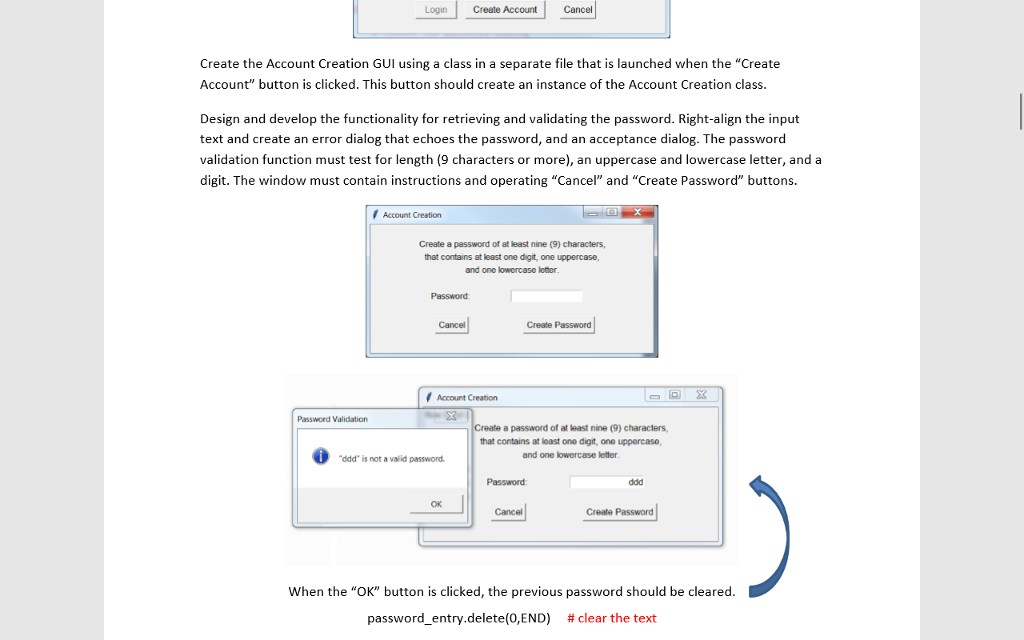
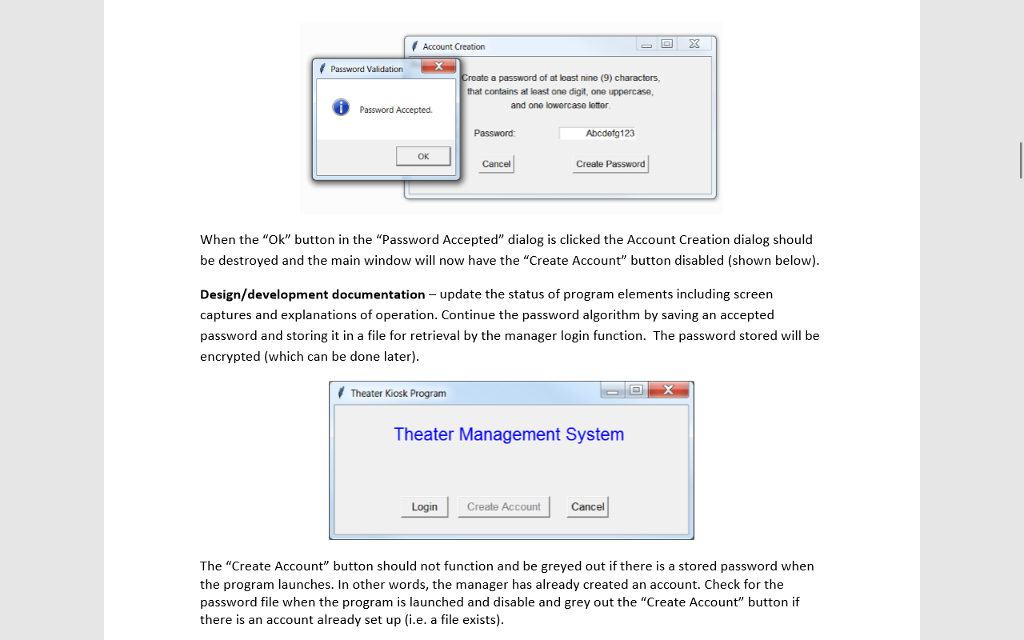
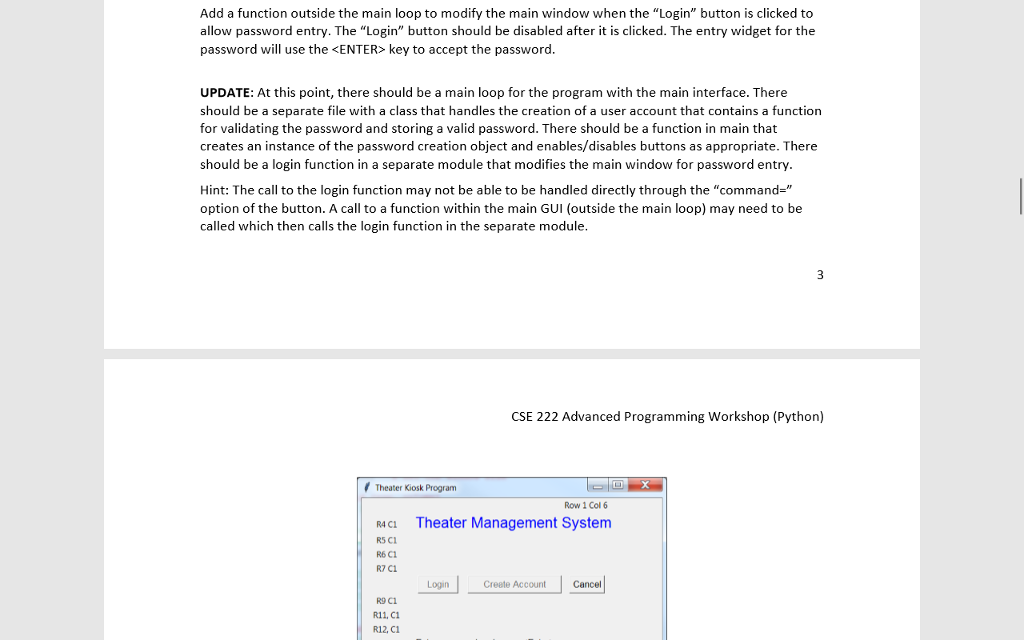
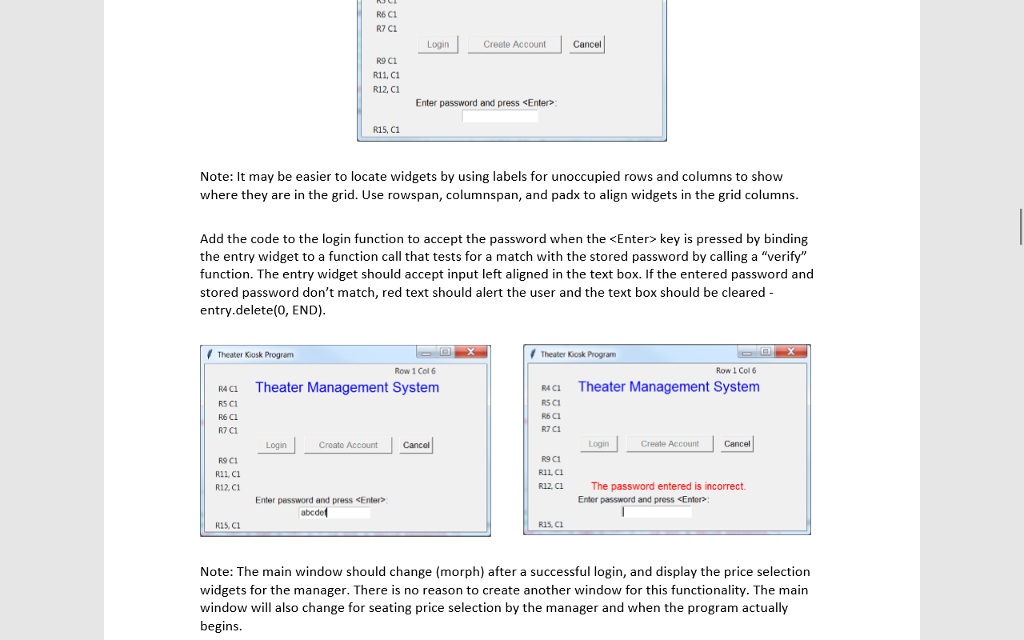
[PYTHON] Begin the Design/development documentation with a general description of Milestone #1 and create the main loop for the program and main window using a grid and button widgets # Theater Kiosk Program Theater Management System Logih Creale Account Cancel Create the Account Creation GUI using a class in a separate file that is launched when the "Create Account" button is clicked. This button should create an instance of the Account Creation class Design and develop the functionality for retrieving and validating the password. Right-align the input text and create an error dialog that echoes the password, and an acceptance dialog. The password validation function must test for length (9 characters or more), an uppercase and lowercase letter, and a digit. The window must contain instructions and operating "Cancel" and "Create Password" buttons. Account Creation Create a pessword of at least nine (9) characters, hat contains at least one digit, one uppercase, and one lowercase leter Password Create Password Account Creation Password Validation Create a password of at least nine (9) characters, hat contains at least one digit, one uppercase and one lowercase letter 6 odd" is not a valid password ![[PYTHON] Begin the Design/development documentation with a general description of Milestone #1](https://dsd5zvtm8ll6.cloudfront.net/si.experts.images/questions/2024/09/66f3bcbf451c7_59866f3bcbeb780d.jpg)
Begin the Design/development documentation with a general description of Milestone #1 and create the main loop for the program and main window using a grid and button widgets # Theater Kiosk Program Theater Management System Logih Creale Account Cancel Create the Account Creation GUI using a class in a separate file that is launched when the "Create Account" button is clicked. This button should create an instance of the Account Creation class Design and develop the functionality for retrieving and validating the password. Right-align the input text and create an error dialog that echoes the password, and an acceptance dialog. The password validation function must test for length (9 characters or more), an uppercase and lowercase letter, and a digit. The window must contain instructions and operating "Cancel" and "Create Password" buttons. Account Creation Create a pessword of at least nine (9) characters, hat contains at least one digit, one uppercase, and one lowercase leter Password Create Password Account Creation Password Validation Create a password of at least nine (9) characters, hat contains at least one digit, one uppercase and one lowercase letter 6 odd" is not a valid password Begin the Design/development documentation with a general description of Milestone #1 and create the main loop for the program and main window using a grid and button widgets # Theater Kiosk Program Theater Management System Logih Creale Account Cancel Create the Account Creation GUI using a class in a separate file that is launched when the "Create Account" button is clicked. This button should create an instance of the Account Creation class Design and develop the functionality for retrieving and validating the password. Right-align the input text and create an error dialog that echoes the password, and an acceptance dialog. The password validation function must test for length (9 characters or more), an uppercase and lowercase letter, and a digit. The window must contain instructions and operating "Cancel" and "Create Password" buttons. Account Creation Create a pessword of at least nine (9) characters, hat contains at least one digit, one uppercase, and one lowercase leter Password Create Password Account Creation Password Validation Create a password of at least nine (9) characters, hat contains at least one digit, one uppercase and one lowercase letter 6 odd" is not a valid password
Step by Step Solution
There are 3 Steps involved in it

Get step-by-step solutions from verified subject matter experts
 Study Help