







Question: python code, I have the instructions and given client code to start with. thanks! here is what I have been given for the clint code.
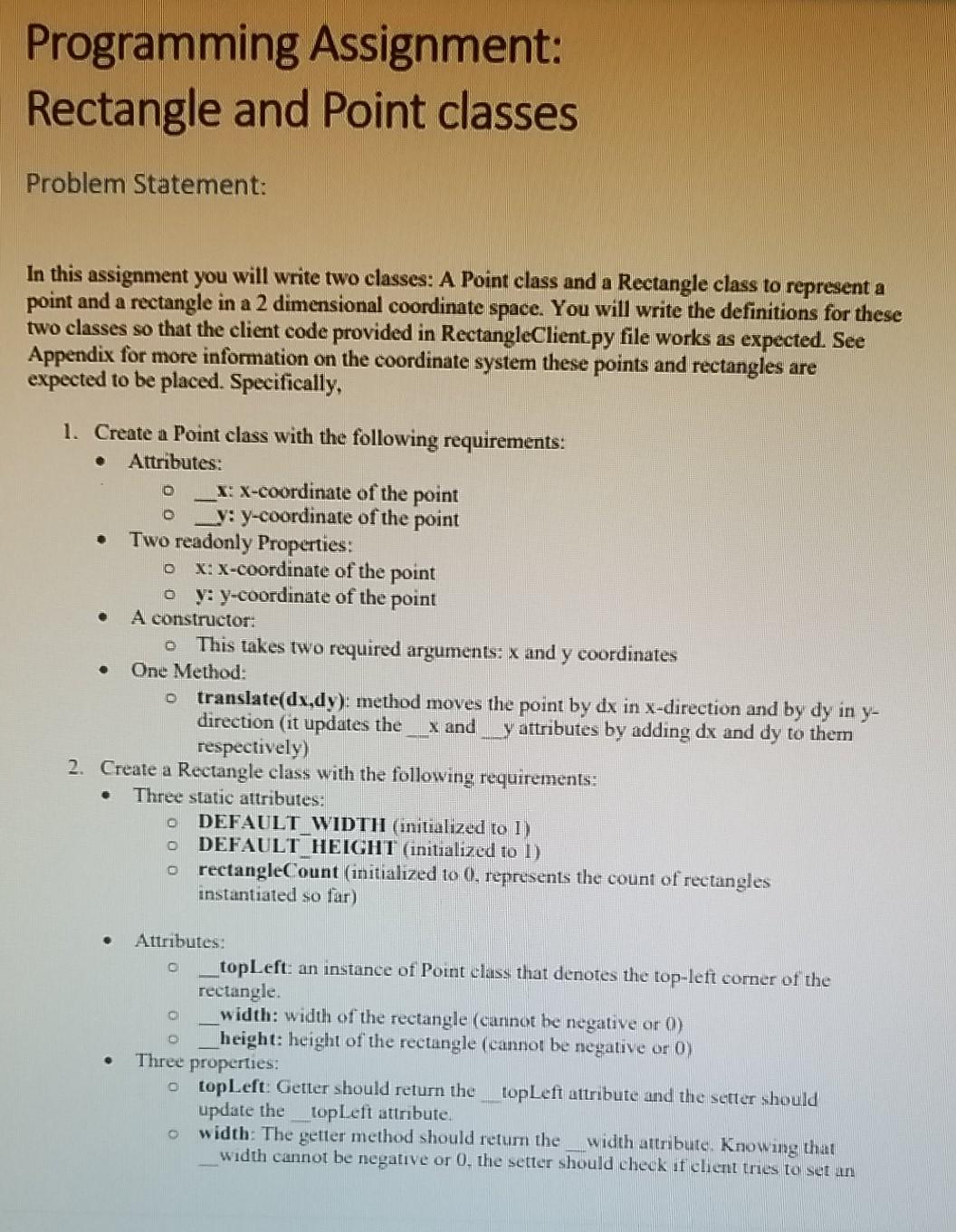
python code, I have the instructions and given client code to start with. thanks!
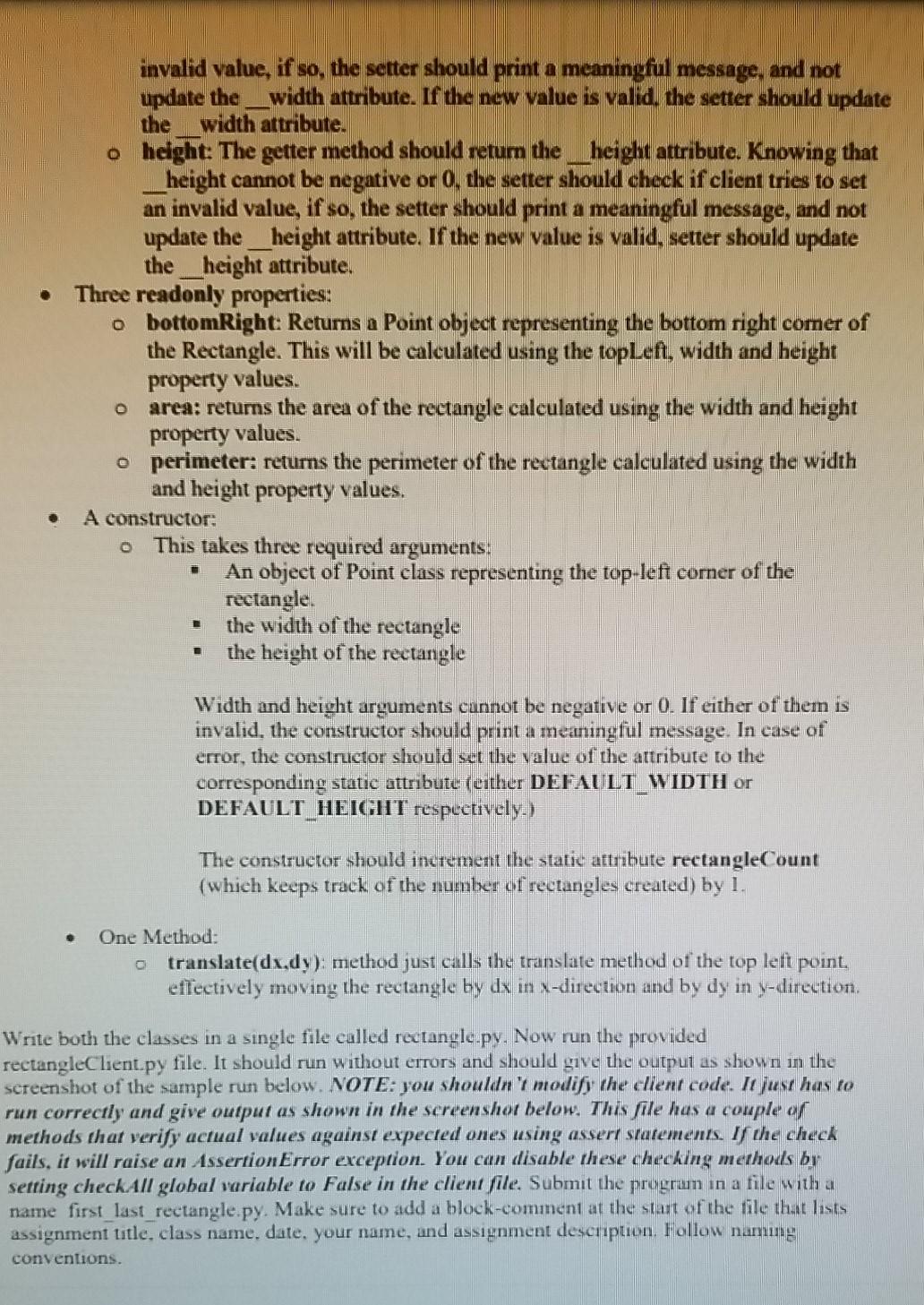
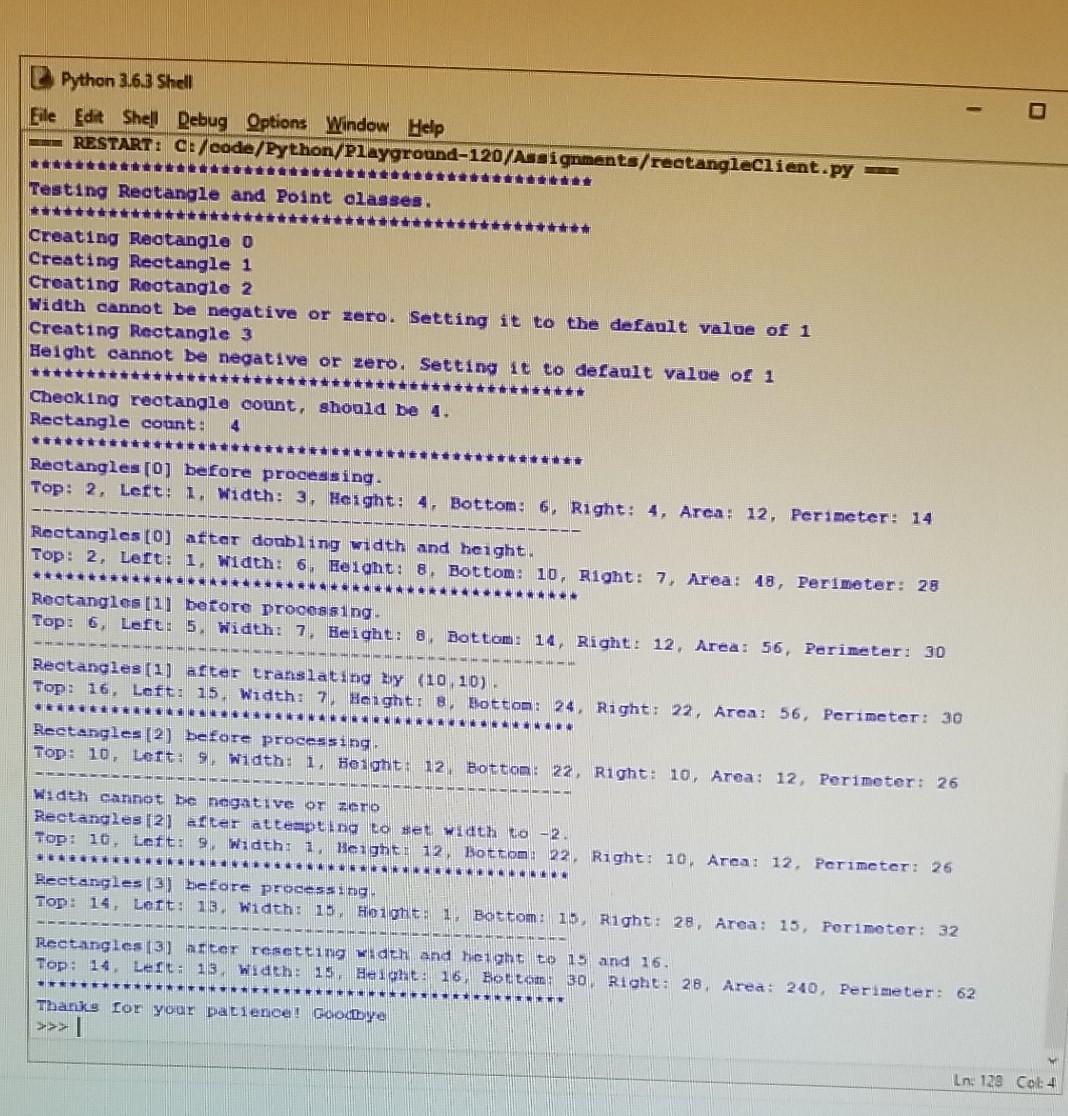
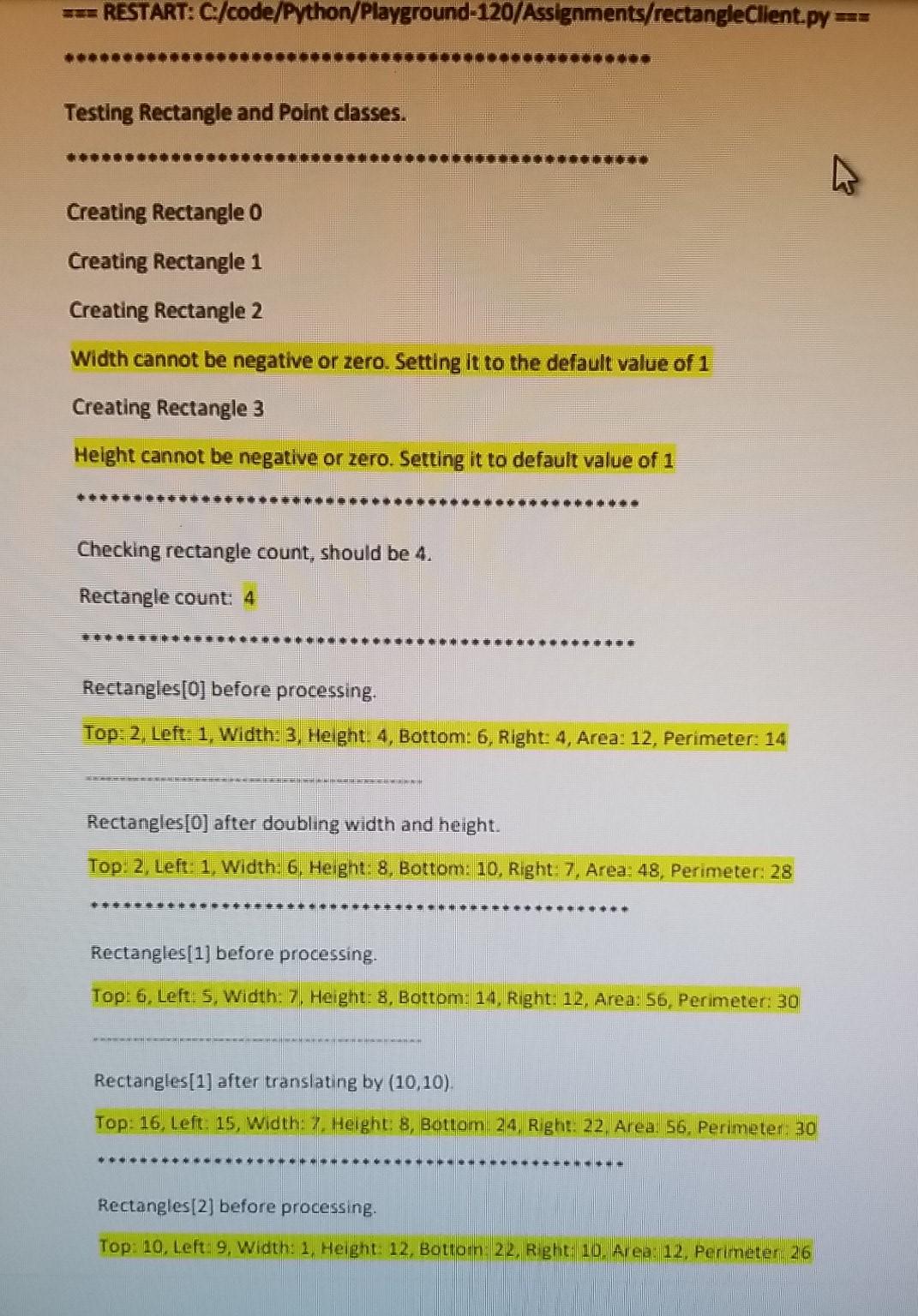
here is what I have been given for the clint code.
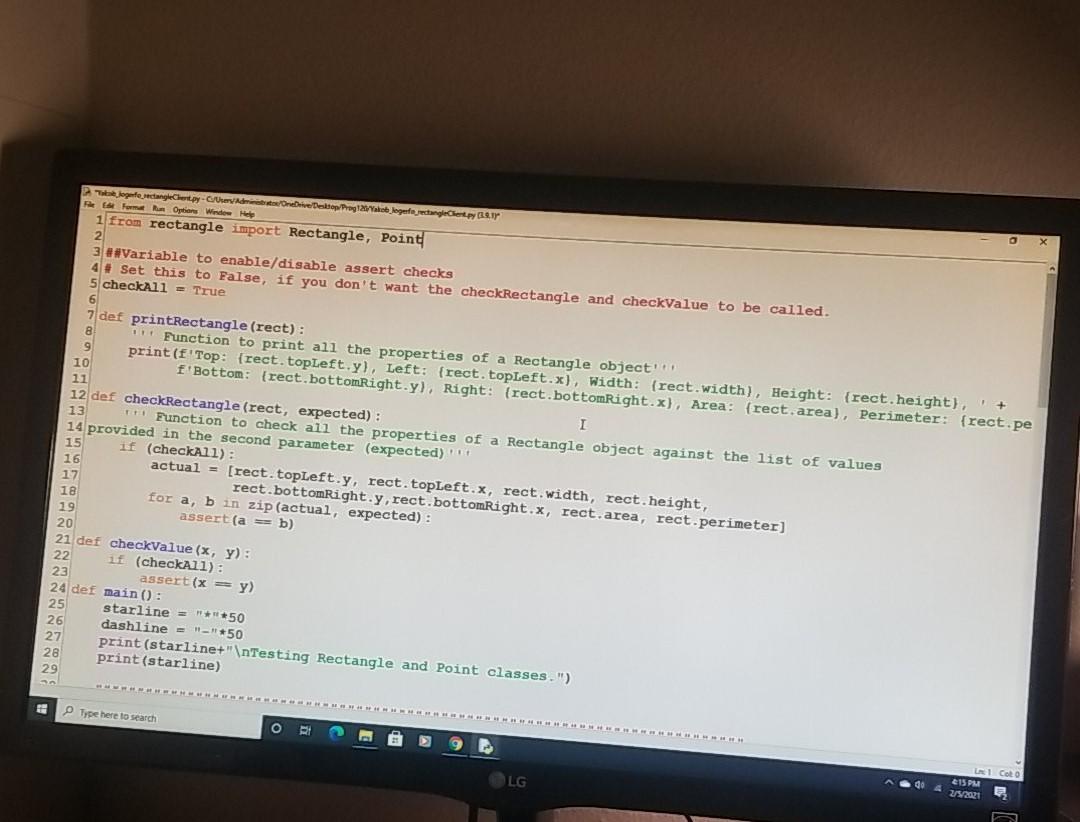
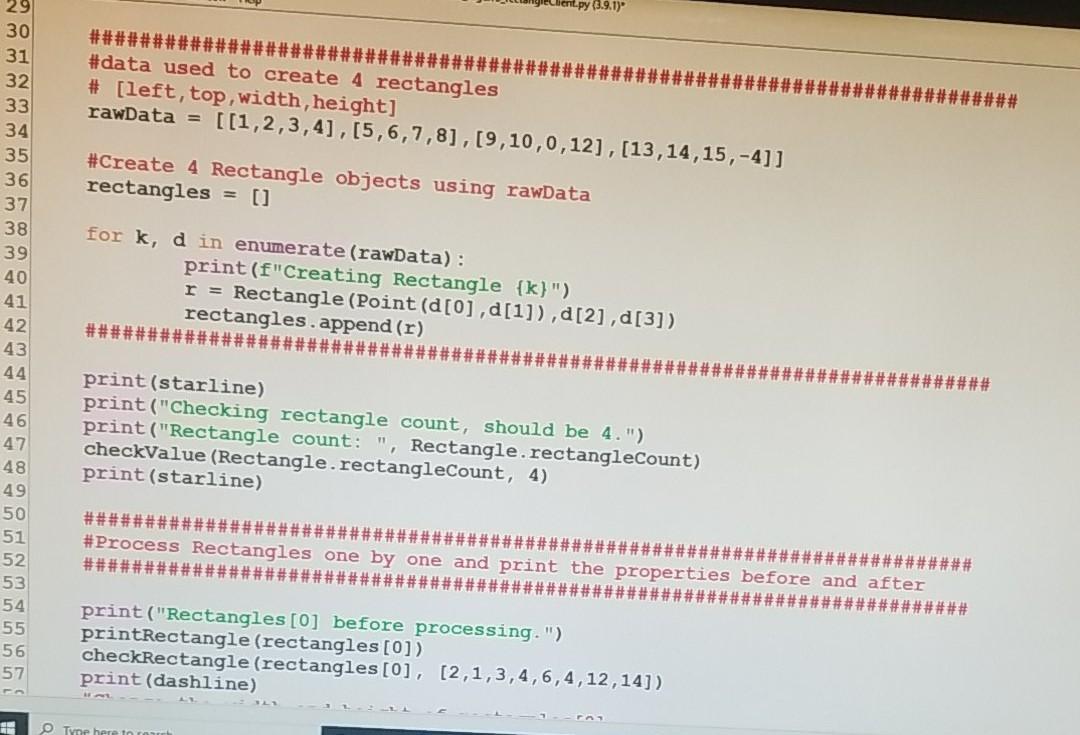
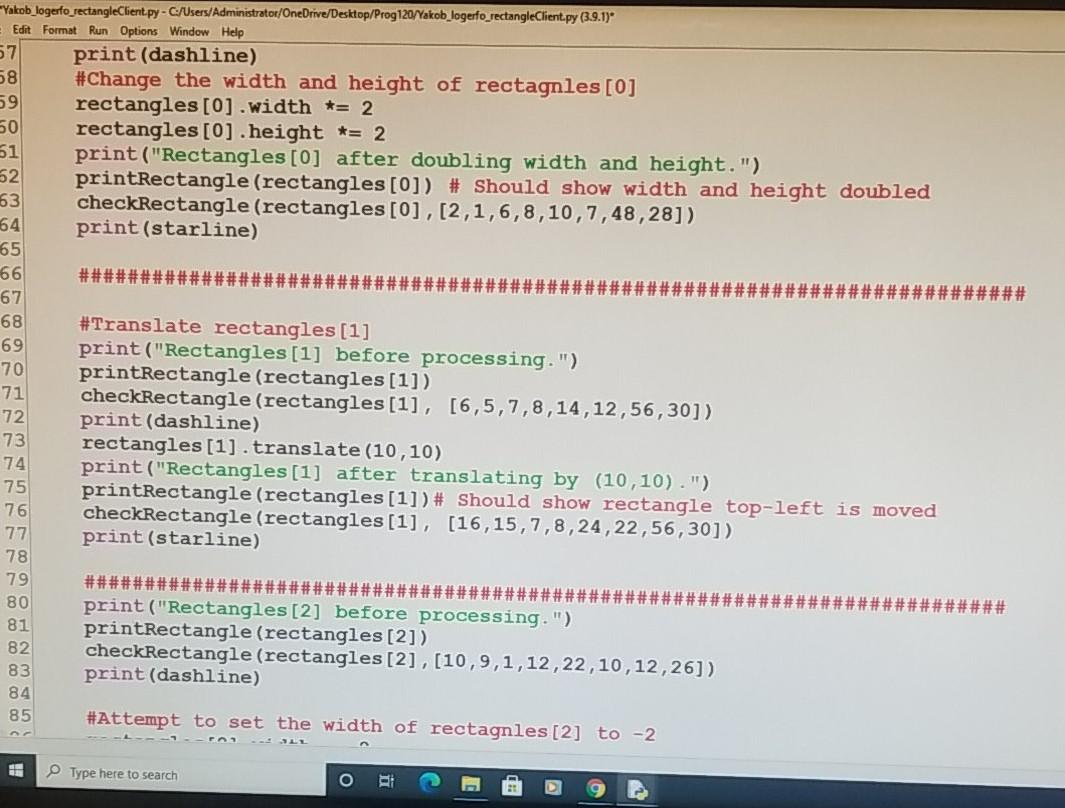
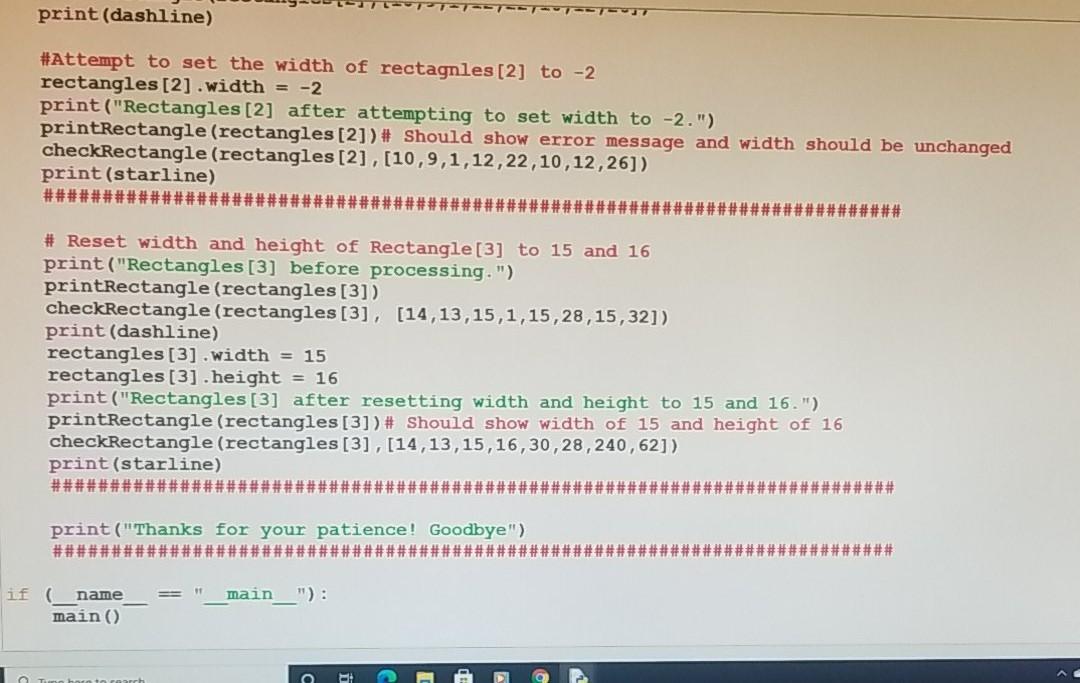
Programming Assignment: Rectangle and Point classes Problem Statement: In this assignment you will write two classes: A Point class and a Rectangle class to represent a point and a rectangle in a 2 dimensional coordinate space. You will write the definitions for these two classes so that the client code provided in RectangleClient.py file works as expected. See Appendix for more information on the coordinate system these points and rectangles are expected to be placed. Specifically, D . o . 1. Create a Point class with the following requirements: Attributes: X: x-coordinate of the point _y: y-coordinate of the point Two readonly Properties: X: X-coordinate of the point y: y-coordinate of the point A constructor: o This takes two required arguments: x and y coordinates One Method: o translate(dx,dy): method moves the point by dx in x-direction and by dy in y- direction (it updates the X and y attributes by adding dx and dy to them respectively) 2. Create a Rectangle class with the following requirements: Three static attributes: DEFAULT WIDTH (initialized to l) o DEFAULT HEIGHT (initialized to 1) o rectangleCount (initialized to 0. represents the count of rectangles instantiated so far) . o . Attributes: topLeft: an instance of Point class that denotes the top-left corner of the rectangle. width: width of the rectangle (cannot be negative or 0) height: height of the rectangle (cannot be negative or 0) Three properties: o topleft: Getter should return the topLeft attribute and the setter should update the topLeft attribute width: The getter method should return the width attribute. Knowing that width cannot be negative or 0, the setter should check if client tries to set un invalid value, if so, the setter should print a meaningful message, and not update the _width attribute. If the new value is valid the setter should update the width attribute. o height: The getter method should retum the __height attribute. Knowing that __height cannot be negative or 0. the setter should check if client tries to set an invalid value, if so, the setter should print a meaningful message, and not update the __height attribute. If the new value is valid, setter should update the_height attribute. Three readonly properties: o bottomRight Returns a Point object representing the bottom right comer of the Rectangle. This will be calculated using the topleft, width and height property values. area: returns the area of the rectangle calculated using the width and height property values. o perimeter: returns the perimeter of the rectangle calculated using the width and height property values. A constructor: This takes three required arguments: An object of Point class representing the top-left corner of the rectangle the width of the rectangle the height of the rectangle Width and height arguments cannot be negative or 0. If either of them is invalid, the constructor should print a meaningful message. In case of error, the constructor should set the value of the attribute to the corresponding static attribute (either DEFAULT WIDTH or DEFAULT_HEIGHT respuetively.) The constructor should increment the static attribute rectangleCount (which keeps track of the number of rectangles created) by 1. One Method: o translate(dx.dy): method just calls the translate method of the top effectively moving the rectangle by dx in X-direction and by dy in y-direction. left point. Write both the classes in a single file called rectangle.py. Now run the provided rectangleClient.py file. It should run without errors and should give the output as shown in the screenshot of the sample run below. NOTE: you shouldn't modify the client code. It just has to run correctly and give output as shown in the screenshor below. This file has a couple of methods that verify actual values against expected ones using assert statements. If the check fails, it will raise an AssertionError exception. You can disable these checking methods or setting checkAll global variable to False in the client file. Submit the prugrun in a file with a name first_last_rectangle.py. Make sure to add a block-comment at the start of the file that lists assignment title, class name, date, your name, and assignment description. Follow naming conventions. Python 3.6.3 Shell Eile Edit Shell Debug Options Window Help RESTART: C:/code/Python/Playground-120/Assignments/rectangleClient.py - - Testing Rectangle and Point classes. Creating Rectangle o Creating Rectangle 1 Creating Rectangle 2 Width cannot be negative or zero. Setting it to the default value of 1 Creating Rectangle 3 Height cannot be negative or zero. Setting it to default value of 1 Checking rectangle count, should be 4. Rectangle count: 4 tette Rectangles (0) before processing. Top: 2, Lert: 1. Width: 3, Height: 4. Bottom: 6. Right: 4, Area: 12, Perimeter: 14 Rectangles [0] after doubling width and height. Top: 2, Left: 1. width: 6. Eeight: 8. Bottom: 10, Right: 7, Area: 18, Perimeter: 28 Rectangles [1] before processing Top: 6, Left: 5 Width: 7. Beight: B. Bottom: 14 Right. 12, Area: 56, Perimeter: 30 Rectangles (1) after translating By (10.10). Top: 16, Left: 15. Width: 7 Height: B, Bottom: 24. Right: 22, Area: 56, Perimeter: 30 1 Rectangles [2] before processing. Top: 10, Leit 9, Width: 1 Height 12 Bottom: 22 Right: 10, Area: 12, Perimeter: 26 Width cannot be negative or CTO Rectangles [2) efter attempting to set width to - 2. Top: 10, Left: 9. Width: 1. Heights 12 Bottom: 22. Right: 10. Areal 12. Perimeter 26 Rectangles (3) before processing Top: 14, Lett: 13, width: 16. Honoht. 1. Bottom: 15 Right: 28, Area: 15, Perimeter: 32 Rectangles (3) arter resetting width and height to 15 and 16. Top: 14 Left: 13. Width: 15. Height: 16. Botto: 30 Right: 28 Area: 240, Perimeter: 62 RE Thanks for your patience! Goodbye >>> Ln: 129 Cok 4 === RESTART: C/code/Python/Playground-120/Assignments/rectangleClient.py = Testing Rectangle and Point classes. Creating Rectangle o Creating Rectangle 1 Creating Rectangle 2 Width cannot be negative or zero. Setting it to the default value of 1 Creating Rectangle 3 Height cannot be negative or zero. Setting it to default value of 1 Checking rectangle count, should be 4. Rectangle count: 4 Rectangles[0] before processing. Top: 2. Left: 1. Width: 3, Height: 4, Bottom: 6, Right: 4, Area: 12, Perimeter: 14 Rectangles[0] after doubling width and height. Top: 2, Left: 1, Width: 6. Height: 8, Bottom: 10. Right: 7, Area: 48, Perimeter: 28 Rectangles[1] before processing. Top: 6. Left: S, Width: 7. Height: 8, Bottom: 14. Right: 12. Area: 56, Perimeter: 30 Rectangles[1] after translating by (10,10) Top: 16, Left: 15, Width: 7. Height: 8. Bottom 24, Right: 22. Area: 56. Perimeter 30 Rectangles [2] before processing. Top: 10. Left: 9. Width: 1, Height: 12. Botton 22. Right: 10. Area: 12, Perimeter 26 belogenfredageCerty. Cher/Adit/OneDrive Desktop Prog 2/Yakoblogerfejedelem 2017 Rome Option Window Help 1 from rectangle import Rectangle, Point 2 3. Variable to enable/disable assert checks 4# Set this to False, if you don't want the checkRectangle and checkValue to be called. 5 checkAll = True 6 7 def printRectangle (rect): "" Function to print all the properties of a Rectangle object' 9 print (f'Top {rect. topleft.y), Left: {rect. topleft.x), Width: (rect width), Height: {rect height). + 10 f Bottom: (rect.bottomRight.y), Right: (rect.bottomRight.x), Area: (rect, area), Perimeter: {rect.pe 11 12 def checkRectangle (rect, expected): I 13 1+ Function to check all the properties of a Rectangle object against the list of alues 14 provided in the second parameter (expected) 15 if (checkAll): 16 actual = [rect. topleft.y, rect. topleft.x, rect.Width, rect height, 17 rect.bottomRight.y, rect.bottomRight.x, rect.area, rect.perimeter) 18 for a, b in zip (actual, expected): 19 assert (a = b) 20 21 def checkValue (x, y): 22 if (checkAll): 23 assert(x = y) 24 def main(): 25 starline = "***50 26 dashline = "-"*50 27 print (starline+" Testing Rectangle and Point classes.") 28 print(starline) 29 Type here to search O 1 Coto LG do &ISPM cnt.py (3.9.1) ######## ############ #### #data used to create 4 rectangles # [left, top,width, height] rawData = [[1,2,3,4],[5,6,7,8], [9,10,0,12), (13,14,15,-4]] #Create 4 Rectangle objects using rawData rectangles = [1] 29 30 31 32 33 34 35 36 37 38 39 40 41 42 43 44 45 46 47 48 49 50 51 52 53 54 for k, d in enumerate (rawData): print (f"Creating Rectangle {k}") r = Rectangle (Point (d[0],[1]),d[2], d[3]) rectangles.append(r) ###### ######## ######## print (starline) print("Checking rectangle count, should be 4.") print("Rectangle count: ", Rectangle rectangleCount) checkValue (Rectangle rectangleCount, 4) print (starline) ######### ###### ################## ################ #Process Rectangles one by one and print the properties before and after ################### ############# ################# 55 56 57 print("Rectangles [0] before processing.") printRectangle (rectangles [0]) checkRectangle (rectangles [0], [2,1,3,4,6,4,12,14]) print(dashline) Tyne here to ro Yakob_logerfo_rectangleClient.py - C:/Users/Administrator/OneDrive/Desktop/Prog 120/Yakob_logerfo_rectangleClient.py (3.9.1) Edit Format Run Options Window Help 57 print (dashline) 58 #Change the width and height of rectagnles [0] 59 rectangles [0] .width *= 2 60 rectangles [0] .height *= 2 51 print("Rectangles [0] after doubling width and height.") 62 printRectangle (rectangles [0]) # Should show width and height doubled 63 checkRectangle (rectangles [0],[2,1,6,8,10,7,48,28]) 64 print (starline) 65 66 ###### ###### 67 68 #Translate rectangles [1] 69 print("Rectangles [1] before processing.") printRectangle (rectangles[1]) 71 checkRectangle (rectangles [1], [6,5,7,8,14,12,56,30]) print (dashline) rectangles [1] . translate (10,10) 74 print("Rectangles [1] after translating by (10,10).") 75 printRectangle (rectangles [1]) # Should show rectangle top-left is moved 76 checkRectangle (rectangles [1], [16,15,7,8,24,22,56,30]) 77 print (starline) 78 79 ################################# ################ 80 print("Rectangles [2] before processing.") 81 printRectangle (rectangles [2]) 82 checkRectangle (rectangles [2], [10,9,1,12,22,10,12,26]) 83 print (dashline) 84 85 #Attempt to set the width of rectagnles [2] to -2 70 72 73 Type here to search o print (dashline) #Attempt to set the width of rectagnles [2] to -2 rectangles [2] .width = -2 print("Rectangles [2] after attempting to set width to -2.") printRectangle (rectangles [2]) # Should show error message and width should be unchanged checkRectangle (rectangles [2],[10,9,1,12,22,10,12,26]) print (starline) ############# ###### ############# # Reset width and height of Rectangle [3] to 15 and 16 print ("Rectangles [3] before processing.") printRectangle (rectangles [3]) checkRectangle (rectangles [3], [14,13,15,1,15,28,15,32]) print (dashline) rectangles [3] .width = 15 rectangles [3] .height = 16 print("Rectangles [3] after resetting width and height to 15 and 16.") printRectangle (rectangles [3]) # Should show width of 15 and height of 16 checkRectangle (rectangles [3],[14,13,15,16,30,28,240,62]) print (starline) ############ ########### ############## print("Thanks for your patience! Goodbye") ######################## ##### ############## main "): if ( name main(
Step by Step Solution
There are 3 Steps involved in it

Get step-by-step solutions from verified subject matter experts
 Study Help