







Question: Python denoise.py: from skimage import data,io from scipy import ndimage import numpy as np # Load in the test image a=io.imread(audrey_noise.png, as_gray=True,dtype='float64') a*=1/(a[:].max()) #

![a*=1/(a[:].max()) # Initialize a copy of the image (y,x)=a.shape b=np.copy(a) for j](https://dsd5zvtm8ll6.cloudfront.net/si.experts.images/questions/2024/10/6703ffa2c4e89_2986703ffa2403f5.jpg)

Python denoise.py:
from skimage import data,io from scipy import ndimage import numpy as np
# Load in the test image a=io.imread("audrey_noise.png", \ as_gray=True,dtype='float64') a*=1/(a[:].max())
# Initialize a copy of the image (y,x)=a.shape b=np.copy(a)
for j in range(1,y-1): for i in range(1,x-1):
# Create list of nearby points l=[a[j,i],a[j+1,i],a[j-1,i],a[j,i-1],a[j,i+1]]
# Set output pixel to be median # of the list b[j,i]=np.median(l)
# Plot the image io.imsave("audrey_denoise.png",b)
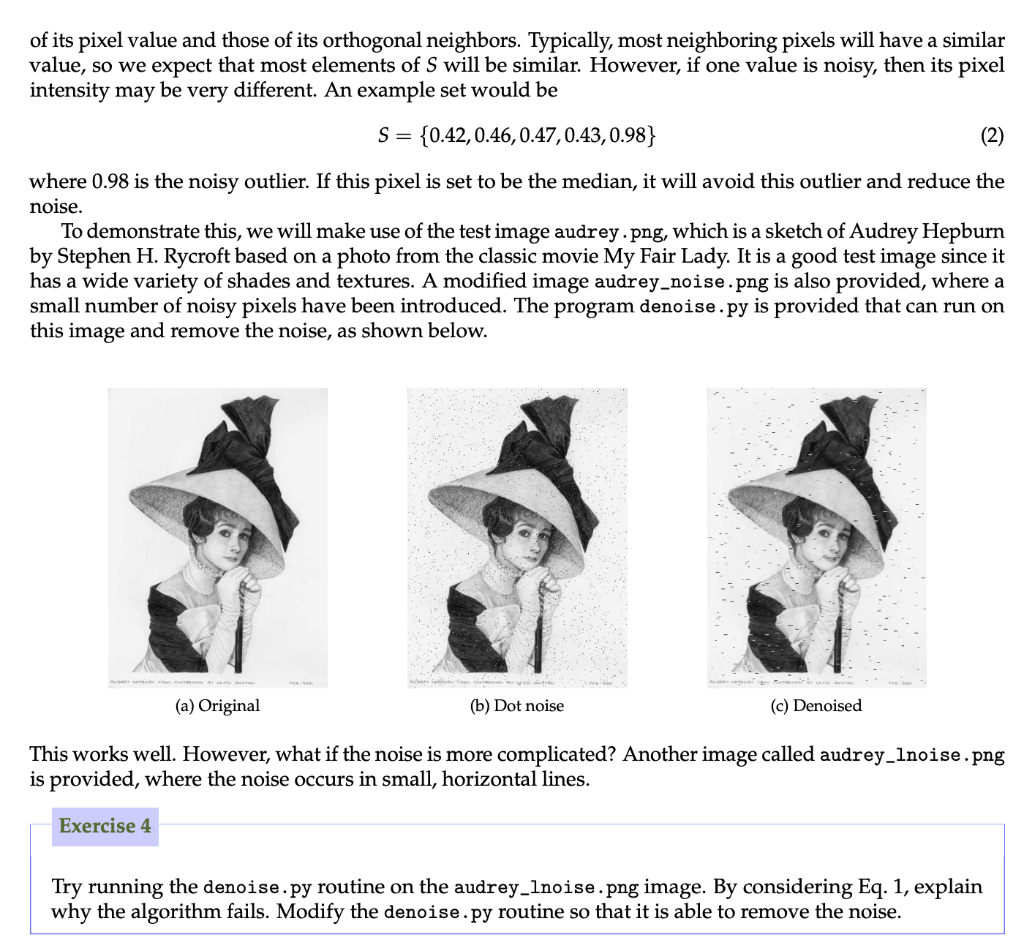
Python's image routines can also be used to process existing images. In lecture 5, an example called denoise.py was given for removing a number of noisy pixels in an image. The technique is based on taking a median over neighboring pixel values. For simplicity, let us consider a greyscale image. Consider a point (i,j), and first construct the set of its pixel value and those of its orthogonal neighbors. Typically, most neighboring pixels will have a similar value, so we expect that most elements of S will be similar. However, if one value is noisy, then its pixel intensity may be very different. An example set would be S 0.42,0.46,0.47,0.43,0.98) where 0.98 is the noisy outlier. If this pixel is set to be the median, it will avoid this outlier and reduce the noise To demonstrate this, we will make use of the test image audrey png, which is a sketch of Audrey Hepburrn by Stephen H. Rycroft based on a photo from the classic movie My Fair Lady. It is a good test image since it has a wide variety of shades and textures. A modified image audrey_noise.png is also provided, where a small number of noisy pixels have been introduced. The program denoise.py is provided that can run on this image and remove the noise, as shown below. (a) Original (b) Dot noise (c) Denoised This works well. However, what if the noise is more complicated? Another image called audrey_lnoise. png is provided, where the noise occurs in small, horizontal lines Exercise 4 Try running the denoise.py routine on the audrey_lnoise png image. By considering Eq. 1, explain why the algorithm fails. Modify the denoise.py routine so that it is able to remove the noise Python's image routines can also be used to process existing images. In lecture 5, an example called denoise.py was given for removing a number of noisy pixels in an image. The technique is based on taking a median over neighboring pixel values. For simplicity, let us consider a greyscale image. Consider a point (i,j), and first construct the set of its pixel value and those of its orthogonal neighbors. Typically, most neighboring pixels will have a similar value, so we expect that most elements of S will be similar. However, if one value is noisy, then its pixel intensity may be very different. An example set would be S 0.42,0.46,0.47,0.43,0.98) where 0.98 is the noisy outlier. If this pixel is set to be the median, it will avoid this outlier and reduce the noise To demonstrate this, we will make use of the test image audrey png, which is a sketch of Audrey Hepburrn by Stephen H. Rycroft based on a photo from the classic movie My Fair Lady. It is a good test image since it has a wide variety of shades and textures. A modified image audrey_noise.png is also provided, where a small number of noisy pixels have been introduced. The program denoise.py is provided that can run on this image and remove the noise, as shown below. (a) Original (b) Dot noise (c) Denoised This works well. However, what if the noise is more complicated? Another image called audrey_lnoise. png is provided, where the noise occurs in small, horizontal lines Exercise 4 Try running the denoise.py routine on the audrey_lnoise png image. By considering Eq. 1, explain why the algorithm fails. Modify the denoise.py routine so that it is able to remove the noise
Step by Step Solution
There are 3 Steps involved in it

Get step-by-step solutions from verified subject matter experts
 Study Help