







Question: Python: File I/O Assignment Name your function file fileIO.py with two inputs for the read filename and the output filename. 1. Included a docstring with
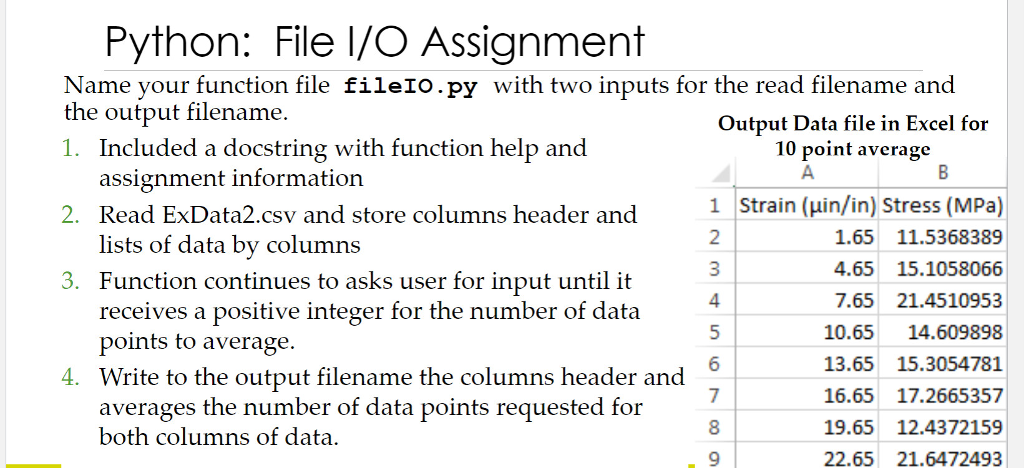
Python: File I/O Assignment Name your function file fileIO.py with two inputs for the read filename and the output filename. 1. Included a docstring with function help and 2. Read ExData2.csv and store columns header and 3. Function continues to asks user for input until it Output Data file in Excel for 10 point average assignment information lists of data by columns receives a positive integer for the number of data 1 Strain (uin/in) Stress (MPa) 1.65 11.5368389 4.65 15.1058066 7.65 21.4510953 10.6514.609898 13.65 15.3054781 16.65 17.2665357 19.65 12.4372159 22.65 21.6472493 2 4 points to average. 4. Write to the output filename the columns header and 7 averages the number of data points requested for both columns of data. Python: File I/O Assignment Name your function file fileIO.py with two inputs for the read filename and the output filename. 1. Included a docstring with function help and 2. Read ExData2.csv and store columns header and 3. Function continues to asks user for input until it Output Data file in Excel for 10 point average assignment information lists of data by columns receives a positive integer for the number of data 1 Strain (uin/in) Stress (MPa) 1.65 11.5368389 4.65 15.1058066 7.65 21.4510953 10.6514.609898 13.65 15.3054781 16.65 17.2665357 19.65 12.4372159 22.65 21.6472493 2 4 points to average. 4. Write to the output filename the columns header and 7 averages the number of data points requested for both columns of data
Step by Step Solution
There are 3 Steps involved in it

Get step-by-step solutions from verified subject matter experts
 Study Help