







Question: Python: How to adjust the code below to fit the instructions provided?? The menu that appears will remain the same, see below - - -
Python: How to adjust the code below to fit the instructions provided??
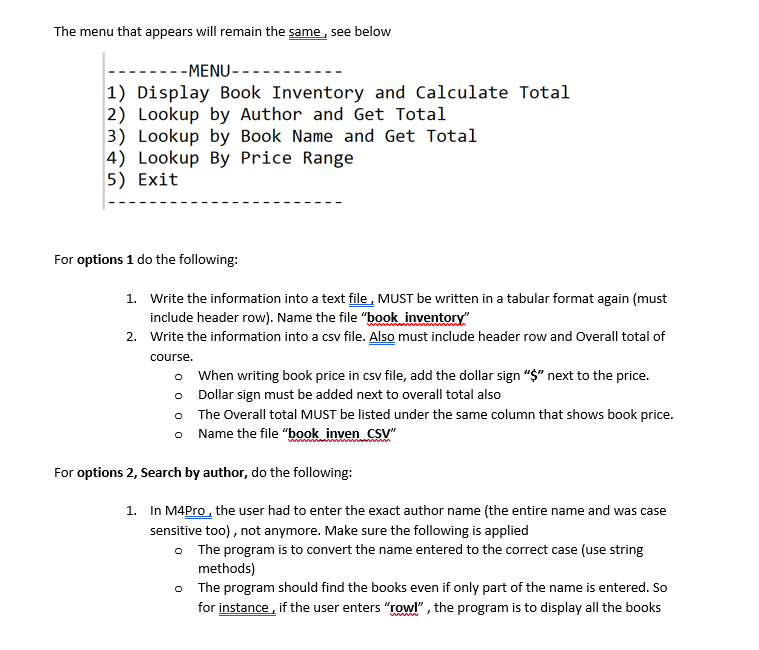
The menu that appears will remain the same, see below
MENU
Display Book Inventory and Calculate Total
Lookup by Author and Get Total
Lookup by Book Name and Get Total
Lookup By Price Range
Exit
For options do the following:
Write the information into a text file, MUST be written in a tabular format again must
include header row Name the file "book inventory"
Write the information into a csv file. Also must include header row and Overall total of
course.
When writing book price in csv file, add the dollar sign $ next to the price.
Dollar sign must be added next to overall total also
The Overall total MUST be listed under the same column that shows book price.
Name the file "book inven CSV
For options Search by author, do the following:
In MPro, the user had to enter the exact author name the entire name and was case
sensitive too not anymore. Make sure the following is applied
The program is to convert the name entered to the correct case use string
methods
The program should find the books even if only part of the name is entered. So
for instance, if the user enters "rowl" the program is to display all the books
for the authors that have names that contain the wordname that was
entered.
If books are found, Write the information into a text file, Again MUST be written in a
tabular format again must include header row
The file name would depend on the name that was entered. So if the user entered
"rowl", the file is to be named "rowl books"
Create a csv file that has the same name. Again, must include header row and Overall
total of course.
When writing book price in csv file, add the dollar sign $ next to the price.
Dollar sign must be added next to overall total also
The Overall total MUST be listed under the same column that shows book price.
File name again depends on the name searched. So if "rowl" was entered, the
file is to be named "rowl books CSV
For options Search by book name:
You won't have to create a file BUT, string evaluation must be done. So here's what you'll have to do
here:
In MPro, the exact book name had to be entered. That shouldn't be required anymore.
The program is to convert the title entered to the correct case use string methods
The program should find the books that have that given title.
Even if only part of the title is entered. So for instance, if the user enters "and the, all
the books that contain that word or set of words are to be displayed.
For options Search by price range:
Again write the information into two files, txt file and csv file
The file names will depend on the price range entered. For instance if starting was and
ending price the files could be named as following "books
Step by Step Solution
There are 3 Steps involved in it
1 Expert Approved Answer
Step: 1 Unlock

Question Has Been Solved by an Expert!
Get step-by-step solutions from verified subject matter experts
Step: 2 Unlock
Step: 3 Unlock
 Study Help