







Question: Python - I am bit stuck on this download section. I need to download a file a place it in the same folder as my
Python - I am bit stuck on this download section. I need to download a file a place it in the same folder as my Python scriptotebook file ?!?! what does that even mean? I need to store it in my desktop folder for Python things? and what does it mean to output the head of the DataFrame after each operation? like print after each statement to make sure it works? English isn't my first language so I am struggling a bit with understanding here....
SCRIPT:
%matplotlib inline #import matplotlib.pyplot as plt
df = df.SomeFunction() new_df = df.SomeFunction()
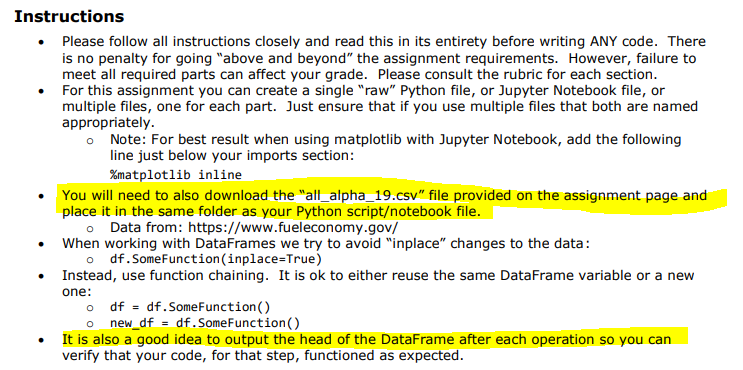
Instructions Please follow all instructions closely and read this in its entirety before writing ANY code. There is no penalty for going "above and beyond the assignment requirements. However, failure to meet all required parts can affect your grade. Please consult the rubric for each section. For this assignment you can create a single "raw" Python file, or Jupyter Notebook file, or multiple files, one for each part. Just ensure that if you use multiple files that both are named appropriately. Note: For best result when using matplotlib with Jupyter Notebook, add the following line just below your imports section: %matplotlib inline You will need to also download the "all_alpha_19.csv" file provided on the assignment page and place it in the same folder as your Python scriptotebook file. o Data from: https://www.fueleconomy.gov/ When working with DataFrames we try to avoid "inplace" changes to the data: odf.SomeFunction(inplace=True) Instead, use function chaining. It is ok to either reuse the same DataFrame variable or a new one: o df = df. Some Function() o new_df = df. Some Function() It is also a good idea to output the head of the DataFrame after each operation so you can verify that your code, for that step, functioned as expected
Step by Step Solution
There are 3 Steps involved in it

Get step-by-step solutions from verified subject matter experts
 Study Help