







Question: Python I am currently getting this error: ValueError could not convert string to float ror: I believe it is coming from one text file that
Python
I am currently getting this error:
ValueError could not convert string to float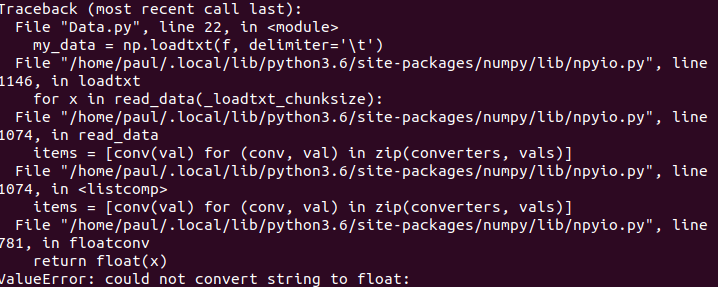 ror:
ror:
I believe it is coming from one text file that has a string in it. How would I check? The file has 50,001 rows.
Code:
import numpy as np
import pandas
import matplotlib.pyplot as plt
import glob
import sys
import re
from tabulate import tabulate
def last_9chars(x):
return(x[-9:])
files = sorted(glob.glob('Data*.txt'),key = last_9chars)
filecount = 0
n = 0
txt = []
Mean = []
Std = []
maxfilecount = int(sys.argv[1]) if len(sys.argv) > 1 else len(files)
for f in files:
filecount +=1
my_data = np.loadtxt(f, delimiter='\t')
mean = np.mean(my_data[:,1])
std = np.std(my_data[:,1])
print(f"Here {n}")
txt.append(f)
Mean.append(mean)
Std.append(std)
n +=1
if filecount >= maxfilecount:
break
d = {'File': txt,'Mean': Mean,'Standard Deviation': Std}
Temp = pandas.DataFrame(d)
Temp.to_excel("Data.xlsx",sheet_name='Sheet_name_1')
Traceback (most recent call last): File "Data.py", line 22, in
Step by Step Solution
There are 3 Steps involved in it

Get step-by-step solutions from verified subject matter experts
 Study Help