







Question: Python - I need to read two text files into a single linked list and use the following methods to check for any duplicates in
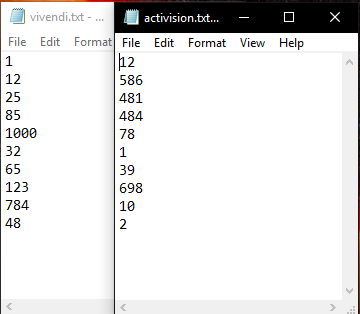
Python - I need to read two text files into a single linked list and use the following methods to check for any duplicates in the linked list, i made a method called single_list that reads two files and joins them into a single list. As the code is now, it reads a single text file, how can i change my code so it can read both text files into a single linked list.
class Node(object): item = -1 next = None
def __init__(self, item, next=None): self.item = item self.next = next #required methods to make the list work def has_next(self): return self.next!=None def get_next(self): return self.next def set_next(self,node): self.next=node
class LinkedList(object): # required constructor def __init__(self): #initializing root and size self.root=None self.size=0
def get_size(self): return self.size
def add(self, item): new_node = Node(item, self.root); self.root = new_node; self.size += 1;
def add_node(self, next): next.set_next(self.root); self.root = next; self.size += 1;
def find(self, item): this_node = self.root while this_node: if this_node.get_data() == item: return item else: this_node = this_node.get_next() return None
def print_list(self): print("Print List.........."); if self.root is None: return; current = self.root; print(current.item); while current.has_next(): current = current.get_next(); print(current.item);
def duplicates_unsorted(list): #This method would find duplicates in a unsorted list k = list duplicate_elements = [] while k is not None: j = k.next while j is not None: if k.item == j.item: duplicate_elements.append(k.item) j = j.next k = k.next print("Duplicates: ", duplicate_elements)
def duplicates_sorted(list): k = list duplicate_elements = [] while k is not None: if k.next is None: break if k.item == k.next.item: duplicate_elements.append(k.item) k = k.next print("Duplicates: ", duplicate_elements) def bubble_sort(list): for i in range(list.length()): m = list n = m.next while n is not None: if n.item is None: break if m.item > n.item: swap(m, n) n = n.next m = m.next
def swap(node1, node2): temp = node1.item node1.item = node2.item node2.item = temp def mergeSort(list):
if list is None or list.next is None: return list else: middle = getMiddleNode(list) nextmiddle = middle.next middle.next = None
left = mergeSort(middle) right = mergeSort(nextmiddle)
sortedList = sortMerged(left, right)
return sortedList
def sortMerged(left, right):
if left is None: return left elif right is None: return right
if (int(right.item)
def getMiddleNode(list):
if list is None or list.next is None: return list else: fast = list.next slow = list
while fast != None: fast = fast.next slow = slow.next
return slow def checkBoolean(list): seen = [False]*(list.length()+1) m = list n = m.next while n is not None: if m.item == n.item: seen[m.item] = True m = m.next if m == n: n = n.next m = list return seen def single_list(): with open('vivendi.txt', 'r') as myfile: #calls on vivendi.txt file vivendi = [] for line in myfile: vivendi.append(int(line.strip())) #print(vivendi)
with open('activision.txt', 'r') as myfile: #calls on activision.txt file activision = [] for line in myfile: activision.append(int(line)) #print(activision) new_list = activision + vivendi return new_list
def main(): #creating a linked list linkedList=LinkedList() filename=input('Enter file name that contains integers: ') #opening file file=open(filename) #looping through each line for line in file: line=line.strip() number=int(line) #adding to list linkedList.add(number) print('Displaying numbers read from',filename) linkedList.print_list() linkedList.duplicates_unsorted() linkedList.bubble_sort() linkedList.mergeSort() linkedList.checkBoolean()
if __name__ =='__main__': main()
vivendi.txt-... activision.txt...- File Edit Format File Edit Format View Help 586 481 12 25 85 1000 32 65 123 784 4 78 39 698 10
Step by Step Solution
There are 3 Steps involved in it

Get step-by-step solutions from verified subject matter experts
 Study Help