







Question: Python Please COMPSCI 130 Assignment, Summer School, 2022 In this assignment you will have to implement a variation of the game Hangman. liol The aim
Python Please
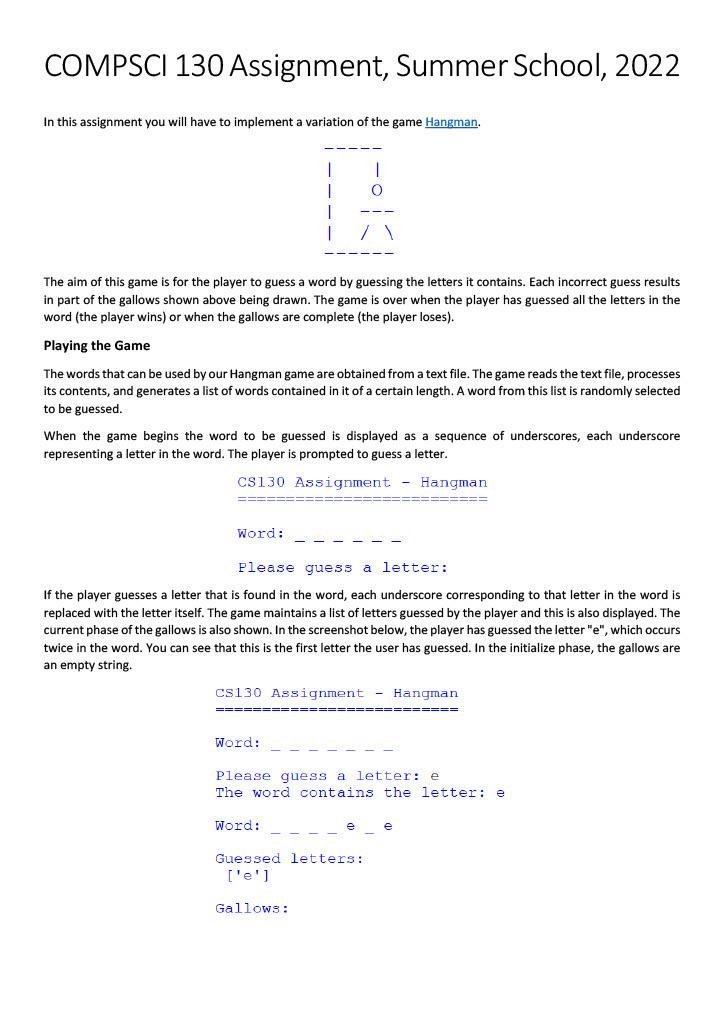
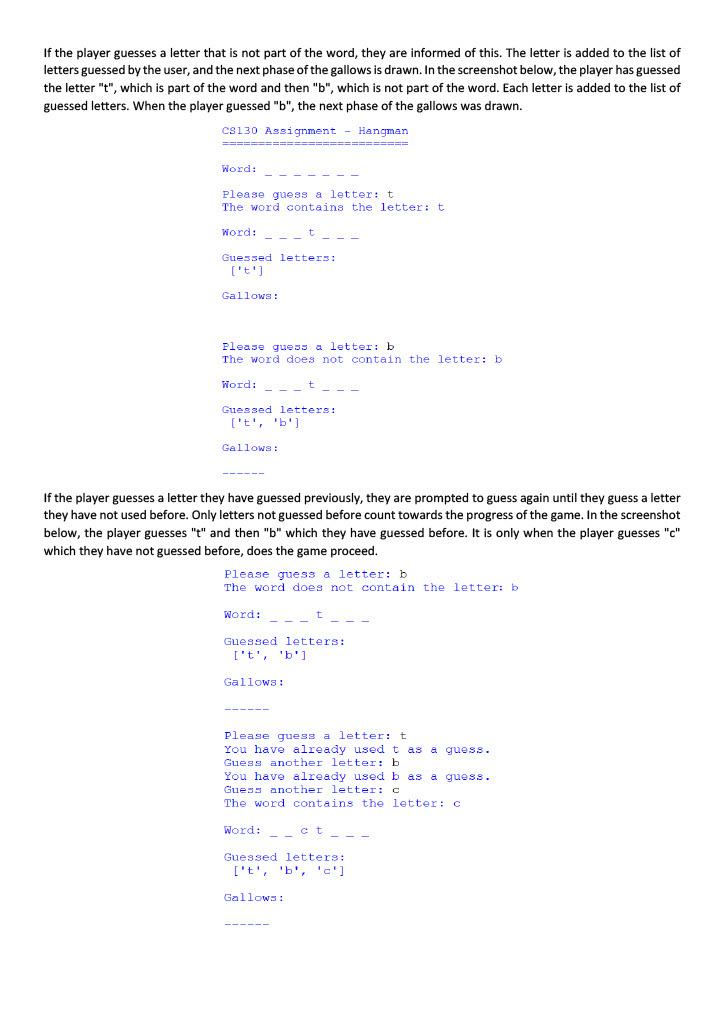
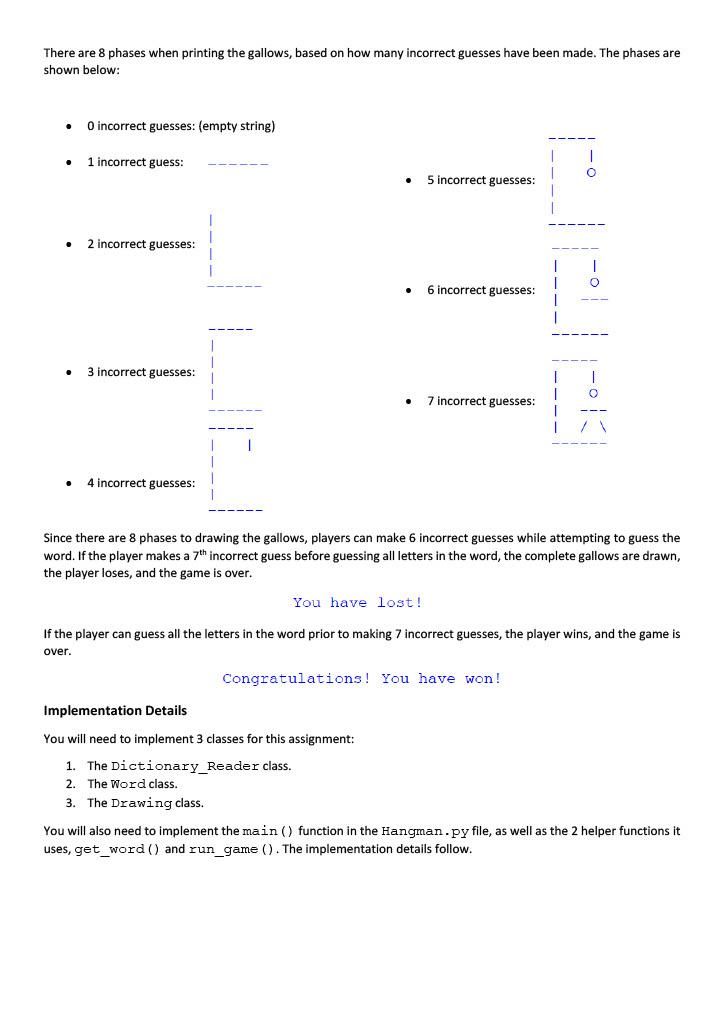
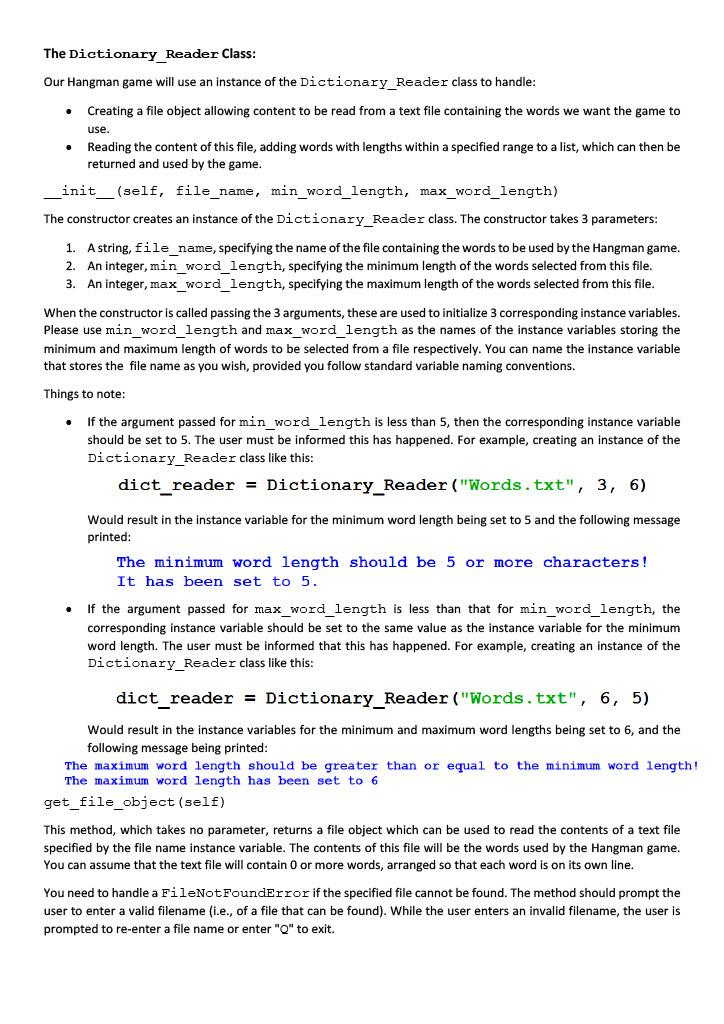
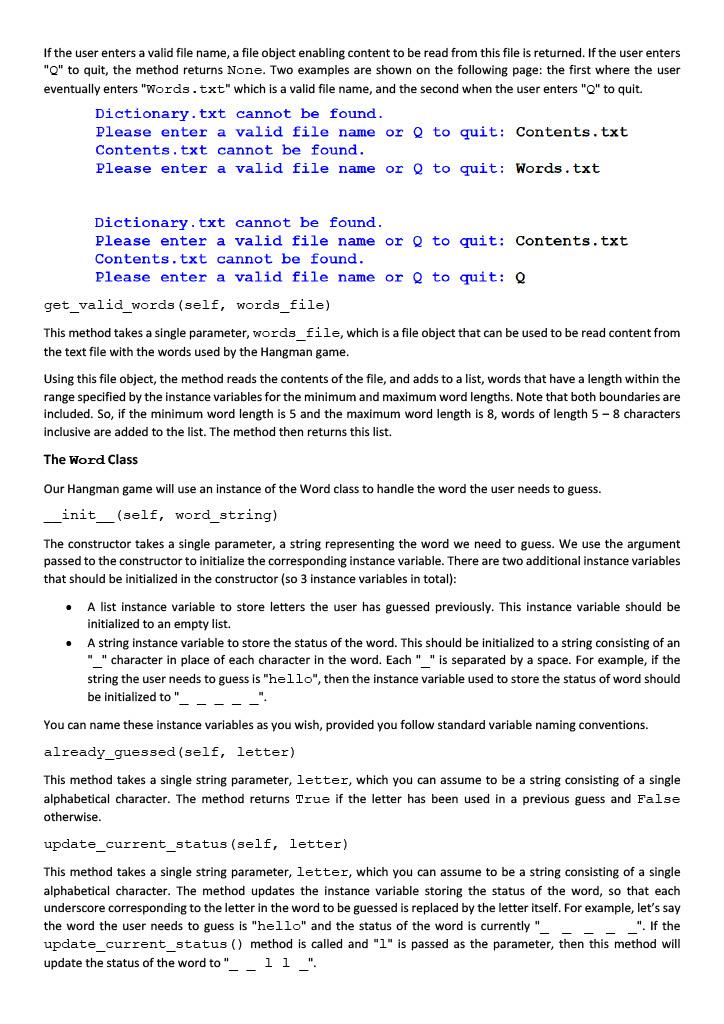
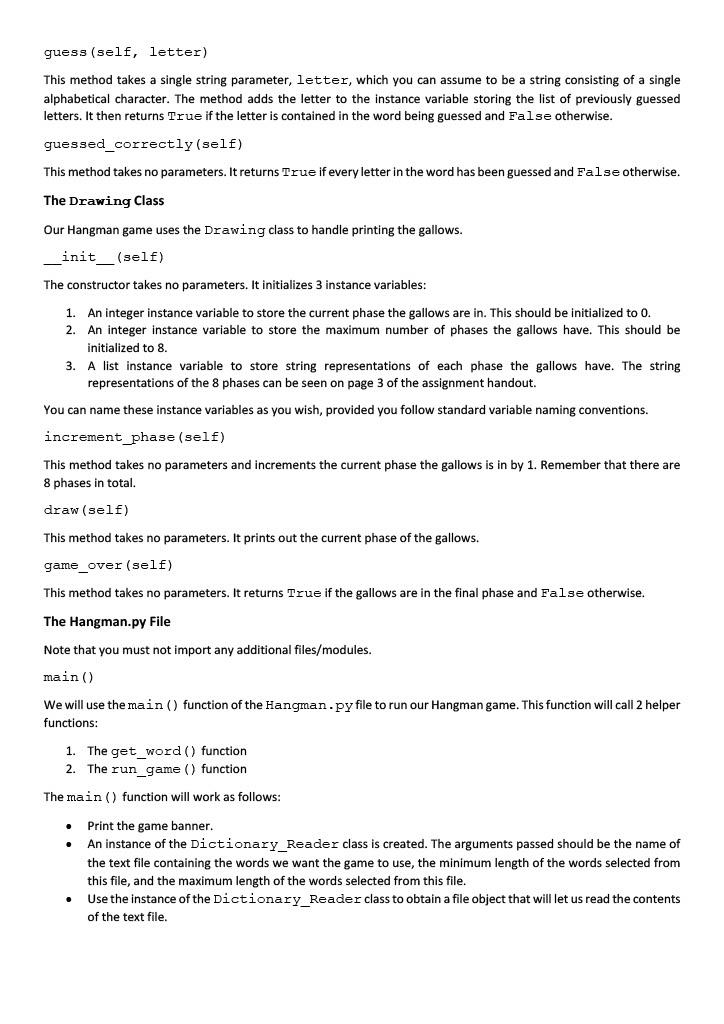
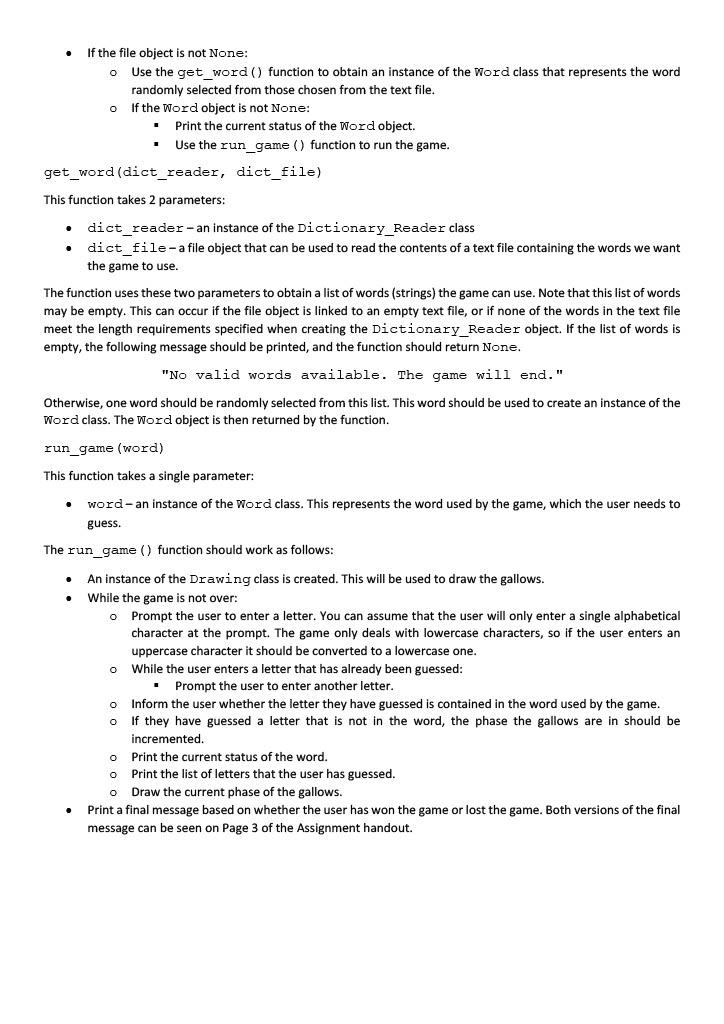
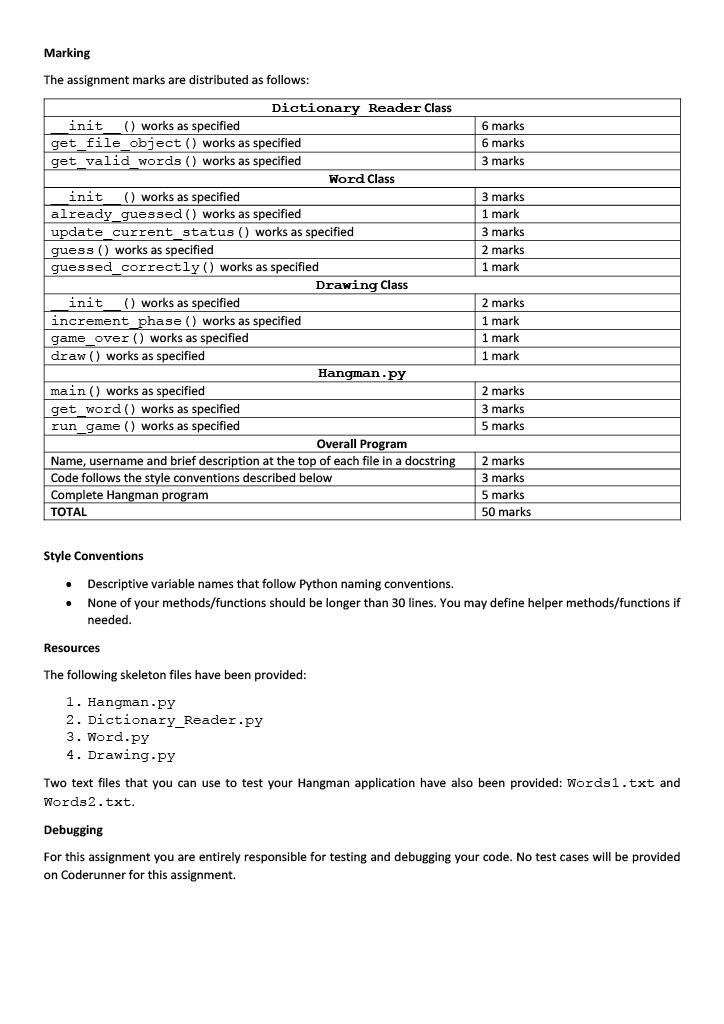
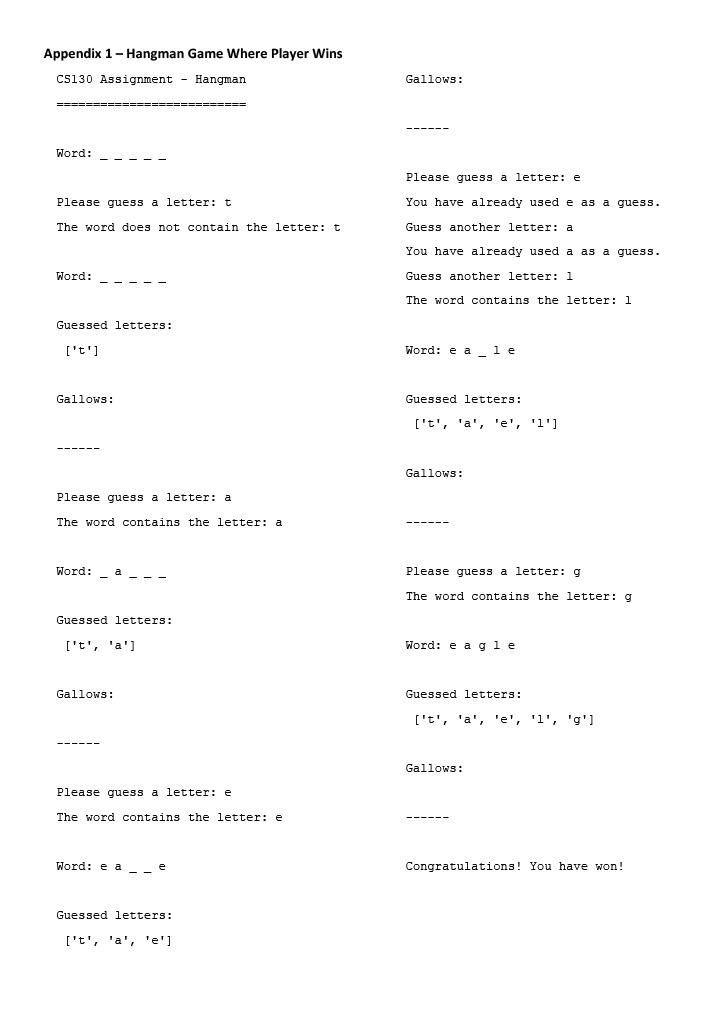
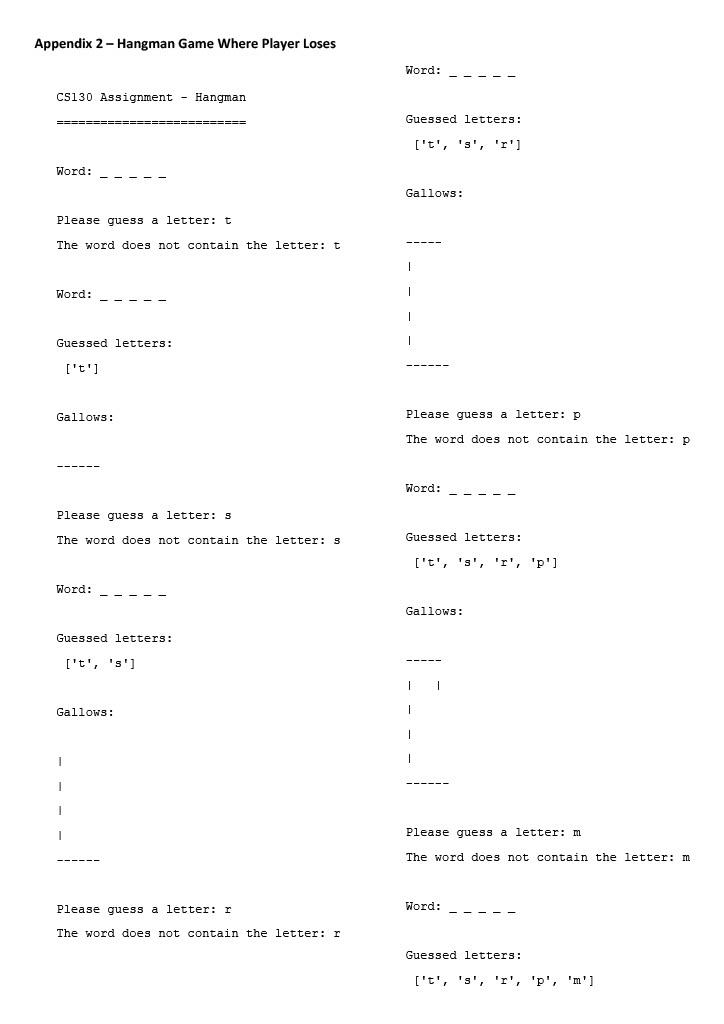
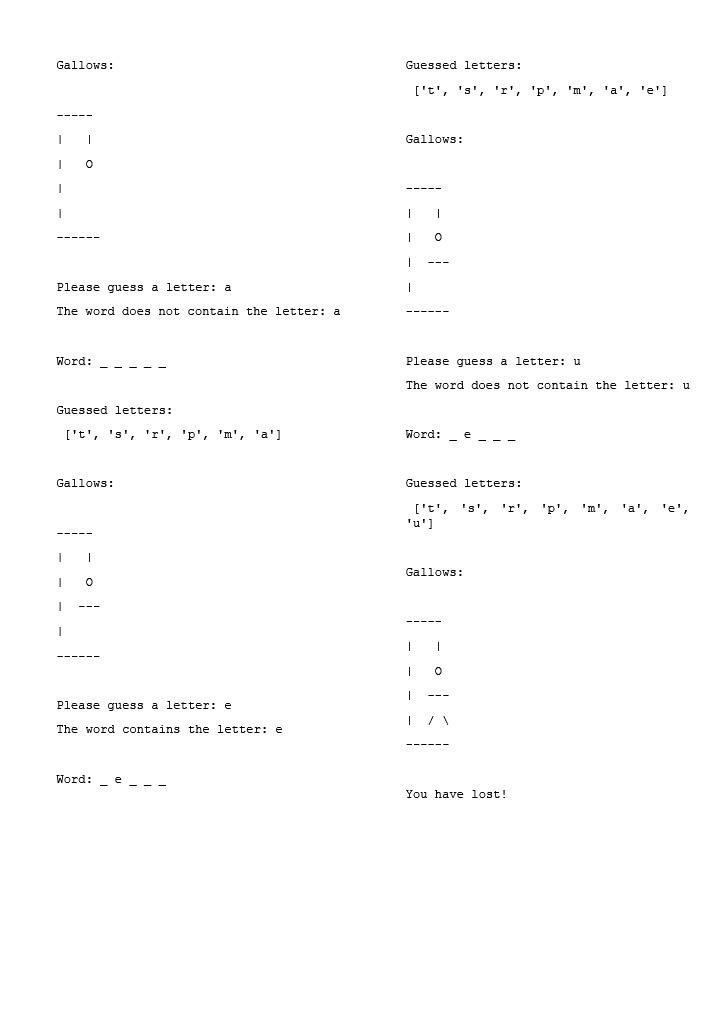
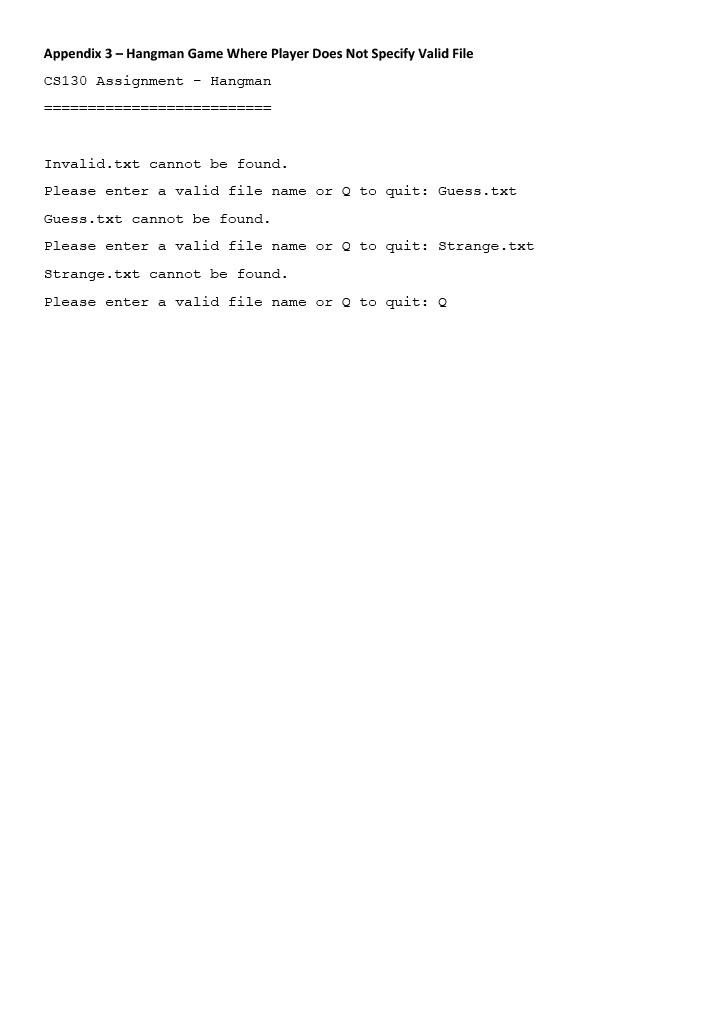
COMPSCI 130 Assignment, Summer School, 2022 In this assignment you will have to implement a variation of the game Hangman. liol The aim of this game is for the player to guess a word by guessing the letters it contains. Each incorrect guess results in part of the gallows shown above being drawn. The game is over when the player has guessed all the letters in the word (the player wins) or when the gallows are complete (the player loses). Playing the Game The words that can be used by our Hangman game are obtained from a text file. The game reads the text file, processes its contents, and generates a list of words contained in it of a certain length. A word from this list is randomly selected to be guessed. When the game begins the word to be guessed is displayed as a sequence of underscores, each underscore representing a letter in the word. The player is prompted to guess a letter. CS130 Assignment - Hangman Word: Please guess a letter: If the player guesses a letter that is found in the word, each underscore corresponding to that letter in the word is replaced with the letter itself. The game maintains a list of letters guessed by the player and this is also displayed. The current phase of the gallows is also shown. In the screenshot below, the player has guessed the letter "e", which occurs twice in the word. You can see that this is the first letter the user has guessed. In the initialize phase, the gallows are an empty string. CS130 Assignment - Hangman ======= ======= Word: Please guess a letter: e The word contains the letter: e Word: Guessed letters: ['e'] Gallows: If the player guesses a letter that is not part of the word, they are informed of this. The letter is added to the list of letters guessed by the user, and the next phase of the gallows is drawn. In the screenshot below, the player has guessed the letter "t", which is part of the word and then "b", which is not part of the word. Each letter is added to the list of guessed letters. When the player guessed "b", the next phase of the gallows was drawn. CS130 Assignment - Hangman ========================= Word: Please guess a letter: t The word contains the letter: t Word: Guessed letters: ['t'l Gallows: Please guess a letter: b The word does not contain the letter: b Word: Guessed letters: ['t', 'b'] Gallows: If the player guesses a letter they have guessed previously, they are prompted to guess again until they guess a letter they have not used before. Only letters not guessed before count towards the progress of the game. In the screenshot below, the player guesses "t" and then "b" which they have guessed before. It is only when the player guesses "C" which they have not guessed before, does the game proceed. Please guess a letter: b The word does not contain the letter: b Word: Guessed letters: I't', 'b'] Gallows: Please guess a letter: t You have already used t as a guess. Guess another letter: b You have already used b as a guess. Guess another letter: C The word contains the letter: c Word: - - ct Guessed letters: ['t', 'b', 'e'] Gallows: There are 8 phases when printing the gallows, based on how many incorrect guesses have been made. The phases are shown below: O incorrect guesses: (empty string) 1 incorrect guess: 5 incorrect guesses: 2 incorrect guesses: 6 incorrect guesses: . 3 incorrect guesses: 1 7 incorrect guesses: 1 1 4 incorrect guesses: Since there are 8 phases to drawing the gallows, players can make 6 incorrect guesses while attempting to guess the word. If the player makes a 7th incorrect guess before guessing all letters in the word, the complete gallows are drawn, the player loses, and the game is over. You have lost! If the player can guess all the letters in the word prior to making 7 incorrect guesses, the player wins, and the game is over. Congratulations! You have won! Implementation Details You will need to implement 3 classes for this assignment: 1. The Dictionary Reader class. 2. The Word class. 3. The Drawing class. You will also need to implement the main() function in the Hangman.py file, as well as the 2 helper functions it uses, get_word () and run_game (). The implementation details follow. The Dictionary_Reader Class: Our Hangman game will use an instance of the Dictionary_Reader class to handle: Creating a file object allowing content to be read from a text file containing the words we want the game to use. Reading the content of this file, adding words with lengths within a specified range to a list, which can then be returned and used by the game. . . init__(self, file_name, min_word_length, max_word_length) The constructor creates an instance of the Dictionary_Reader class. The constructor takes 3 parameters: 1. A string, file_name, specifying the name of the file containing the words to be used by the Hangman game. 2. An integer, min_word_length, specifying the minimum length of the words selected from this file. 3. An integer, max_word_length, specifying the maximum length of the words selected from this file. When the constructor is called passing the 3 arguments, these are used to initialize 3 corresponding instance variables. Please use min_word_length and max_word_length as the names of the instance variables storing the minimum and maximum length of words to be selected from a file respectively. You can name the instance variable that stores the file name as you wish, provided you follow standard variable naming conventions. Things to note: . If the argument passed for min_word_length is less than 5, then the corresponding instance variable should be set to 5. The user must be informed this has happened. For example, creating an instance of the Dictionary_Reader class like this: dict_reader = Dictionary_Reader ("Words.txt", 3, 6) Would result in the instance variable for the minimum word length being set to 5 and the following message printed: The minimum word length should be 5 or more characters! It has been set to 5. If the argument passed for max_word_length is less than that for min_word_length, the corresponding instance variable should be set to the same value as the instance variable for the minimum word length. The user must be informed that this has happened. For example, creating an instance of the Dictionary_Reader class like this: dict_reader = Dictionary_Reader ("Words.txt", 6, 5) Would result in the instance variables for the minimum and maximum word lengths being set to 6, and the following message being printed: The maximum word length should be greater than or equal to the minimum word length! The maximum word length has been set to 6 get_file_object (self) This method, which takes no parameter, returns a file object which can be used to read the contents of a text file specified by the file name instance variable. The contents of this file will be the words used by the Hangman game. You can assume that the text file will contain 0 or more words, arranged so that each word is on its own line. You need to handle a FileNotFoundError if the specified file cannot be found. The method should prompt the user to enter a valid filename (i.e., of a file that can be found). While the user enters an invalid filename, the user is prompted to re-enter a file name or enter "Q" to exit. If the user enters a valid file name, a file object enabling content to be read from this file is returned. If the user enters "Q" to quit, the method returns None. Two examples are shown on the following page: the first where the user eventually enters "Words.txt" which is a valid file name, and the second when the user enters "Q" to quit. Dictionary.txt cannot be found. Please enter a valid file name or Q to quit: Contents.txt Contents.txt cannot be found. Please enter a valid file name or Q to quit: Words.txt Dictionary.txt cannot be found. Please enter a valid file name or Q to quit: Contents.txt Contents.txt cannot be found. Please enter a valid file name or Q to quit: Q get_valid_words (self, words_file) This method takes a single parameter, words_file, which is a file object that can be used to be read content from the text file with the words used by the Hangman game. Using this file object, the method reads the contents of the file, and adds to a list, words that have a length within the range specified by the instance variables for the minimum and maximum word lengths. Note that both boundaries are included. So, if the minimum word length is 5 and the maximum word length is 8, words of length 5 - 8 characters inclusive are added to the list. The method then returns this list. The Word Class Our Hangman game will use an instance of the Word class to handle the word the user needs to guess. init__(self, word_string) The constructor takes a single parameter, a string representing the word we need to guess. We use the argument passed to the constructor to initialize the corresponding instance variable. There are two additional instance variables that should be initialized in the constructor (so 3 instance variables in total): A list instance variable to store letters the user has guessed previously. This instance variable should be initialized to an empty list. A string instance variable to store the status of the word. This should be initialized to a string consisting of an "_" character in place of each character in the word. Each "_" is separated by a space. For example, if the string the user needs to guess is "hello", then the instance variable used to store the status of word should be initialized to " . You can name these instance variables as you wish, provided you follow standard variable naming conventions. already_guessed (self, letter) This method takes a single string parameter, letter, which you can assume to be a string consisting of a single alphabetical character. The method returns True if the letter has been used in a previous guess and False otherwise. update_current_status (self, letter) This method takes a single string parameter, letter, which you can assume to be a string consisting of a single alphabetical character. The method updates the instance variable storing the status of the word, so that each underscore corresponding to the letter in the word to be guessed is replaced by the letter itself. For example, let's say the word the user needs to guess is "hello" and the status of the word is currently" ". If the update_current_status() method is called and "1" is passed as the parameter, then this method will update the status of the word to " il ". guess (self, letter) This method takes a single string parameter, letter, which you can assume to be a string consisting of a single alphabetical character. The method adds the letter to the instance variable storing the list of previously guessed letters. It then returns True if the letter is contained in the word being guessed and False otherwise. guessed_correctly (self) This method takes no parameters. It returns True if every letter in the word has been guessed and False otherwise. The Drawing Class 2 Our Hangman game uses the Drawing class to handle printing the gallows. _init__(self) The constructor takes no parameters. It initializes 3 instance variables: 1. An integer instance variable to store the current phase the gallows are in. This should be initialized to 0. An integer instance variable to store the maximum number of phases the gallows have. This should be initialized to 8. A list instance variable to store string representations of each phase the gallows have. The string representations of the 8 phases can be seen on page 3 of the assignment handout. You can name these instance variables as you wish, provided you follow standard variable naming conventions. increment_phase (self) This method takes no parameters and increments the current phase the gallows is in by 1. Remember that there are 8 phases in total. 3. draw (self) This method takes no parameters. It prints out the current phase of the gallows. game_over (self) This method takes no parameters. It returns True if the gallows are in the final phase and False otherwise. The Hangman.py File Note that you must not import any additional files/modules. main() We will use the main() function of the Hangman.py file to run our Hangman game. This function will call 2 helper functions: 1. The get word() function 2. The run_game () function The main() function will work as follows: Print the game banner. An instance of the Dictionary_Reader class is created. The arguments passed should be the name of the text file containing the words we want the game to use, the minimum length of the words selected from this file, and the maximum length of the words selected from this file. Use the instance of the Dictionary_Reader class to obtain a file object that will let us read the contents of the text file. o o If the file object is not None: Use the get_word() function to obtain an instance of the Word class that represents the word randomly selected from those chosen from the text file. If the Word object is not None: Print the current status of the Word object. Use the run_game () function to run the game. get_word (dict_reader, dict_file) . This function takes 2 parameters: a dict_reader-an instance of the Dictionary_Reader class dict_file-a file object that can be used to read the contents of a text file containing the words we want the game to use. The function uses these two parameters to obtain a list of words (strings) the game can use. Note that this list of words may be empty. This can occur if the file object is linked to an empty text file, or if none of the words in the text file meet the length requirements specified when creating the Dictionary_Reader object. If the list of words is empty, the following message should be printed, and the function should return None. "No valid words available. The game will end." Otherwise, one word should be randomly selected from this list. This word should be used to create an instance of the Word class. The Word object is then returned by the function. run_game (word) This function takes a single parameter: . word-an instance of the Word class. This represents the word used by the game, which the user needs to guess. The run_game () function should work as follows: An instance of the Drawing class is created. This will be used to draw the gallows. While the game is not over: o Prompt the user to enter a letter. You can assume that the user will only enter a single alphabetical character at the prompt. The game only deals with lowercase characters, so if the user enters an uppercase character it should be converted to a lowercase one. While the user enters a letter that has already been guessed: Prompt the user to enter another letter. Inform the user whether the letter they have guessed is contained in the word used by the game. . If they have guessed a letter that is not in the word, the phase the gallows are in should be incremented o Print the current status of the word. o Print the list of letters that the user has guessed. . o Draw the current phase of the gallows. Print a final message based on whether the user has won the game or lost the game. Both versions of the final message can be seen on Page 3 of the Assignment handout. . o . Marking The assignment marks are distributed as follows: 6 marks 6 marks 3 marks 3 marks 1 mark 3 marks 2 marks 1 mark Dictionary Reader Class init() works as specified get_file_object() works as specified get_valid words () works as specified Word Class init () works as specified already_guessed() works as specified update current status () works as specified guess () works as specified guessed correctly () works as specified Drawing Class init ( works as specified increment_phase () works as specified game_over () works as specified draw() works as specified Hangman.py main() works as specified get_word() works as specified run_game () works as specified Overall Program Name, username and brief description at the top of each file in a docstring Code follows the style conventions described below Complete Hangman program TOTAL 2 marks 2 1 mark 1 mark 1 mark 2 marks 2 3 marks 5 marks 2 marks 3 marks 5 marks 50 marks Style Conventions . Descriptive variable names that follow Python naming conventions. None of your methods/functions should be longer than 30 lines. You may define helper methods/functions if needed. Resources The following skeleton files have been provided: 1. Hangman.py 2. Dictionary_Reader.py 3. Word.py 4. Drawing.PY Two text files that you can use to test your Hangman application have also been provided: Words1.txt and Words2.txt. Debugging For this assignment you are entirely responsible for testing and debugging your code. No test cases will be provided on Coderunner for this assignment. Appendix 1 - Hangman Game Where Player Wins CS130 Assignment - Hangman Gallows: ==== Word: Please guess a letter: e Please guess a letter: t You have already used e as a guess. The word does not contain the letter: t Guess another letter: a You have already used a as a guess. Word: Guess another letter: 1 The word contains the letter: 1 Guessed letters: ['t'l Word: e ale Gallows: Guessed letters: ['t', 'a', 'e', 'l'] Gallows: Please guess a letter: a The word contains the letter: a Word: Please guess a letter: g The word contains the letter: g Guessed letters: ['t', 'a'] Word: eagle Gallows: Guessed letters: ['t', 'a', 'e', 'l', 'g'l Gallows: Please guess a letter: e The word contains the letter: e Word: e a Congratulations! You have won! Guessed letters: ['t', 'a', 'e'] Appendix 2 - Hangman Game Where Player Loses Word: CS130 Assignment - Hangman Guessed letters: ======== ['t', 's', 'r'] Word: Gallows: Please guess a letter: t The word does not contain the letter: t Word: Guessed letters: ['t'] Gallows: Please guess a letter: p The word does not contain the letter: P Word: Please guess a letter: s The word does not contain the letter: s Guessed letters: ['t', 's', 'r', 'p'] Word: Gallows: Guessed letters: ['t', 's'] 1 1 Gallows: Please guess a letter: m The word does not contain the letter: m Please guess a letter: r Word: The word does not contain the letter: r Guessed letters: ['t', 's', 'r', 'p', 'm'] Gallows: Guessed letters: ['t', 's', 'T', 'p', 'm', 'a', 'e'] 1 Gallows: o 1 1 1 1 I o 1 1 Please guess a letter: a The word does not contain the letter: a Word: Please guess a letter: u The word does not contain the letter: u Guessed letters: ['t', 's', 'r', 'p', 'm', 'a'] Word: Gallows: Guessed letters: ['t', 's', 'r', 'p', 'm', 'a', 'e', 1 1 Gallows: 1 o 1 1 I 1 Please guess a letter: e The word contains the letter: e 1010 Word: You have lost! Appendix 3 - Hangman Game Where Player Does Not Specify Valid File CS130 Assignment - Hangman === Invalid.txt cannot be found. Please enter a valid file name or Q to quit: Guess.txt Guess.txt cannot be found. Please enter a valid file name or Q to quit: Strange.txt Strange. txt cannot be found. Please enter a valid file name or Q to quit: 0
Step by Step Solution
There are 3 Steps involved in it

Get step-by-step solutions from verified subject matter experts
 Study Help