







Question: ##Python It's a set of question, and after I finish the first question, I am stuck in the following one, and I even don't know
##Python
It's a set of question, and after I finish the first question, I am stuck in the following one, and I even don't know how to start it:(
(I post my code at the end of this page)
Question:
Our interest rate table is a natural Pandas DataFrame, with trading dates as rows and bond maturities as columns. From the daily_yield_curves list of lists, create a DataFrame named yield_curve_df with the date strings as the row labels (01/02/2018, , 07/20/2018), the bond maturities as the column labels (1 mo, , 30 yr), and the corresponding interest rate values as the row/column item values. Use appropriate slices/loops/comprehensions involving daily_yield_curves to create yield_curve_df.
has a plot() member function that uses matplotlib. You can use yield_curve_df.plot() to create a plot with rows on the horizontal axis, values on the vertical axis, and with each column represented as a different line. You will still need to use
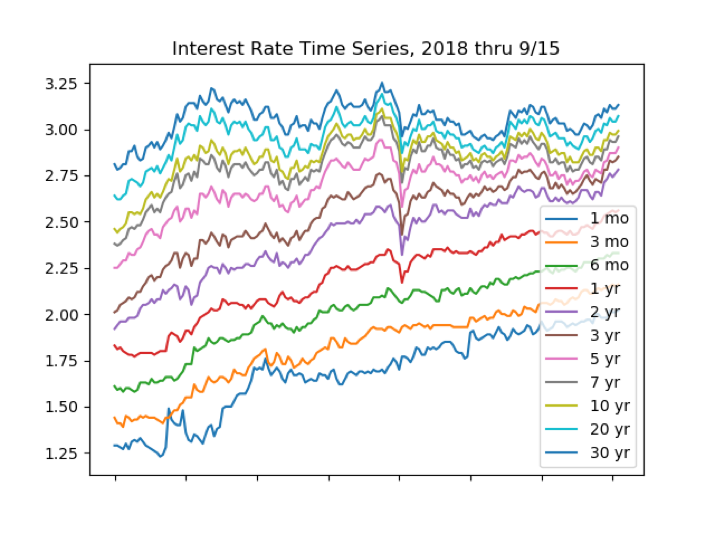
to make the plot be drawn on your screen. Since the rows are trading days, this plot will be of the time series of interest rates for each maturity: 1 month, 3 months, , 30 years. You will see that so far during 2018, short-term interest rates are rising relatively rapidly, whereas long-term rates have fluctuated but not risen very much. This so-called flattening of the yield curve may signal a slowing economy.
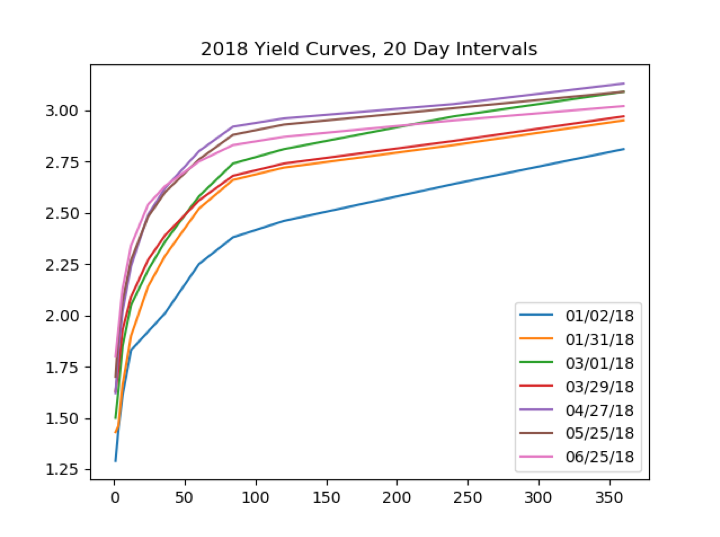
If we transpose yield_curve_df, so that trading dates become the columns and maturities become the rows, then a plot() will show us the daily yield curve for every trading day so far this year. This will be an unreadable mess with over 100 lines.
From yield_curve_df create a DataFrame object named by_day_yield_curve_df, containing the transpose of yield_curve_df but only including a column for every 20th trading day, that is, day 0, day 20, day 40, , day 120. The column labels should be 01/02/18, 01/31/18, , 06/25/28 if you do this correctly. You will need to modify the row labels from 1 mo, 3 mo, and so forth, to the corresponding integer number of months1, 3, , 360in order for the plots horizontal axis to make sense.
The by-maturity time series plot and the by-trading-day yield curve plots should look about like the examples shown on the next page:
My code:
from urllib.request import urlopen # b_soup_1.py from bs4 import BeautifulSoup import numpy as np import matplotlib.pyplot as plt from mpl_toolkits.mplot3d import Axes3D from matplotlib import cm from matplotlib.ticker import LinearLocator, FormatStrFormatter
# Treasury Yield Curve web site, known to be HTML code html = urlopen('https://www.treasury.gov/resource-center/' 'data-chart-center/interest-rates/Pages/' 'TextView.aspx?data=yieldYear&year=2018')
# create the BeautifulSoup object (BeautifulSoup Yield Curve) bsyc = BeautifulSoup(html.read(), "lxml")
# save it to a file that we can edit fout = open('daily_yield_curves.txt', 'wt', encoding='utf-8')
# so get a list of all table tags
table_list = bsyc.findAll('table')
# to findAll as a dictionary attribute tc_table_list = bsyc.findAll('table', { "class" : "t-chart" } )
# only 1 t-chart table, so grab it tc_table = tc_table_list[0] # what are this table's components/children? # tag tr means table row, containing table data # what are the children of those rows? # we have found the table data! # just get the contents of each cell
daily_yield_curves_temp = [] daily_yield_curves = [] for c in tc_table.children: for r in c.children: for i in r.contents: daily_yield_curves_temp.append(i)
for x in range(len(daily_yield_curves_temp) // 12): daily_yield_curves.append(daily_yield_curves_temp[12 * x : 12 * x + 12])
for y in daily_yield_curves: for z in y: fout.write(z) fout.write(" ") fout.write(" ")
for i in range(1, len(daily_yield_curves_temp) // 12): for j in range(1,12): daily_yield_curves[i][j] = float(daily_yield_curves[i][j])
print(' the contents of the children of the t-chart table:') for j in daily_yield_curves: print("\t ",j,", ")
# the contents of each cell is a list of one # string -- we can work with those!
fout.close()
Interest Rate Time Series, 2018 thru 9/15 3.25 3.00 2.75 1mo 3 mo 6 mo 2.50 2.25 _ 1yr 2 yr 2.00 1.75 -7 yr -10 yr 1.50 - 20 yr -30 yr 1.25 Interest Rate Time Series, 2018 thru 9/15 3.25 3.00 2.75 1mo 3 mo 6 mo 2.50 2.25 _ 1yr 2 yr 2.00 1.75 -7 yr -10 yr 1.50 - 20 yr -30 yr 1.25
Step by Step Solution
There are 3 Steps involved in it

Get step-by-step solutions from verified subject matter experts
 Study Help