







Question: %%%% PYTHON - JUPITERNOTEBOOK fh = open(bls_gender_income.txt) flines = fh.readlines() # insert your code here Question 3 - Analyze income data from BLS data file
%%%% PYTHON - JUPITERNOTEBOOK
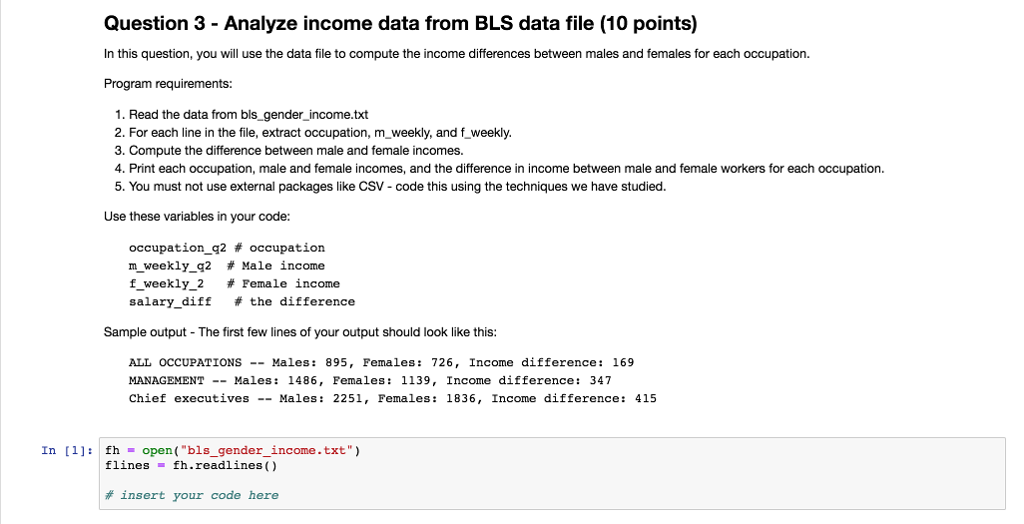
fh = open("bls_gender_income.txt") flines = fh.readlines()
# insert your code here
Question 3 - Analyze income data from BLS data file (10 points) In this question, you will use the data file to compute the income differences between males and females for each occupation Program requirements: 1. Read the data from bls_gender_income.txt 2. For each line in the file, extract occupation, m_ weekly, and f_weekly. 3. Compute the difference between male and female incomes. 4. Print each occupation, male and female incomes, and the difference in income between male and female workers for each occupation 5. You must not use external packages like CSV - code this using the techniques we have studied. Use these variables in your code: occupation-g2 # occupation m weekly-g2 # Male income f weekly-2 # Female income salary-diff # the difference Sample output The first few lines of your output should look like this: ALL OCCUPATIONS -Males: 895, Females: 726, Income difference: 169 MANAGEMENT -- Males: 1486, Females: 1139, Income difference: 347 Chief executives Males: 2251, Females: 1836, Income difference: 415 In [1]: fh -open("bls_gender_income.txt" flines - fh.readlines) # insert your code here
Step by Step Solution
There are 3 Steps involved in it

Get step-by-step solutions from verified subject matter experts
 Study Help