







Question: Python Level 1: Assignment 10 - Functions In Assignment 9 you created a calculator that output among other things the sine, cosine, and tangent of
Python Level 1: Assignment 10 - Functions
In Assignment 9 you created a calculator that output among other things the sine, cosine, and tangent of a number in radians. For this assignment I want you to output the value in degrees also.
Required
Create a function called rad2deg that takes as an argument the value in radians to convert. When the sine, cosine, and tangent functions are selected you will output the value in both radians and degrees. You must use the rad2deg function to convert the value.
Converting
The formula for converting radians to degrees is: degrees = radians * 180 / pi
Using the math constant
As most of us know PI is a constant value that is 3.14159 or larger depending on how much precision is required. The math class has pi defined within it which makes it nice for you. To use anything from the math class you need to import math.
Once you have done this you can simply plug pi into the formula:
degrees s= radians * 180 / math.pi
What not to do
using global variables
using print in the rad2deg function
using input in the rad2deg function
Your program should function like the following:
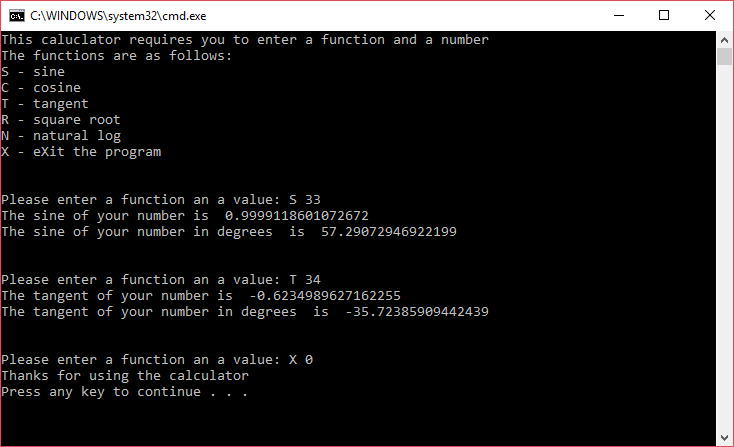
C:WINDOWS system32\cmd.exe This caluclator requires you to enter a function and a number The functions are as follows: s - sine C - cosine - tangent R square root N- natural log x- eXit the program Please enter a function an a value: S 33 The sine of your number is e.9999118601072672 The sine of your number in degrees is 57.29072946922199 Please enter a function an a value: T 34 The tangent of your number is 0.6234989627162255 The tangent of your number in degrees is 35.72385909442439 Please enter a function an a value : X 0 Thanks for using the calculator Press any key to continue
Step by Step Solution
There are 3 Steps involved in it

Get step-by-step solutions from verified subject matter experts
 Study Help