







Question: PYTHON (mass_weight.py) Complete Programming Exercise #5 at the end of Chapter 3 (Mass and Weight) from the textbook. If the user supplies a negative value
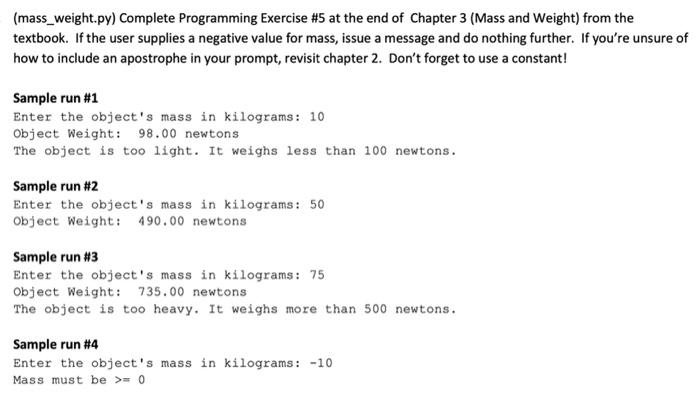
(mass_weight.py) Complete Programming Exercise #5 at the end of Chapter 3 (Mass and Weight) from the textbook. If the user supplies a negative value for mass, issue a message and do nothing further. If you're unsure of how to include an apostrophe in your prompt, revisit chapter 2. Don't forget to use a constant! Sample run #1 Enter the object's mass in kilograms: 10 Object Weight: 98.00 newtons The object is too light. It weighs less than 100 newtons. Sample run #2 Enter the object's mass in kilograms: 50 Object Weight: 490.00 newtons Sample run #3 Enter the object's mass in kilograms: 75 Object Weight: 735.00 newtons The object is too heavy. It weighs more than 500 newtons. Sample run #4 Enter the object's mass in kilograms: -10 Mass must be >= 0
Step by Step Solution
There are 3 Steps involved in it

Get step-by-step solutions from verified subject matter experts
 Study Help