







Question: PYTHON ONLY! only allowed to use numpy and Cimpl. CANT USE ANYTHING ELSE LIKE CV2! ONLY CIMPL AND NUMPY. I need the code to be
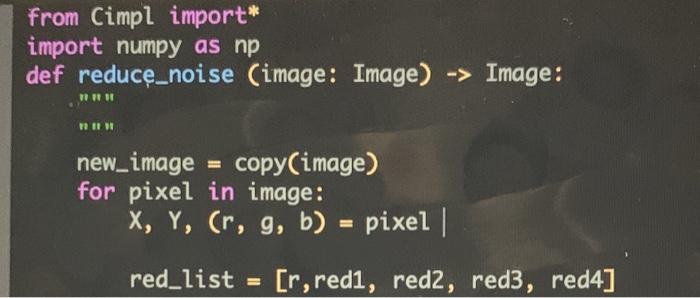
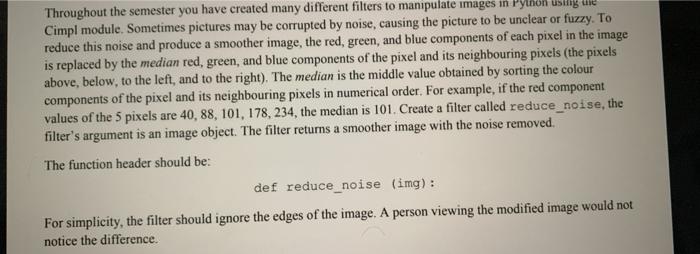
from Cimpl import* import numpy as np def reduce_noise (image: Image) -> Image: TI new_image = copy(image) for pixel in image: X, Y, Cr, g, b) = pixel | red_list = [r, redi, red2, red3, red4] Throughout the semester you have created many different filters to manipulate images in Python usiig ure Cimpl module. Sometimes pictures may be corrupted by noise, causing the picture to be unclear or fuzzy. To reduce this noise and produce a smoother image, the red, green, and blue components of each pixel in the image is replaced by the median red, green, and blue components of the pixel and its neighbouring pixels (the pixels above, below, to the left, and to the right). The median is the middle value obtained by sorting the colour components of the pixel and its neighbouring pixels in numerical order. For example, if the red component values of the 5 pixels are 40, 88, 101, 178, 234, the median is 101. Create a filter called reduce_noise, the filter's argument is an image object. The filter returns a smoother image with the noise removed. The function header should be: def reduce_noise (img): For simplicity, the filter should ignore the edges of the image. A person viewing the modified image would not notice the difference from Cimpl import* import numpy as np def reduce_noise (image: Image) -> Image: TI new_image = copy(image) for pixel in image: X, Y, Cr, g, b) = pixel | red_list = [r, redi, red2, red3, red4] Throughout the semester you have created many different filters to manipulate images in Python usiig ure Cimpl module. Sometimes pictures may be corrupted by noise, causing the picture to be unclear or fuzzy. To reduce this noise and produce a smoother image, the red, green, and blue components of each pixel in the image is replaced by the median red, green, and blue components of the pixel and its neighbouring pixels (the pixels above, below, to the left, and to the right). The median is the middle value obtained by sorting the colour components of the pixel and its neighbouring pixels in numerical order. For example, if the red component values of the 5 pixels are 40, 88, 101, 178, 234, the median is 101. Create a filter called reduce_noise, the filter's argument is an image object. The filter returns a smoother image with the noise removed. The function header should be: def reduce_noise (img): For simplicity, the filter should ignore the edges of the image. A person viewing the modified image would not notice the difference
Step by Step Solution
There are 3 Steps involved in it

Get step-by-step solutions from verified subject matter experts
 Study Help