







Question: Python pandas: Remove decimal point when reading csv data with an empty cell. I have the following file data.csv, which contains 2 empty cells (the
Python pandas: Remove decimal point when reading csv data with an empty cell.
I have the following file data.csv, which contains 2 empty cells (the age for Rohan Medoza and age for Leo Klein):
Name,StartDate,Age
"Rohan Medoza",06202012, "Adrianna Byrd",02162012,32 "Lusha Soares",09082011,39 "Leo Klein",03082011, "Arthur Kamaka-Green",05202010,48 "Ada Klein",05202010,45 "Gerry Fowler",05202010,49
I have the following python program that reads the data and replaces the empty age cells with the mean age (which is 42):
import pandas as pd
df = pd.read_csv("data.csv")
avg_age = df["Age"].mean()
df["Age"].fillna(avg_age.astype(int), inplace = True) print(df)
My issue is that a decimal point is now printing with the Age when the program is run (shown below). How can I avoid this?
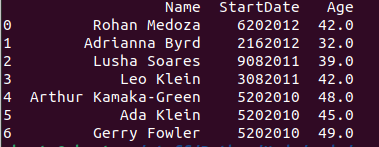
0123456NameRohanMedozaAdriannaByrdLushaSoaresLeoKleinArthurKamaka-GreenAdaKleinGerryFowlerStartDate6202012216201290820113082011520201052020105202010Age42.032.039.042.048.045.049.0
Step by Step Solution
There are 3 Steps involved in it

Get step-by-step solutions from verified subject matter experts
 Study Help