







Question: python please 4.1 Diagram A Draw a reference diagram for the final state of the variables, after this snippet of code runs. data = [None,
python please
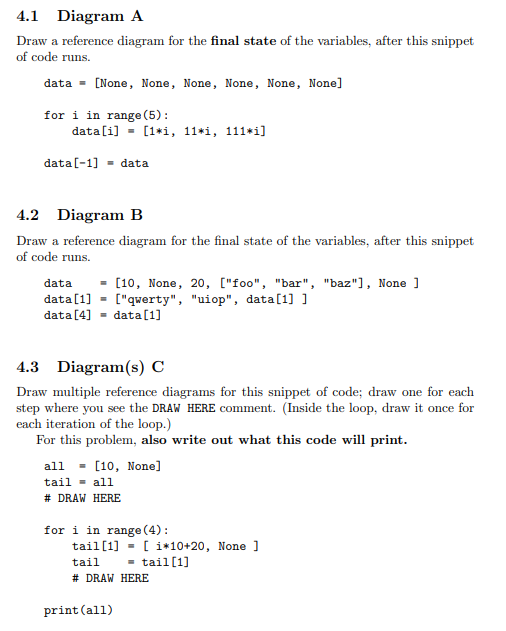
4.1 Diagram A Draw a reference diagram for the final state of the variables, after this snippet of code runs. data = [None, None, None, None, None, None] for i in range (5): data[i] [1*i, 11*i, 111*i] data[-1] = data 4.2 Diagram B Draw a reference diagram for the final state of the variables, after this snippet of code runs. data [10, None, 20, ["f00", "bar", "baz"], None ] data[1] = ["qwerty", "uiop", data[1] ] data[4] = data[1] 4.3 Diagram(s) C Draw multiple reference diagrams for this snippet of code; draw one for each step where you see the DRAW HERE comment. (Inside the loop, draw it once for each iteration of the loop.) For this problem, also write out what this code will print. all = [10, None] tail = all # DRAW HERE for i in range (4): tail[1] - [ i*10+20, None ] tail = tail[1] # DRAW HERE print(all) 4.1 Diagram A Draw a reference diagram for the final state of the variables, after this snippet of code runs. data = [None, None, None, None, None, None] for i in range (5): data[i] [1*i, 11*i, 111*i] data[-1] = data 4.2 Diagram B Draw a reference diagram for the final state of the variables, after this snippet of code runs. data [10, None, 20, ["f00", "bar", "baz"], None ] data[1] = ["qwerty", "uiop", data[1] ] data[4] = data[1] 4.3 Diagram(s) C Draw multiple reference diagrams for this snippet of code; draw one for each step where you see the DRAW HERE comment. (Inside the loop, draw it once for each iteration of the loop.) For this problem, also write out what this code will print. all = [10, None] tail = all # DRAW HERE for i in range (4): tail[1] - [ i*10+20, None ] tail = tail[1] # DRAW HERE print(all)
Step by Step Solution
There are 3 Steps involved in it

Get step-by-step solutions from verified subject matter experts
 Study Help