







Question: PYTHON - Please help with PART III in this Lab. Description: Functions, Modules and Packages Instructions Please follow all instructions closely. There is no penalty
PYTHON - Please help with PART III in this Lab.
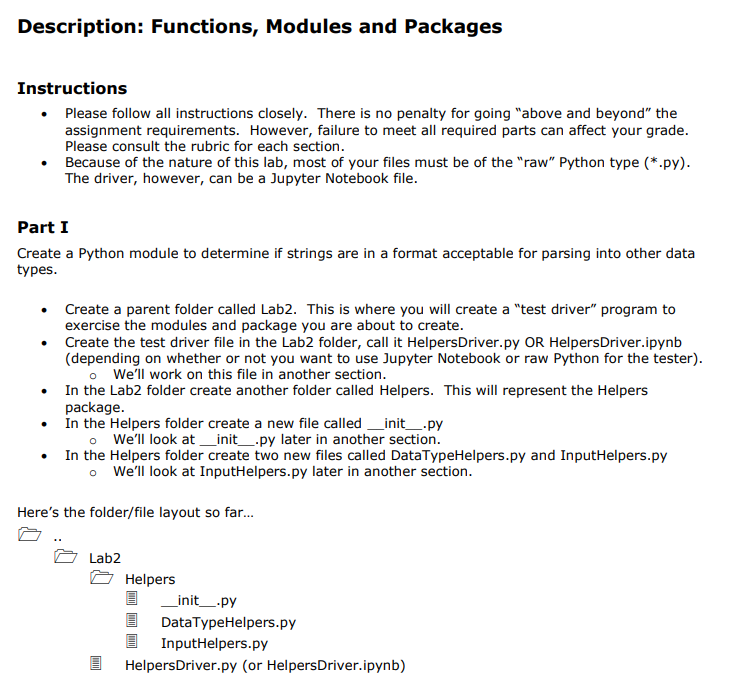
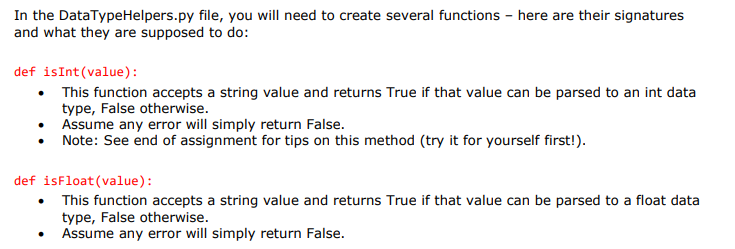
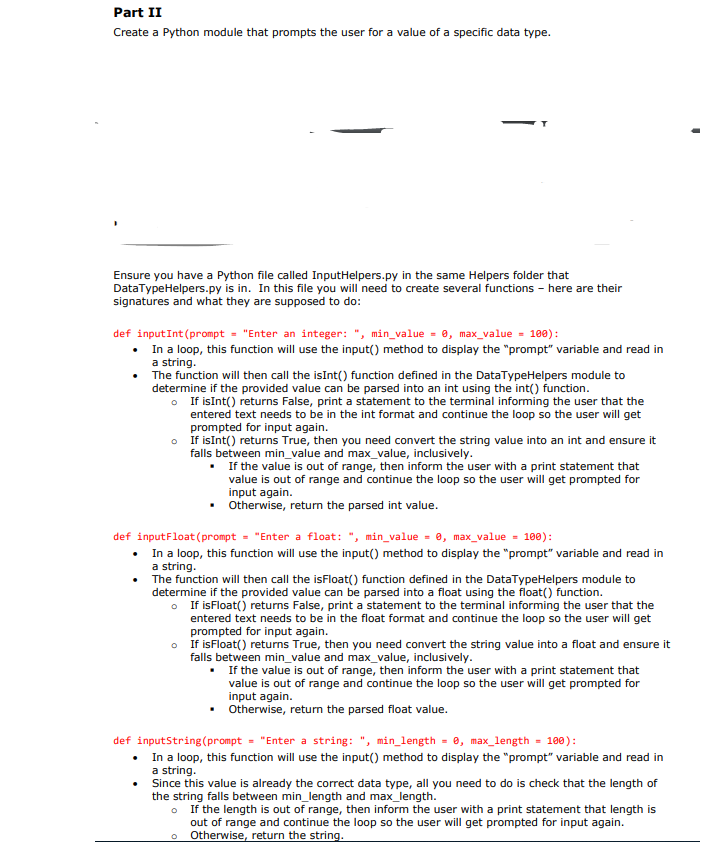
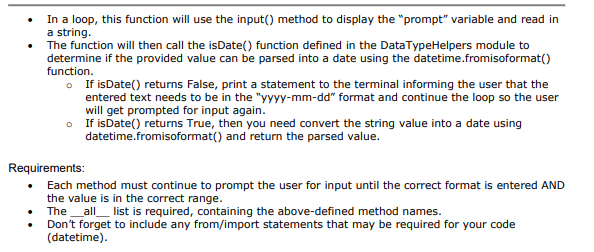
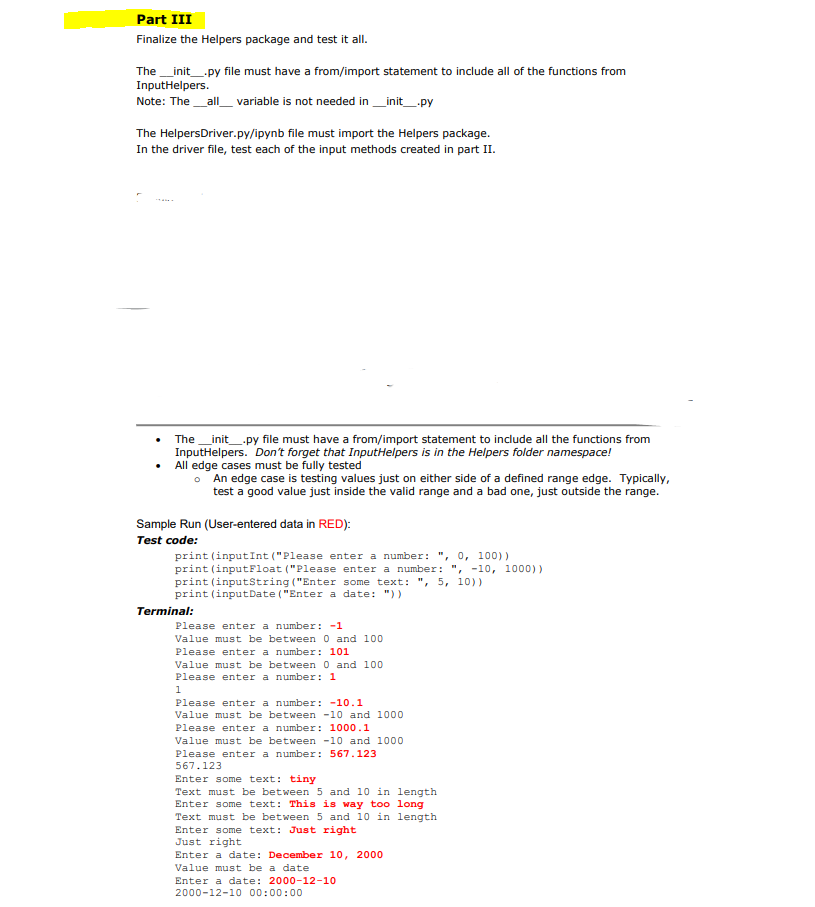
Description: Functions, Modules and Packages Instructions Please follow all instructions closely. There is no penalty for going "above and beyond" the assignment requirements. However, failure to meet all required parts can affect your grade. Please consult the rubric for each section. Because of the nature of this lab, most of your files must be of the "raw" Python type (*.py). The driver, however, can be a Jupyter Notebook file. Part I Create a Python module to determine if strings are in a format acceptable for parsing into other data types. Create a parent folder called Lab2. This is where you will create a "test driver" program to exercise the modules and package you are about to create. Create the test driver file in the Lab2 folder, call it HelpersDriver.py OR HelpersDriver.ipynb (depending on whether or not you want to use Jupyter Notebook or raw Python for the tester). o We'll work on this file in another section. In the Lab2 folder create another folder called Helpers. This will represent the Helpers package. In the Helpers folder create a new file called __init__.py o We'll look at _init__.py later in another section. In the Helpers folder create two new files called DataTypeHelpers.py and InputHelpers.py o We'll look at InputHelpers.py later in another section. Here's the folder/file layout so far... Lab2 Helpers _init__.py DataTypeHelpers.py InputHelpers.py Helpers Driver.py (or HelpersDriver.ipynb) In the DataTypeHelpers.py file, you will need to create several functions - here are their signatures and what they are supposed to do: def isInt(value): This function accepts a string value and returns True if that value can be parsed to an int data type, False otherwise. Assume any error will simply return false. Note: See end of assignment for tips on this method (try it for yourself first!). . def isfloat(value): This function accepts a string value and returns True if that value can be parsed to a float data type, False otherwise. Assume any error will simply return False. Part II Create a Python module that prompts the user for a value of a specific data type. Ensure you have a Python file called InputHelpers.py in the same Helpers folder that DataTypeHelpers.py is in. In this file you will need to create several functions - here are their signatures and what they are supposed to do: def input Int (prompt = "Enter an integer: ", min_value = 0, max_value = 100): In a loop, this function will use the input() method to display the "prompt" variable and read in a string. The function will then call the isInt() function defined in the DataTypeHelpers module to determine if the provided value can be parsed into an int using the int() function. If isInt() returns False, print a statement to the terminal informing the user that the entered text needs to be in the int format and continue the loop so the user will get prompted for input again. If isInt() returns True, then you need convert the string value into an int and ensure it falls between min_value and max_value, inclusively. If the value is out of range, then inform the user with a print statement that value is out of range and continue the loop so the user will get prompted for input again. Otherwise, return the parsed int value. def inputFloat (prompt - "Enter a float: ", min_value = @, max_value = 100): In a loop, this function will use the input() method to display the "prompt" variable and read in a string. The function will then call the isfloat() function defined in the DataTypeHelpers module to determine if the provided value can be parsed into a float using the float() function. If is Float() returns False, print a statement to the terminal informing the user that the entered text needs to be in the float format and continue the loop so the user will get prompted for input again. If isFloat() returns True, then you need convert the string value into a float and ensure it falls between min_value and max_value, inclusively. If the value is out of range, then inform the user with a print statement that value is out of range and continue the loop so the user will get prompted for input again. Otherwise, return the parsed float value. def inputString(prompt = "Enter a string: ", min_length = 0, max_length = 100): In a loop, this function will use the input() method to display the "prompt" variable and read in a string . Since this value is already the correct data type, all you need to do is check that the length of the string falls between min_length and max_length. If the length is out of range, then inform the user with a print statement that length is out of range and continue the loop so the user will get prompted for input again. Otherwise, return the string. In a loop, this function will use the input() method to display the "prompt" variable and read in a string. The function will then call the isDate() function defined in the DataTypeHelpers module to determine if the provided value can be parsed into a date using the datetime.fromisoformat() function. If isDate() returns False, print a statement to the terminal informing the user that the entered text needs to be in the "yyyy-mm-dd" format and continue the loop so the user will get prompted for input again. If isDate() returns True, then you need convert the string value into a date using datetime.fromisoformat() and return the parsed value. Requirements: Each method must continue to prompt the user for input until the correct format is entered AND the value is in the correct range. The_all_ list is required, containing the above-defined method names. Don't forget to include any from/import statements that may be required for your code (datetime). Part III Finalize the Helpers package and test it all. The __init__.py file must have a from/import statement to include all of the functions from InputHelpers. Note: The _all_variable is not needed in __init__.py The HelpersDriver.py/ipynb file must import the Helpers package. In the driver file, test each of the input methods created in part II. The _init__.py file must have a from/import statement to include all the functions from InputHelpers. Don't forget that InputHelpers is in the Helpers folder namespace! All edge cases must be fully tested An edge case is testing values just on either side of a defined range edge. Typically, test a good value just inside the valid range and a bad one, just outside the range. Sample Run (User-entered data in RED): Test code: print (input Int("Please enter a number: ", 0, 100)) print (input Float ("Please enter a number: ", -10, 1000)) print (inputString("Enter some text: ", 5, 10)) print (inputDate("Enter a date: ")) Terminal: Please enter a number: -1 Value must be between 0 and 100 Please enter a number: 101 Value must be between 0 and 100 Please enter a number: 1 1 Please enter a number: -10.1 Value must be between -10 and 1000 Please enter a number: 1000.1 Value must be between -10 and 1000 Please enter a number: 567.123 567.123 Enter some text: tiny Text must be between 5 and 10 in length Enter some text: This is way too long Text must be between 5 and 10 in length Enter some text: Just right Just right Enter a date: December 10, 2000 Value must be a date Enter a date: 2000-12-10 2000-12-10 00:00:00
Step by Step Solution
There are 3 Steps involved in it

Get step-by-step solutions from verified subject matter experts
 Study Help