







Question: PYTHON: Please look over Q3 I keep getting an error and dk what is wrong and solve 4-6. Solve ALL for ratings Question 3 (10
PYTHON:
Please look over Q3 I keep getting an error and dk what is wrong
and solve 4-6. Solve ALL for ratings
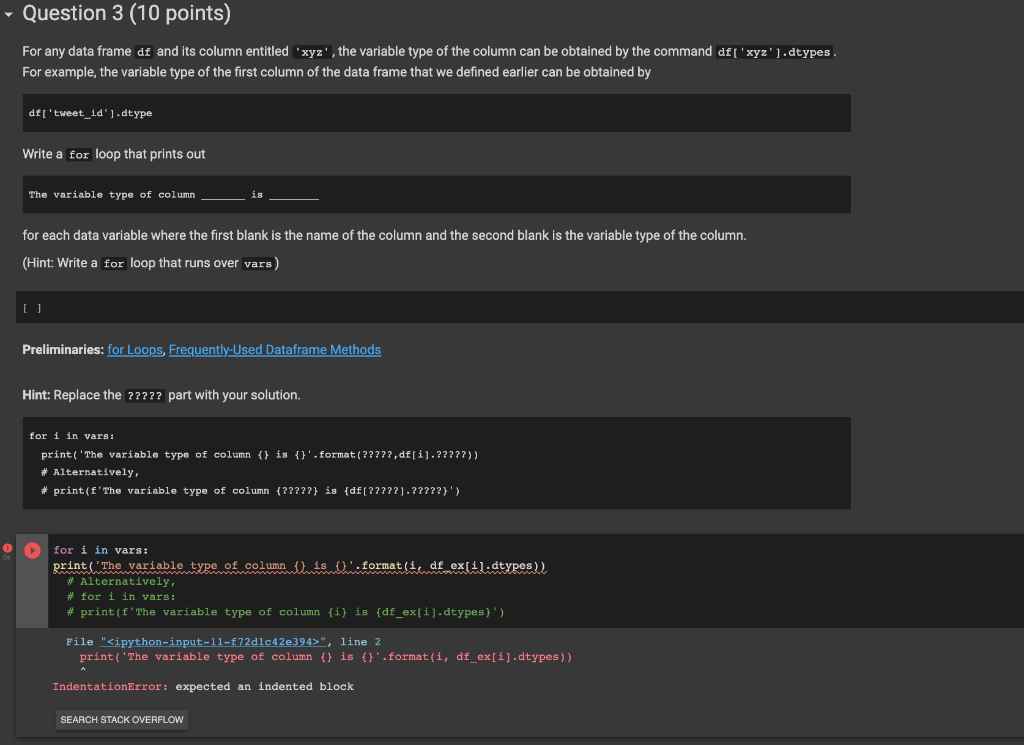
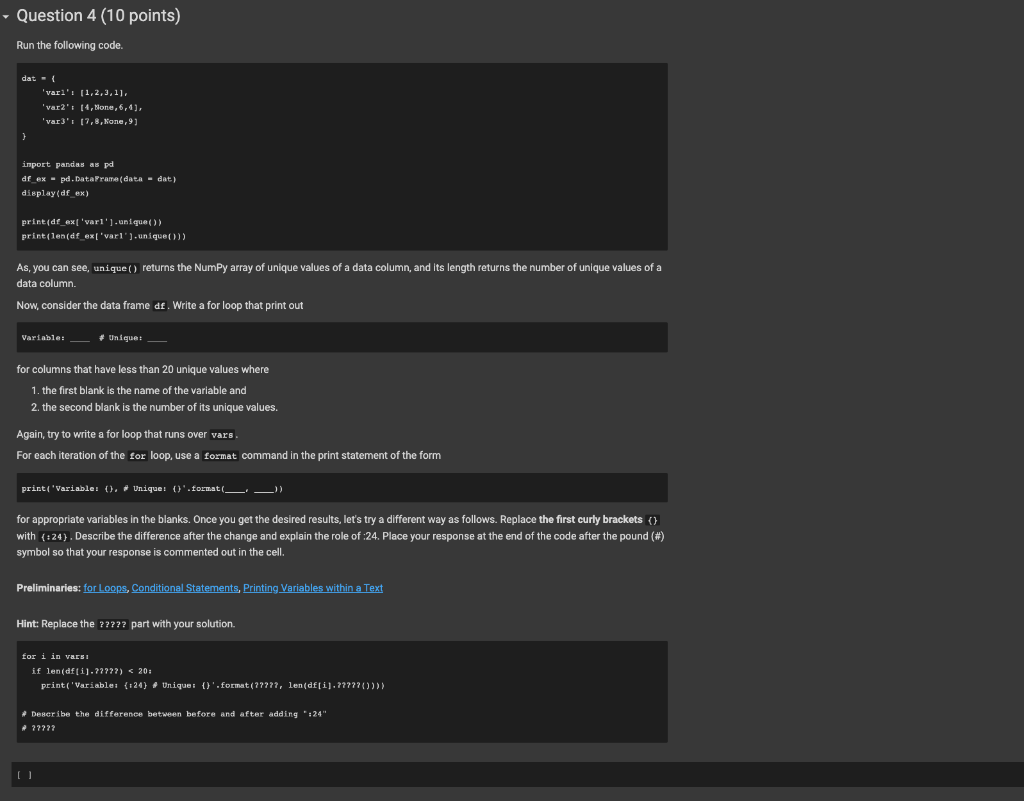
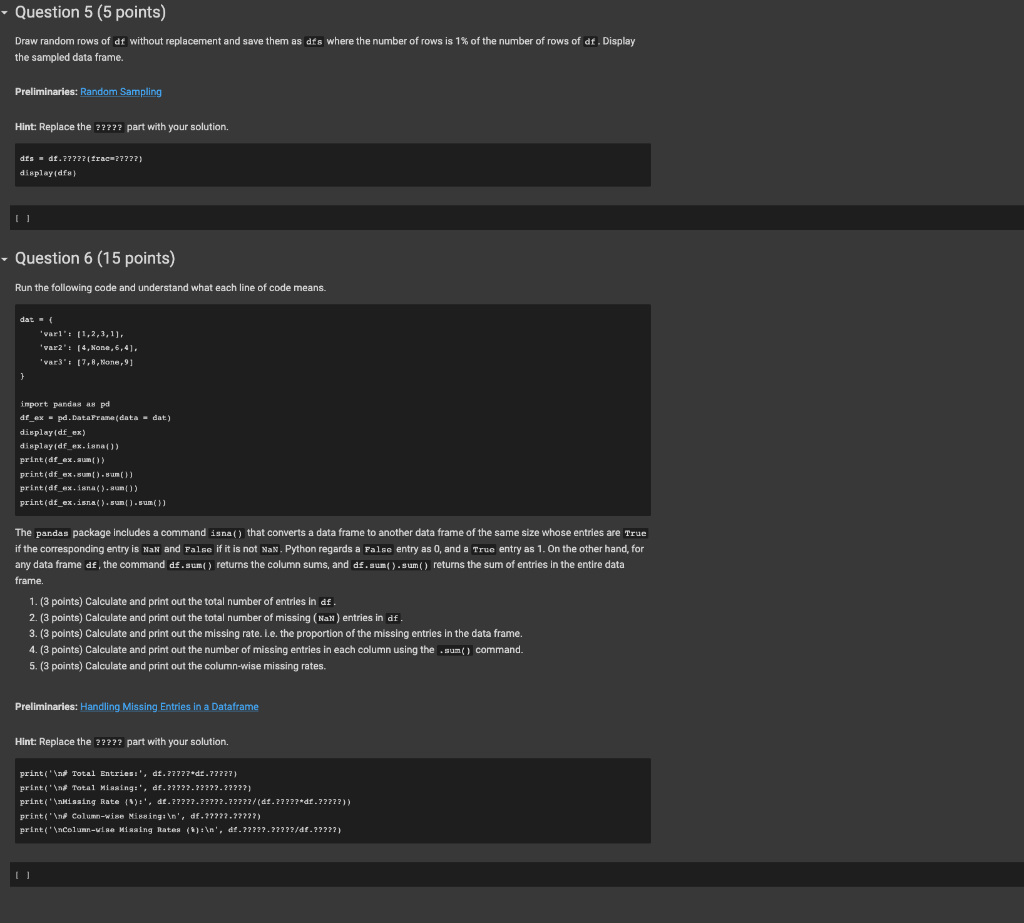
Question 3 (10 points) For any data frame df and its column entitled ' xyz ', the variable type of the column can be obtained by the command df [ ' xzz '] . dtypes. For example, the variable type of the first column of the data frame that we defined earlier can be obtained by df[ 'tweet_1d'].dtype Write a for loop that prints out The variable type of column is for each data variable where the first blank is the name of the column and the second blank is the variable type of the column. (Hint: Write a for loop that runs over vars) [ ] Preliminaries: for Loops, Frequently-Used Dataframe Methods Hint: Replace the ????? part with your solution. (1) for i in vars : print (The variable type of column i) is \{). format (1) df ex [1]. dtypes)) * Alternatively, \# for i in vars: \# print(f"The variable type of column \{i\} is \{df ex[i].dtypes\}") File "72dc42e394> ", Iine 2 print('The variable type of column \{\} is \{\}.format(i, df.ex[i].dtypes)) Indentationerror: expected an indented block As, you can see, unique() returns the NumPy array of unique values of a data column, and its length returns the number of unique values of a data column. Now, consider the data frame df. Write a for loop that print out Variable: for columns that have less than 20 unique values where 1. the first blank is the name of the variable and 2. the second blank is the number of its unique values. Again, try to write a for loop that runs over vars . For each iteration of the for loop, use a format command in the print statement of the form print 'variable: \{\} , Uniquet \{\} " format ( for appropriate variables in the blanks. Once you get the desired results, let's try a different way as follows. Replace the first curly brackets \} with {=24}. Describe the difference after the change and explain the role of :24. Place your response at the end of the code after the pound (\#) symbol so that your response is commented out in the cell. Preliminaries: for Loops, Conditional Statements, Printing Variables within a Text Hint: Replace the ????? part with your solution. * Deseribe the difference between before and after adding ":24" - ??7? [ ] Draw random rows of df without replacement and save them as dfs where the number of rows is 1% of the number of rows of df, Display the sampled data frame. Preliminaries: Random Sampling Hint: Replace the ????? part with your solution. dfs=df.7?77(trac=?7??7)display(dfs) I I Question 6 (15 points) Run the following code and understand what each line of code means. The pandas package includes a command isna() that converts a data frame to another data frame of the same size whose entries are True if the corresponding entry is vak and False if it is not NaN. Python regards a False entry as 0, and a True entry as 1. On the other hand, for any data frame df, the command df.sum() returns the column sums, and df.sum() .sum() returns the sum of entries in the entire data frame. 1. (3 points) Calculate and print out the total number of entries in df. 2. (3 points) Calculate and print out the total number of missing ( Kak) entries in df . 3. (3 points) Calculate and print out the missing rate. l.e. the proportion of the missing entries in the data frame. 4. (3 points) Calculate and print out the number of missing entries in each column using the .sum() command. 5. (3 points) Calculate and print out the column-wise missing rates. Preliminaries: Handling Missing Entries in a Dataframe Hint Replace the ????? part with your solution. [ ]
Step by Step Solution
There are 3 Steps involved in it

Get step-by-step solutions from verified subject matter experts
 Study Help