







Question: python plotting error pls let me know how to python plotting error (all kinds of correct codes for plotting doesn't work.) = = = =
python plotting error
pls let me know how to python plotting error (all kinds of correct codes for plotting doesn't work.)
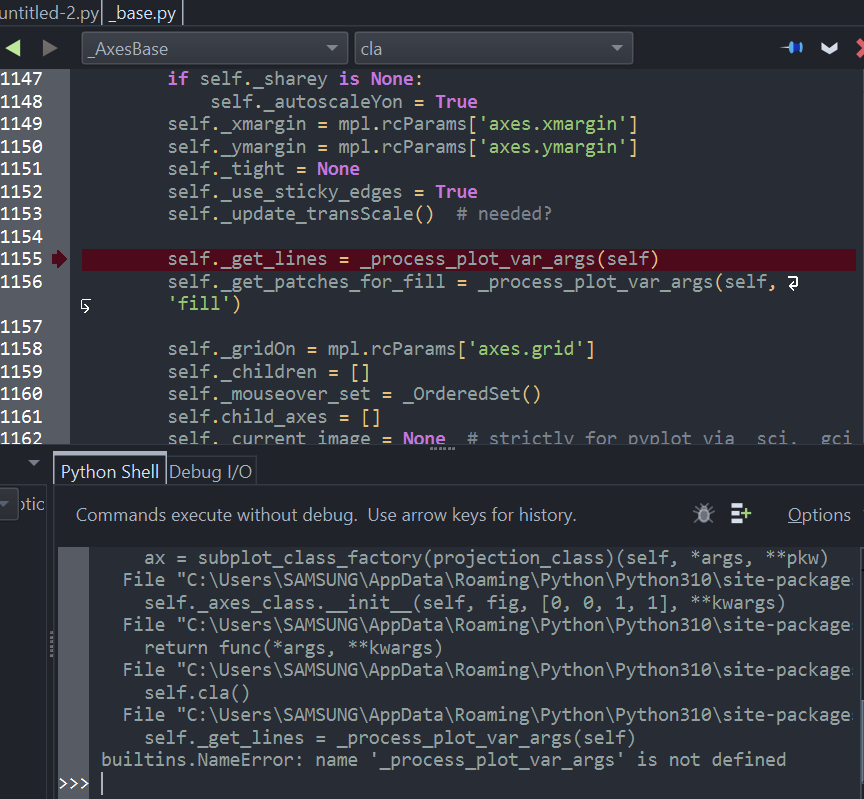
= = = = untitled-2.py_base.py AxesBase cla 1147 if self._sharey is None: 1148 self._autoscaleyon True 1149 self._xmargin = mp1.rcParams['axes.xmargin'] 1150 self._ymargin = mp1.rcParams['axes.ymargin'] ' 1151 self._tight = None 1152 self._use_sticky_edges = True 1153 self._update_transScale() # needed? 1154 1155 self._get_lines = _process_plot_var_args(self) 1156 self._get_patches_for_fill = _process_plot_var_args(self, ? 5 'fill') 1157 1158 self._gridon = mp1.rcParams['axes.grid'] 1159 self._children = [] 1160 self._mouseover_set = _OrderedSet() 1161 self.child_axes = [] 1162 self. current image = None # strictly for pvplot via sci. gci Python Shell Debug I/O ptic Commands execute without debug. Use arrow keys for history. Options ax = subplot_class_factory(projection_class) (self, *args, **pkw) File "C:\Users\SAMSUNG\AppData\Roaming Python\Python310\site-package self._axes_class. _init__(self, fig, [0, 0, 1, 1], **kwargs) File "C:\Users\SAMSUNG\AppData\Roaming\Python\Python310\site-package return func(*args, **kwargs) File "C:\Users\SAMSUNG\AppData\Roaming Python\Python310\site-package self.cla() File "C:\Users\SAMSUNG\AppData\Roaming\Python\Python310\site-package self._get_lines = _process_plot_var_args(self) builtins.NameError: name '_process_plot_var_args' is not defined >>> | - 3
Step by Step Solution
There are 3 Steps involved in it

Get step-by-step solutions from verified subject matter experts
 Study Help