







Question: Python Program. Question 1 Create an application using PyQt The user must enter the name of a UNISA Community Engagement Project. Please consult the UNISA
Python Program.
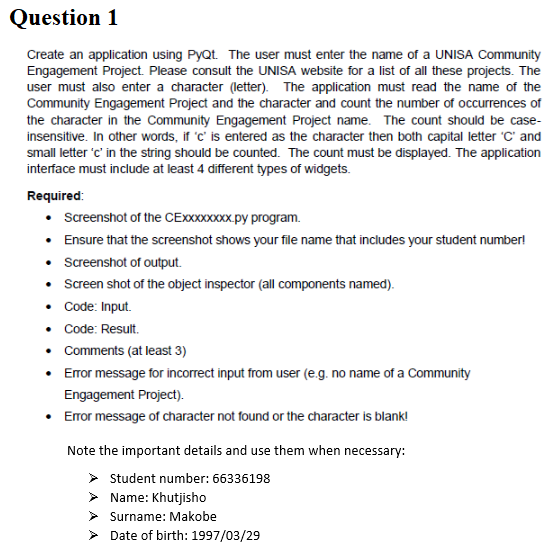
Question 1 Create an application using PyQt The user must enter the name of a UNISA Community Engagement Project. Please consult the UNISA website for a list of all these projects. The user must also enter a character (letter) The application must read the name of the Community Engagement Project and the character and count the number of occurrences of the character in the Community Engagement Project name. The count should be case- insensitive. In other words, if 'c is entered as the character then both capitC and small letter'c, in the string should be counted. The count must be displayed. The application interface must include at least 4 different types of widgets. Required . Screenshot of the CExxxxxxxx.py program. .Ensure that the screenshot shows your file name that includes your student number . Screenshot of output. . Screen shot of the object inspector (all components named). Code: Input Comments (at least 3) Eror message for incorrect input from user (e.g. no name of a Community .Error message of character not found or the character is blank Note the important details and use them when necessary: Student number: 66336198 Name: Khutjisho Surname: Makobe Date of birth: 1997/03/29 Question 1 Create an application using PyQt The user must enter the name of a UNISA Community Engagement Project. Please consult the UNISA website for a list of all these projects. The user must also enter a character (letter) The application must read the name of the Community Engagement Project and the character and count the number of occurrences of the character in the Community Engagement Project name. The count should be case- insensitive. In other words, if 'c is entered as the character then both capitC and small letter'c, in the string should be counted. The count must be displayed. The application interface must include at least 4 different types of widgets. Required . Screenshot of the CExxxxxxxx.py program. .Ensure that the screenshot shows your file name that includes your student number . Screenshot of output. . Screen shot of the object inspector (all components named). Code: Input Comments (at least 3) Eror message for incorrect input from user (e.g. no name of a Community .Error message of character not found or the character is blank Note the important details and use them when necessary: Student number: 66336198 Name: Khutjisho Surname: Makobe Date of birth: 1997/03/29
Step by Step Solution
There are 3 Steps involved in it

Get step-by-step solutions from verified subject matter experts
 Study Help