







Question: Python Programming, I need someone to edit my code. Very easy. Write a fx'n called secret that takes a string & a key [integer]. The
Python Programming, I need someone to edit my code. Very easy.
Write a fx'n called secret that takes a string & a key [integer]. The fx'n ciphers the string into a different string & returns the new string. Please be aware that when we reach "z", we must 'roll' into the alphabet once more. Therefore, ord('z')+4 should give us ord('d') (from above example)
When running the code, I get: But the output screenshot shows different results. Decrypted message should be what the user input for message. "zxywv" doesn't equal "sqrpo" and "z" doesn't equal "s"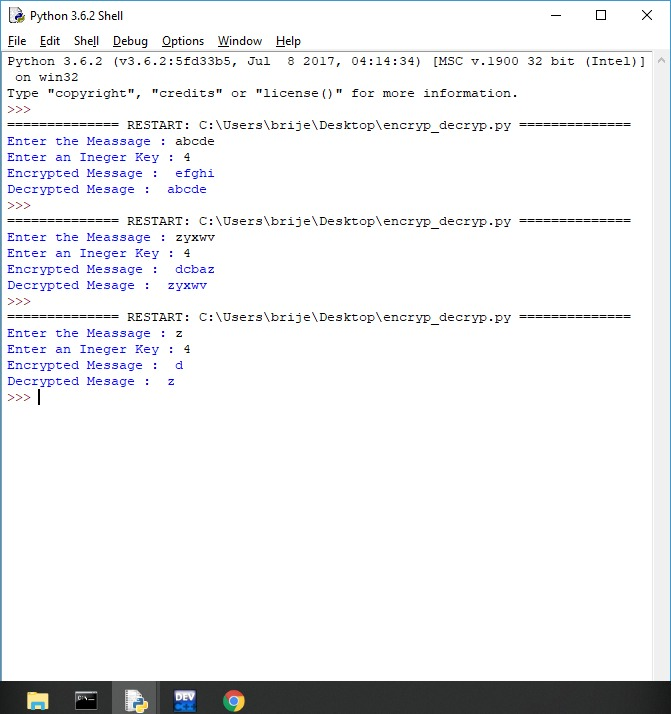
#Stored all the letters in order to reduce computation letters = ["a","b","c","d","e","f","g","h","i","j","k","l","m","n","o","p","q","r","s","t","u","v","w","x","y","z"]
def cipher(message,key): encrypted_message = "" for i in message: #Bringing the encrypted value in the range of 0 to 25 to get proper letter encrypted_message += letters[((ord(i)+key)%97)%26] return encrypted_message
def decipher(message,key): decrypted_message = "" for i in message: decrypted_message += letters[((ord(i)-key)%97)%26] return decrypted_message
#Taking Inputs message = input("Enter the Meassage : ") key = int(input("Enter an Ineger Key : "))
#Printing the messages
print("Encrypted Message : ",cipher(message,key))
encrypted_message = cipher(message,key) print("Decrypted Mesage : ",decipher(encrypted_message,key))
Python 3.6.2 Shell File Edit She Debug Options Window Help Python 3.6.2 (v3.6.2:5fd33b5, Jul 8 2017, 04:14:34) [MSC v.1900 32 bit (Intel)] ^ on win32 Type "copyright", "credits" or "license () " for more information. ============== RESTART: C:\Users\brije\Desktop\encryp decryp . py ============== Enter the Meassageabcde Enter an Ineger Key : 4 Encrypted Message efghi Decrypted Mesageabcde ============== RESTART: C:\Users\brije\Desktop\encryp decryp . py ============== Enter the Meassage zyXwv Enter an Ineger Key : 4 Encrypted Message dcbaz Decrypted Mesagezyxwv ============== RESTART: C:\Users\brije\Desktop\encryp decryp . py ============== Enter the Meassage : z Enter an Ineger Key : 4 Encrypted Message d Decrypted Mesagez DEV
Step by Step Solution
There are 3 Steps involved in it

Get step-by-step solutions from verified subject matter experts
 Study Help