







Question: Python Programming. --When the program is launched, the user should be presented with a correctly structured month view of the current month and year. If
Python Programming.
--When the program is launched, the user should be presented with a correctly structured month view of the current month and year. If a date has at least one event linked with it, an asterisk ("*") mark should be placed next to the date. Also, ensure that the dates are correctly matched with the corresponding day of the week (i.e., Sun-Sat). For every month view, the application gives the user two options: (1) Events, or (2) Exit. Any invalid inputs will cause the application to ask for a valid input again.
--If the user entered 1, the program would show all events linked with that month and year, if any exist; otherwise, the program will say "No events to display." Additionally, the program presents four options: (a) create event, (b) update event, (c) delete event, and (d) return to month view. Option (b) and (c) will only be shown if any events occur. Option (d) merely takes you back to the month view. Any invalid inputs will cause the application to ask for a valid input again.
--Event Editing and Deletion To modify or delete an event, the application must first prompt the user for the event number (e.g., "Enter event number"). When updating an event, the user must re-enter every entry information of the event for modification. Any invalid inputs will cause the application to ask for a valid input again.
--Creating a new event. The application will prompt the user to input the following event information: a. Title (mandatory field) b. Begin date (mandatory field, format: "MM/DD/YYYY") c. Date of completion (optional field, format: "MM/DD/YYYY") d. Location (optional) e. Notes (optional field). Please keep in mind that optional fields may have empty strings as their value. If this is the case, there is no need to show them in Show Events.
--The programmer can save the calendar events to a text file (".txt"), comma-separated-value file (".csv"), or database.
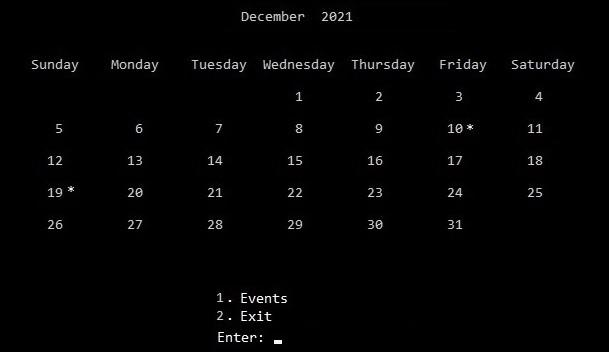
December 2021 Sunday Monday Tuesday Wednesday Thursday Friday Saturday 2 N 3 4 5 6 7 8 8 9 10* 11 12 13 14 15 16 18 17 24 19* 20 21 22 23 25 26 27 28 29 30 31 1. Events 2. Exit Enter
Step by Step Solution
There are 3 Steps involved in it

Get step-by-step solutions from verified subject matter experts
 Study Help