







Question: python question import csv import json import pathlib from operator import itemgetter def load_db(path): Load books from the database csv file. Args: path (pathlib.Path): path
python question
import csv
import json
import pathlib
from operator import itemgetter
def load_db(path):
"""Load books from the database csv file.
Args:
path (pathlib.Path): path to the csv file
Returns:
list: a list of books where each book is a dictionary
"""
pass
def save_db(books, path):
"""Write a list of books to csv file.
Args:
books (list): a list of books where each book is a dictionary
path (pathlib.Path): the path to the csv file
Returns:
None
"""
pass
def fullname(fname, lname):
"""Join arguments into a full name"""
return f"{fname}, {lname}"
def id_generator(books):
"""Generate the id of the next book to be added to
the database.
Ids are assigned incrementally, so we take the current
largest id in the database and add 1 to get the next id.
This is useful when creating new books, so that we don't
have to guess what the next id should be.
"""
return max(int(book['id']) for book in books) + 1
def display_books(books):
if books:
for book in books:
print(format_book(book))
else:
print('There are no books to display')
def format_book(book):
"""Return a formatted representation of the book"""
pass
def get_book(books, id):
"""Retrieve a single book from the database.
Args:
books (str): a copy of the books db
id (int): the book's unique id
Returns:
dict: the book with the specified id if found
None: if the book was not found
"""
for book in books:
if int(book['id']) == id:
return book
return None
def filter_books(books, key, value):
"""Filter books by the specified key.
Args:
books (list): a copy of the books db
key (str): the filter key, one of the keys
of the book dictionary
value (any): the filter criterion
Returns:
list : a list of books matching the filter criteria
"""
pass
def update_book(books, id):
"""Edit the details of the book matching the specified id.
Args:
books (list): a copy of the books db
id (int): the unique id of the book to update
Returns:
list: a list of books containing the updated book
"""
book = get_book(books, id)
if not book:
print(f"The book with id: {id} was not found")
return False
for key in book.keys():
new_value = input("Press
f"Enter {key!r} new value: ").strip()
if new_value:
book[key] = new_value
return books
def display_main_menu():
print('Please choose an action to perform: ')
print('1. Show all books')
print('2. Search books')
print('3. Add books')
print('4. Update book')
print('5. Delete book')
print('6. Quit')
def perform_action(action):
db_path = 'books_db.csv'
books = load_db(db_path)
if action == 1:
# implement the following display options:
# 1. Display all books unsorted
# 2. Filter books according to some criteria
# 3. Display books sorted according to some criteria
display_books(books)
if action == 2:
# perform search action
display_books(books)
if action == 3:
# Perform add books action
# Add the new books to the book database
# by calling save_db()
pass
if action == 4:
id = int(input('Enter book id: ').strip())
books = update_book(books, id)
if books:
save_db(books, db_path)
if action == 5:
# Perform delete book action
# If deletion is successful,
# save the updated list of books to the database
pass
def main():
while True:
display_main_menu()
action = int(input('> ').strip())
if action == 6:
break
else:
perform_action(action)
if __name__ == '__main__':
main()
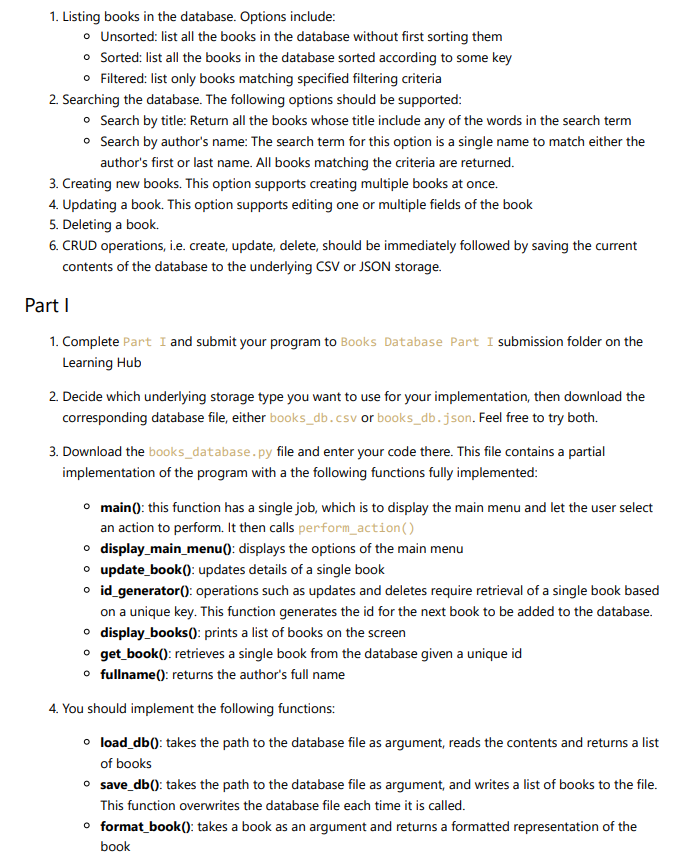
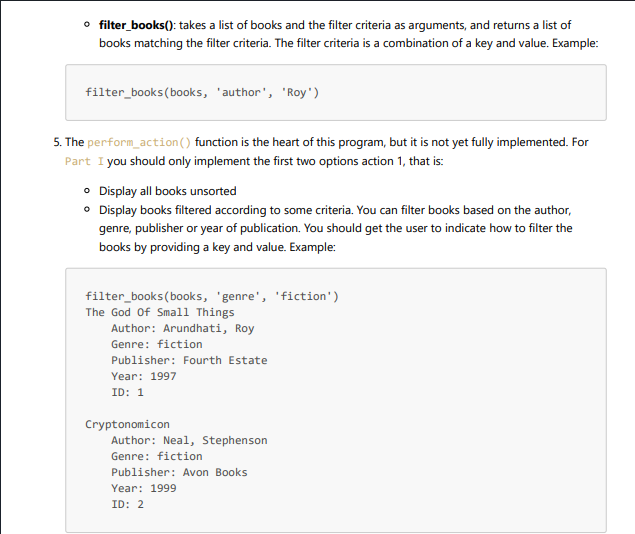
- Unsorted: list all the books in the database without first sorting them - Sorted: list all the books in the database sorted according to some key - Filtered: list only books matching specified filtering criteria 2. Searching the database. The following options should be supported: - Search by title: Return all the books whose title include any of the words in the search term - Search by author's name: The search term for this option is a single name to match either the author's first or last name. All books matching the criteria are returned. 3. Creating new books. This option supports creating multiple books at once. 4. Updating a book. This option supports editing one or multiple fields of the book 5. Deleting a book. 6. CRUD operations, i.e. create, update, delete, should be immediately followed by saving the current contents of the database to the underlying CSV or JSON storage. Part I 1. Complete Part I and submit your program to Books Database Part I submission folder on the Learning Hub 2. Decide which underlying storage type you want to use for your implementation, then download the corresponding database file, either books_db.csv or books_db. .json. Feel free to try both. 3. Download the books_database.py file and enter your code there. This file contains a partial implementation of the program with a the following functions fully implemented: - main(): this function has a single job, which is to display the main menu and let the user select an action to perform. It then calls perform_action () - display_main_menu(0: displays the options of the main menu - update_book0: updates details of a single book - id_generator(): operations such as updates and deletes require retrieval of a single book based on a unique key. This function generates the id for the next book to be added to the database. - display_books(: prints a list of books on the screen - get_book(): retrieves a single book from the database given a unique id - fullname(): returns the author's full name 4. You should implement the following functions: - load_db(): takes the path to the database file as argument, reads the contents and returns a list of books - save_db(): takes the path to the database file as argument, and writes a list of books to the file. This function overwrites the database file each time it is called. - format_book(0: takes a book as an argument and returns a formatted representation of the book - filter_books(): takes a list of books and the filter criteria as arguments, and returns a list of books matching the filter criteria. The filter criteria is a combination of a key and value. Example: filter_books(books, 'author', 'Roy') 5. The perform_action () function is the heart of this program, but it is not yet fully implemented. For Part I you should only implement the first two options action 1, that is: - Display all books unsorted - Display books filtered according to some criteria. You can filter books based on the author, genre, publisher or year of publication. You should get the user to indicate how to filter the books by providing a key and value. Example: filter_books(books, 'genre', 'fiction') The God of Small Things Author: Arundhati, Roy Genre: fiction Publisher: Fourth Estate Year: 1997 ID: 1 Cryptonomicon Author: Neal, Stephenson Genre: fiction Publisher: Avon Books Year: 1999 ID: 2
Step by Step Solution
There are 3 Steps involved in it

Get step-by-step solutions from verified subject matter experts
 Study Help