







Question: python question, please complete my code below, do not make a new one just complete it - DO NOT USE elif - make the output
python question, please complete my code below, do not make a new one just complete it
- DO NOT USE elif
- make the output exactly as the sample run, ( if there is round, or formating such as %0.2f or %d)
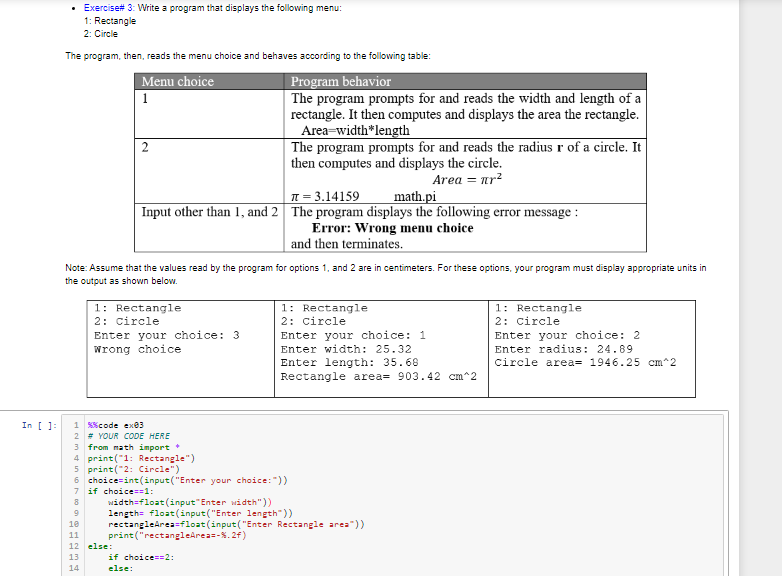
my code:
from math import * print("1: Rectangle") print("2: Circle") choice=int(input("Enter your choice:")) if choice==1: width=float(input"Enter width")) length= float(input("Enter length")) rectangleArea=float(input("Enter Rectangle area")) print("rectangleArea=-%.2f) else: if choice==2: else:
Exercise# 3: Write a program that displays the following menu: 1: Rectangle 2: Circle The program, then, reads the menu choice and behaves according to the following table: Menu choice Program behavior 1 The program prompts for and reads the width and length of a rectangle. It then computes and displays the area the rectangle. Area=width*length 2 The program prompts for and reads the radius r of a circle. It then computes and displays the circle. Area = nr2 1 = 3.14159 math.pi Input other than 1, and 2 The program displays the following error message: Error: Wrong menu choice and then terminates. Note: Assume that the values read by the program for options 1 and 2 are in centimeters. For these options, your program must display appropriate units in the output as shown below. 1: Rectangle 2: circle Enter your choice: 3 Wrong choice 1: Rectangle 2: Circle Enter your choice: 1 Enter width: 25.32 Enter length: 35.68 Rectangle area= 903.42 cm 2 1: Rectangle 2: Circle Enter your choice: 2 Enter radius: 24.89 Circle area= 1946.25 cm2 In [ ]: 1 code exe3 2 # YOUR CODE HERE 3 from math import 4 print("1: Rectangle") 5 print(-2: Circle") 6 choice=int(input("Enter your choice:-)) 7 if choice 1: width=float(inputEnter width")) 9 length= float(input("Enter length)) 10 rectangleArea=float(input("Enter Rectangle area)) 11 print("rectangleArea-$.27) 12 else: 13 if choice=2: 14 else
Step by Step Solution
There are 3 Steps involved in it

Get step-by-step solutions from verified subject matter experts
 Study Help