







Question: PYTHON. Step #1 The code cell below contains code from the AI-BOOK described in chapter 3 of the online code guide . You will NOT
PYTHON.
Step #1
The code cell below contains code from the AI-BOOK described in chapter 3 of the online code guide . You will NOT need to modify any of the code in this code cell since it has code that provides the basis for the code you will develop for this assignment. Hit the play button on this cell to execute this cell so that all the class and function definitions become available.
[ ]
(RUN CELL) Contains code from the AI-BOOK
Step #2
What follows are three code cells which need to be run (i.e. hit the play button) in order.
- The first code cell below constructs an explicit graph search problem based on Figure 3.2 found on the page 36 of the online code guide. You will also need to understand the interface of the Search_problem_from_explicit_graph class on page 33 of the online code guide. Read other code listings and descriptions as necessary.
- The next cell creates a DFS searcher on that problem.
- The next cell calls the search method on that searcher. This cell will produce an output that shows the first path found.
- The next cell calls the search method again and produces output that no more solutions were found but a total of 8 paths were expanded. You will need to make sense of both outputs by looking at Figure 3.2
[ ]
problem_fig_3_2 = Search_problem_from_explicit_graph(
{'a','b','c','d','e','g','h','j'},
[Arc('a','b',1), Arc('b','c',3), Arc('b','d',1), Arc('d','e',3),
Arc('d','g',1), Arc('a','h',3), Arc('h','j',1)],
start = 'a',
goals = {'g'})
[ ]
searcher = Searcher(problem_fig_3_2)
[ ]
searcher.search()
[ ]
searcher.search()
Step #3
We will now modify the problem in a small way. Note how another arc has been added which connects node 'a' with 'g' the goal.
TO-DO:
Add code to four more code cells below that code cell and before Step #4 to create a searcher, and call search three times consecutively on the searcher. You should be able to see that both paths from 'a' to 'g' have been discovered before the output says there are not more solutions. For convenience those code cells have been added for you with the comment "WRITE YOUR CODE HERE"
IMPORTANT NOTE
Part of your grade will depend on this TO-DO and other TO-DOs that follow. Therefore you must save your work.
[ ]
mod_problem_fig_3_2 = Search_problem_from_explicit_graph(
{'a','b','c','d','e','g','h','j'},
[Arc('a','b',1), Arc('b','c',3), Arc('b','d',1), Arc('d','e',3),
Arc('d','g',1), Arc('a','h',3), Arc('h','j',1), Arc('a','g',1)],
start = 'a',
goals = {'g'})
[ ]
# WRITE YOUR CODE HERE
[ ]
# WRITE YOUR CODE HERE
[ ]
# WRITE YOUR CODE HERE
[ ]
# WRITE YOUR CODE HERE
Step #4
This part is inspired by problem 3 of section 3.11 Exercises of the AI-BOOK.
TO-DO:
Create a search-problem-from-explicit-graph based on a grid with forbibben area, create a searcher and call search on the searcher at least three times to see the output to see different paths that are found. The assignment on Canvas has specific instruction on the grid design you will need to adopt for the explicit graph.
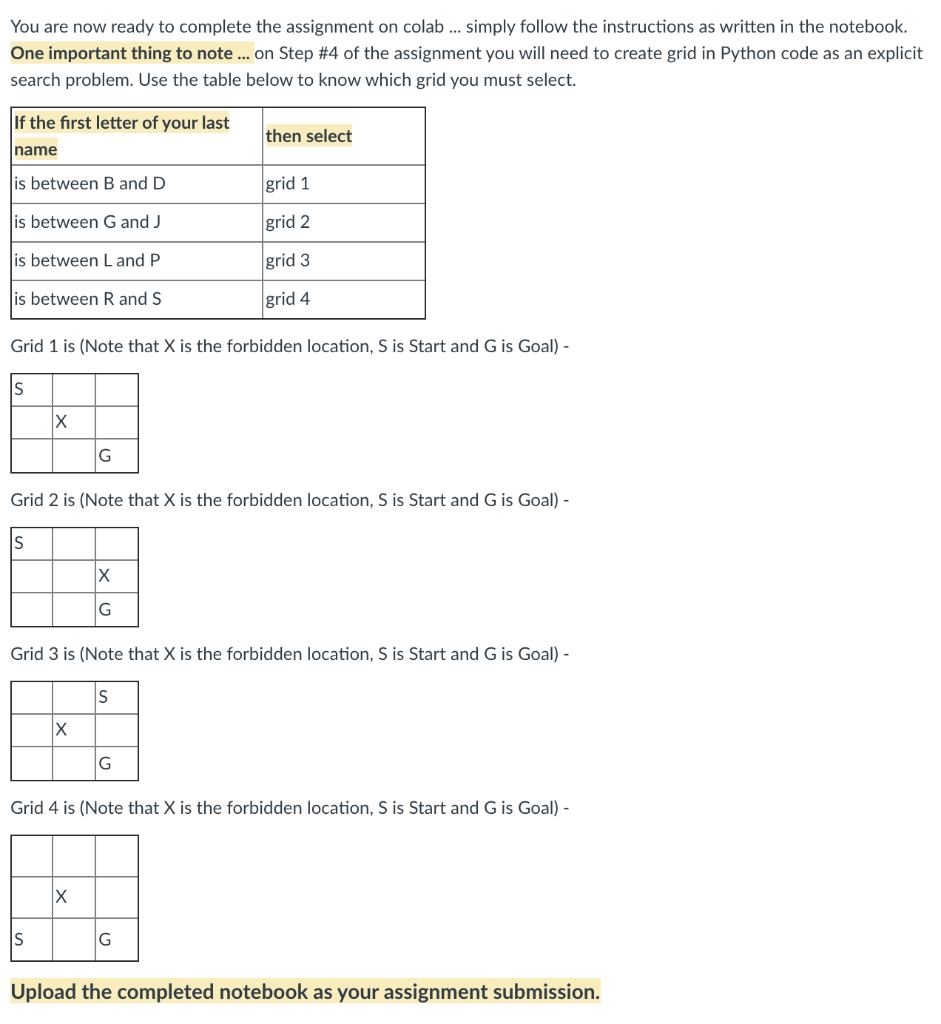
You are now ready to complete the assignment on colab ... simply follow the instructions as written in the notebook. One important thing to note ... on Step #4 of the assignment you will need to create grid in Python code as an explicit search problem. Use the table below to know which grid you must select. If the first letter of your last then select name is between B and D grid 1 is between G and J grid 2 is between L and P grid 3 is between R and S grid 4 Grid 1 is (Note that X is the forbidden location, Sis Start and G is Goal) - S Grid 2 is (Note that X is the forbidden location, Sis Start and Gis Goal) - S G Grid 3 is (Note that X is the forbidden location, Sis Start and G is Goal) - S X G Grid 4 is (Note that X is the forbidden location, S is Start and G is Goal) - X S Upload the completed notebook as your assignment submission. You are now ready to complete the assignment on colab ... simply follow the instructions as written in the notebook. One important thing to note ... on Step #4 of the assignment you will need to create grid in Python code as an explicit search problem. Use the table below to know which grid you must select. If the first letter of your last then select name is between B and D grid 1 is between G and J grid 2 is between L and P grid 3 is between R and S grid 4 Grid 1 is (Note that X is the forbidden location, Sis Start and G is Goal) - S Grid 2 is (Note that X is the forbidden location, Sis Start and Gis Goal) - S G Grid 3 is (Note that X is the forbidden location, Sis Start and G is Goal) - S X G Grid 4 is (Note that X is the forbidden location, S is Start and G is Goal) - X S Upload the completed notebook as your assignment submission
Step by Step Solution
There are 3 Steps involved in it

Get step-by-step solutions from verified subject matter experts
 Study Help