







Question: (PYTHON) What is wrong with my code, and why isnt it printing properly? It's supposed to be automated testing of functions that reverse Strings. MY
(PYTHON) What is wrong with my code, and why isnt it printing properly? It's supposed to be automated testing of functions that reverse Strings.
MY CODE
def strReverseI(s): '''(str) -> str
Iterative function to reverse s; return the reversed string.
Testing: Basic - 'abc', 'hello' Boundary - '' Equivalence classes - alpha, non-alpha
>>> strReverseI('abc') 'cba' >>> strReverseI('hello') 'olleh' >>> strReverseI('') '' >>> strReverseI('CIS 210') '012 SIC' ''' rstr = '' for ch in s: rstr = ch + rstr
return rstr
def strReverseR(word): ''' Reversing String ''' if(word==""): return word else: return strReverseR(word[1:])+word[0]
def test_reverse(functionName): ''' one parameter, f, a function (either strReverseR or strReversel) compares result returned by the called function to the expected result '''
#Set of test cases testCases = ((","),('a','a'),('xyz','zyx'),('testing123','321gnitet'),('hello, world','dlrow ,olleh'));
#Iterating over each pair for test in testCases:
#Calling functions by passing arguments functResult = functionName(test[0]);
#Comparing results if(functResult == test[1]): #If it passes the test print(" Checking(%'s)... it's value %s is correct! " %(test[0], test[1])); else: #If it fails to pass the test print(" Checking(%s)...Error: has wrong value %s, expected %s. " %(test[0], functResult, test[1]));
WHAT IT SHOULD BE PRINTING:
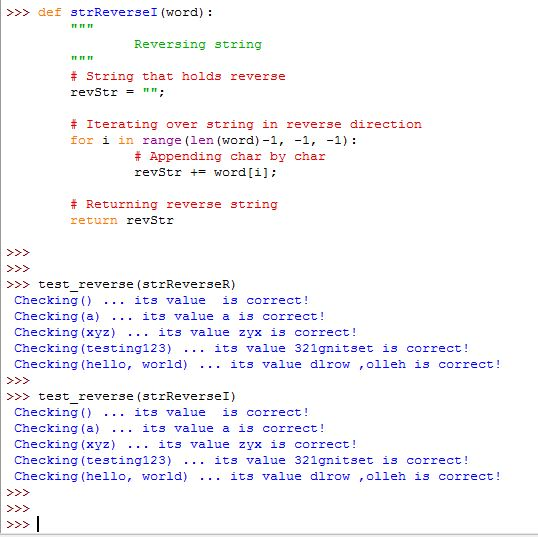
>>>def strReverseI (word): Reversing string # string that hold3 reve r 3e revStr = ""; # Iterating over 3tring in reve r 3e direction for i in range (len (word) -1, 1,-1) # Appending char by char revStr word [1] ; # Returning reverse 3tring return revStr >>>test reverse (strReverseR) Checking) its value is correct! Checking (a) its value a is correct! Checking (xyz) its value zyx is correct! Checking (testing123) its value 321gnitset is correct! Checking (hello, world) . .. its value dlrow,olleh is correct! >>>test reverse (strReverseI) Checking) its value is correct! Checking (a) its value a is correct! Checking (xyz) its value zyx is correct! Checking (testing123) its value 321gnitset is correct! Checking (hello, world) . .. its value dlrow,olleh is correct
Step by Step Solution
There are 3 Steps involved in it

Get step-by-step solutions from verified subject matter experts
 Study Help