







Question: Python3.6 Need copy code Use the header: def dirPrint(pathname, indent): pass 4. Write a recursive function dirPrintO that takes as parameters a pathname of a
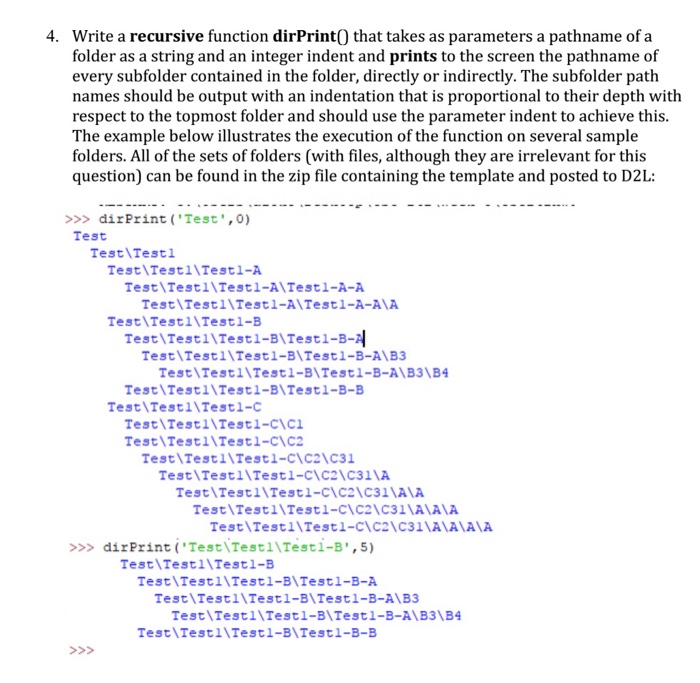
4. Write a recursive function dirPrintO that takes as parameters a pathname of a folder as a string and an integer indent and prints to the screen the pathname of every subfolder contained in the folder, directly or indirectly. The subfolder path names should be output with an indentation that is proportional to their depth with respect to the topmost folder and should use the parameter indent to achieve this The example below illustrates the execution of the function on several sample folders. All of the sets of folders (with files, although they are irrelevant for this question) can be found in the zip file containing the template and posted to D2L: >>>dirPrint ('Test',0) Test Test\Testl Test Testl\Testl-A Test Testl Testl-A\Testl-A-A Test\Testl\Testl-A\Testl-A-AA Test\Testl Testl-B Test Testl\Testl-BITestl-B- Test TestllTestl-B Testl-B-A\B3 Test\TestllTestl-B\Testl-B-B Test\TestllTestl-clYC Test Testl\Testl-B\Testl-B-A\B3\B TestlTestllTestl-c Test\TestllTestl-cIC Test TestllTestl-cIC2 C31 Test\TestllTestl-cIC2 C311A Test\Testl\Testl-cIC2IC31 AA Test\TestllTestl-ciC2\C31\AAIA Test TestllTestl-clC21C31AA AA >>> dirPrint ('Test TestllTestl-B',5) Test Testl\Testl-B Test Testl\Testl-B\Testl-B-A Test\Testl\Testl-B\Testl-B-A\B3 Test\Testl\Testl-B\Test1-B-A\B3 B4 Test Testl\Testl-B\Test1-B-B
Step by Step Solution
There are 3 Steps involved in it

Get step-by-step solutions from verified subject matter experts
 Study Help