







Question: python-please help asap make_prediction: The signature for this function should look exactly like this: def make prediction (params, description='x-intercept:', X_name='x', y_name='y', ceiling=False): The default arguments
python-please help asap
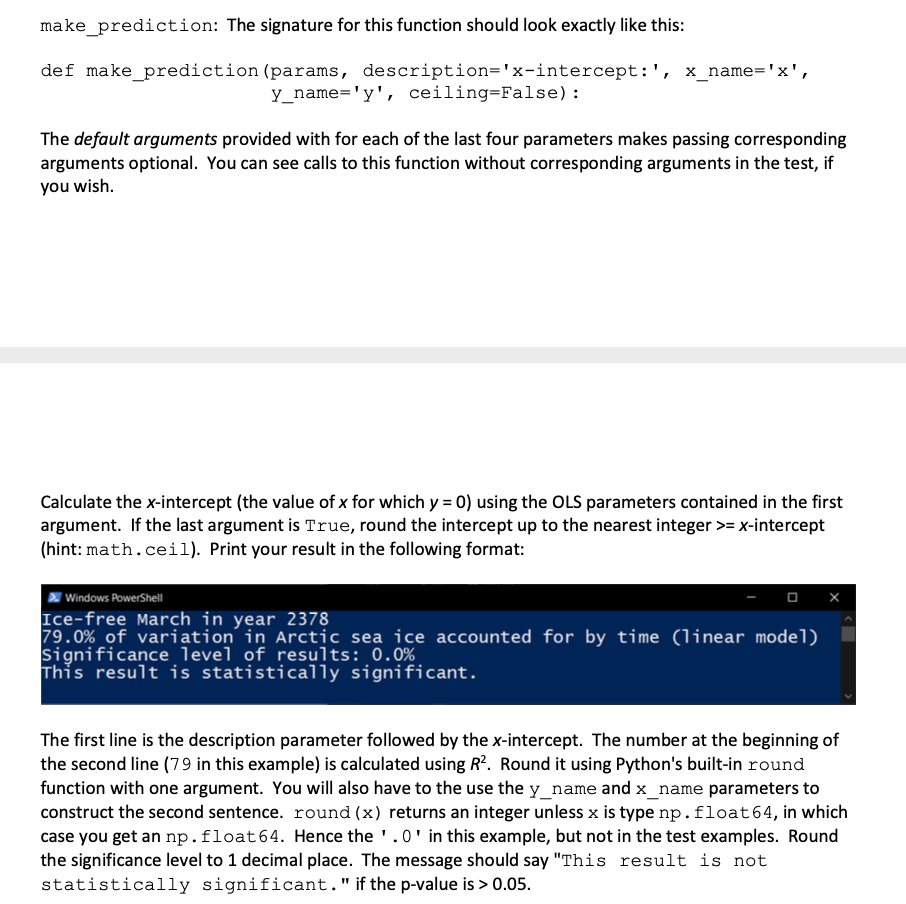
make_prediction: The signature for this function should look exactly like this: def make prediction (params, description='x-intercept:', X_name='x', y_name='y', ceiling=False): The default arguments provided with for each of the last four parameters makes passing corresponding arguments optional. You can see calls to this function without corresponding arguments in the test, if you wish. Calculate the x-intercept (the value of x for which y = 0) using the OLS parameters contained in the first argument. If the last argument is True, round the intercept up to the nearest integer >= x-intercept (hint: math.ceil). Print your result in the following format: Windows PowerShell Ice-free March in year 2378 79.0% of variation in Arctic sea ice accounted for by time (linear model) significance level of results: 0.0% This result is statistically significant. The first line is the description parameter followed by the x-intercept. The number at the beginning of the second line (79 in this example) is calculated using R2. Round it using Python's built-in round function with one argument. You will also have to the use the y_name and x_name parameters to construct the second sentence. round(x) returns an integer unless x is type np.float64, in which case you get an np.float 64. Hence the '.0' in this example, but not in the test examples. Round the significance level to 1 decimal place. The message should say "This result is not statistically significant." if the p-value is > 0.05. make_prediction: The signature for this function should look exactly like this: def make prediction (params, description='x-intercept:', X_name='x', y_name='y', ceiling=False): The default arguments provided with for each of the last four parameters makes passing corresponding arguments optional. You can see calls to this function without corresponding arguments in the test, if you wish. Calculate the x-intercept (the value of x for which y = 0) using the OLS parameters contained in the first argument. If the last argument is True, round the intercept up to the nearest integer >= x-intercept (hint: math.ceil). Print your result in the following format: Windows PowerShell Ice-free March in year 2378 79.0% of variation in Arctic sea ice accounted for by time (linear model) significance level of results: 0.0% This result is statistically significant. The first line is the description parameter followed by the x-intercept. The number at the beginning of the second line (79 in this example) is calculated using R2. Round it using Python's built-in round function with one argument. You will also have to the use the y_name and x_name parameters to construct the second sentence. round(x) returns an integer unless x is type np.float64, in which case you get an np.float 64. Hence the '.0' in this example, but not in the test examples. Round the significance level to 1 decimal place. The message should say "This result is not statistically significant." if the p-value is > 0.05
Step by Step Solution
There are 3 Steps involved in it

Get step-by-step solutions from verified subject matter experts
 Study Help