







Question: Q 1 . ( 3 Marks ) Create a VI that simulates a temperature - monitoring device. Use the signal simulator to simulate temperatures between
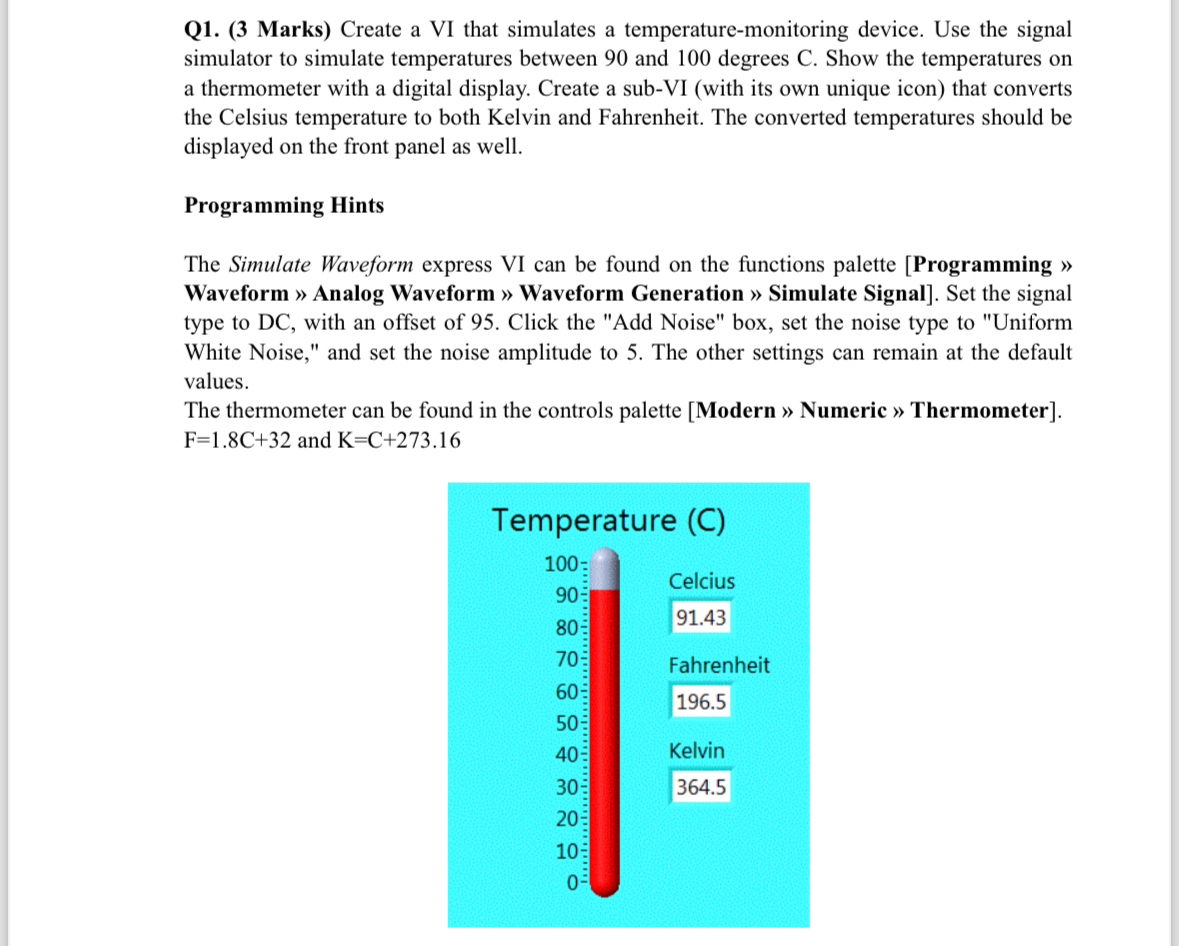
Q Marks Create a VI that simulates a temperaturemonitoring device. Use the signal simulator to simulate temperatures between and degrees C Show the temperatures on a thermometer with a digital display. Create a subVI with its own unique icon that converts the Celsius temperature to both Kelvin and Fahrenheit. The converted temperatures should be displayed on the front panel as well.
Programming Hints
The Simulate Waveform express VI can be found on the functions palette Programming Waveform Analog Waveform Waveform Generation Simulate Signal Set the signal type to DC with an offset of Click the "Add Noise" box, set the noise type to "Uniform White Noise," and set the noise amplitude to The other settings can remain at the default values.
The thermometer can be found in the controls palette Modern Numeric Thermometer and
Step by Step Solution
There are 3 Steps involved in it
1 Expert Approved Answer
Step: 1 Unlock

Question Has Been Solved by an Expert!
Get step-by-step solutions from verified subject matter experts
Step: 2 Unlock
Step: 3 Unlock
 Study Help