







Question: Q2. Active code: Write a code that sketches figure 1 when no key is pressed. When any key is pressed on the keyboard, figure 1
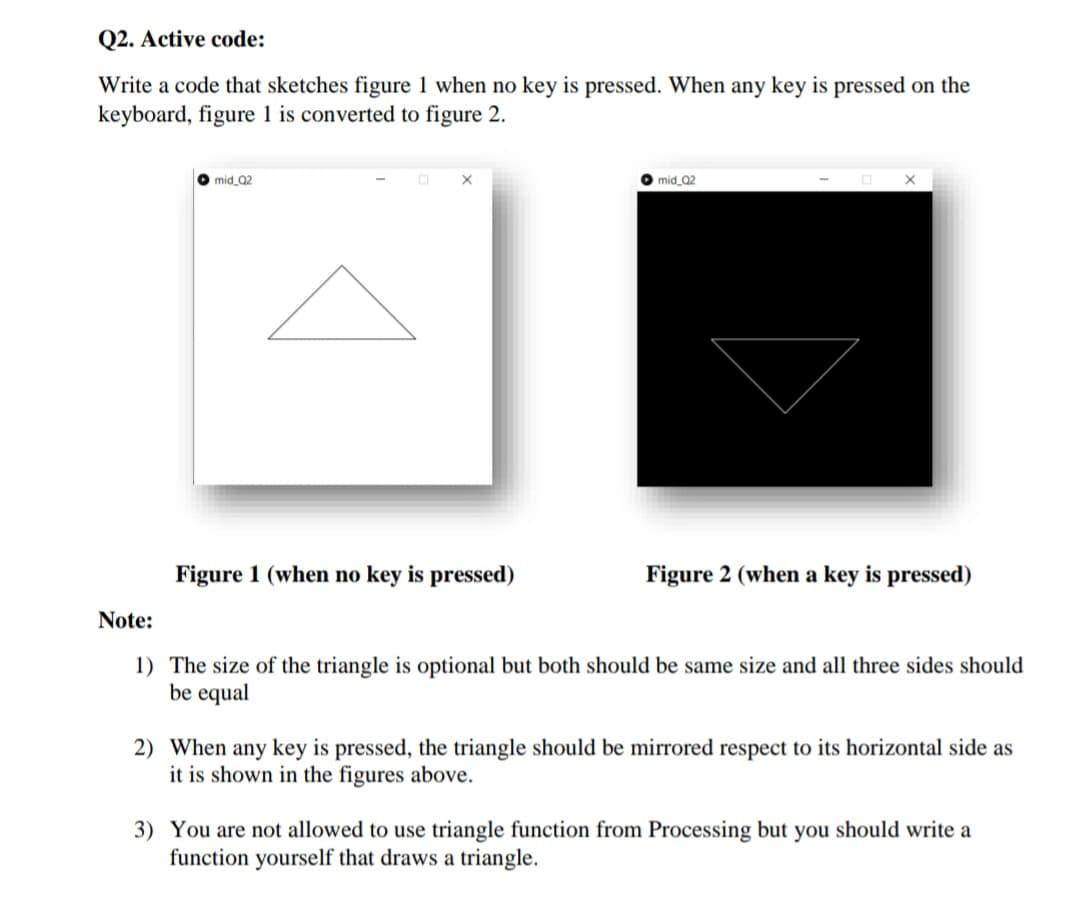
Q2. Active code: Write a code that sketches figure 1 when no key is pressed. When any key is pressed on the keyboard, figure 1 is converted to figure 2. mid 02 mid Q2 Figure 1 (when no key is pressed) Figure 2 (when a key is pressed) Note: 1) The size of the triangle is optional but both should be same size and all three sides should be equal 2) When any key is pressed, the triangle should be mirrored respect to its horizontal side as it is shown in the figures above. 3) You are not allowed to use triangle function from Processing but you should write a function yourself that draws a triangle
Step by Step Solution
There are 3 Steps involved in it
1 Expert Approved Answer
Step: 1 Unlock

Question Has Been Solved by an Expert!
Get step-by-step solutions from verified subject matter experts
Step: 2 Unlock
Step: 3 Unlock
 Study Help