



Question: Q2: when you press in contact us will open the following page. Jerash University Full Name: Email Phone Number University Collage Departments and centers Contact
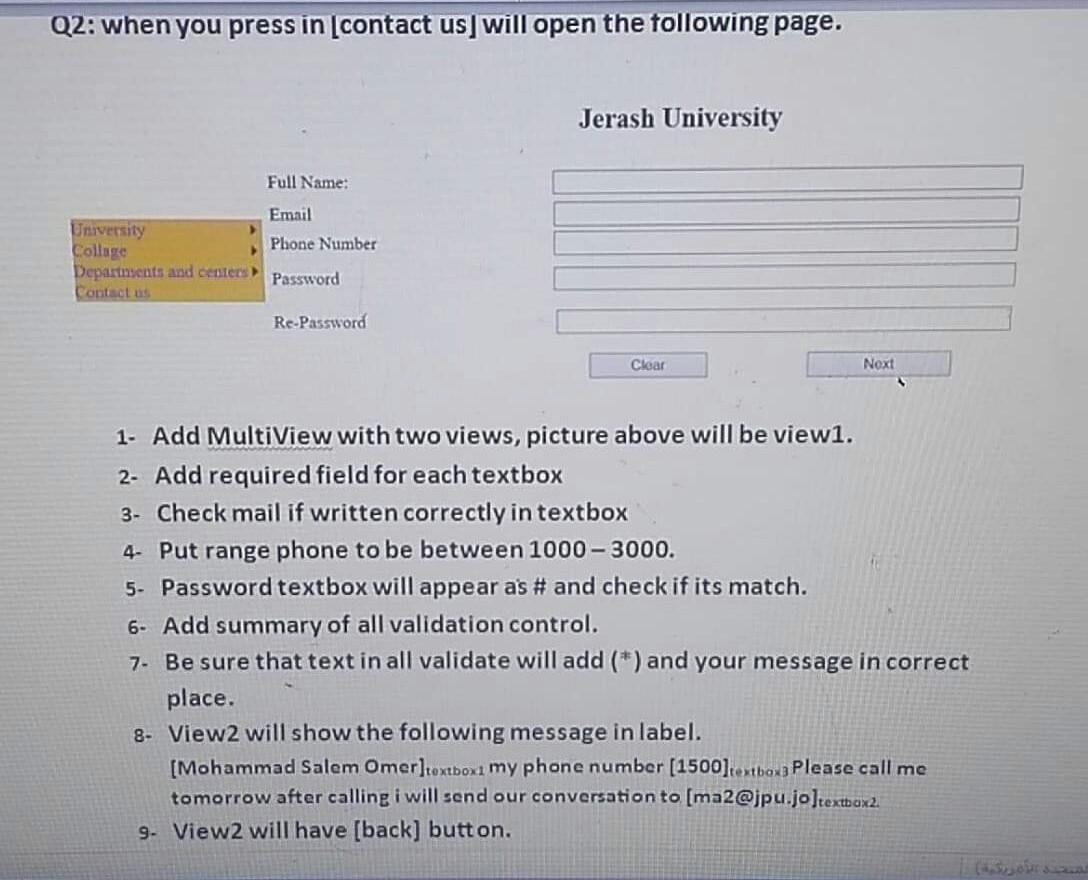
Q2: when you press in contact us will open the following page. Jerash University Full Name: Email Phone Number University Collage Departments and centers Contact us Password Re-Password Clear Next 1. Add MultiView with two views, picture above will be view1. 2- Add required field for each textbox 3- Check mail if written correctly in textbox 4. Put range phone to be between 1000 - 3000. 5. Password textbox will appear as # and check if its match. 6- Add summary of all validation control. 7. Be sure that text in all validate will add (*) and your message in correct place. 8- View2 will show the following message in label. [Mohammad Salem Omer]textbox1 my phone number (1500]tostboxa Please call me tomorrow after calling i will send our conversation to [ma2@jpu.jo ]textbox2 9. View 2 will have [back] button. Q2: when you press in contact us will open the following page. Jerash University Full Name: Email Phone Number University Collage Departments and centers Contact us Password Re-Password Clear Next 1. Add MultiView with two views, picture above will be view1. 2- Add required field for each textbox 3- Check mail if written correctly in textbox 4. Put range phone to be between 1000 - 3000. 5. Password textbox will appear as # and check if its match. 6- Add summary of all validation control. 7. Be sure that text in all validate will add (*) and your message in correct place. 8- View2 will show the following message in label. [Mohammad Salem Omer]textbox1 my phone number (1500]tostboxa Please call me tomorrow after calling i will send our conversation to [ma2@jpu.jo ]textbox2 9. View 2 will have [back] button
Step by Step Solution
There are 3 Steps involved in it

Get step-by-step solutions from verified subject matter experts