







Question: qtest.c /* * File: qtest.c * ------------- * This program tests the queue package by allowing the user to * keep track of a waiting
qtest.c
/* * File: qtest.c * ------------- * This program tests the queue package by allowing the user to * keep track of a waiting list. The commands are listed in the * function GiveInstructions. */ #include#include "genlib.h" #include "simpio.h" #include "strlib.h" #include "scanadt.h" #include "queue.h" /* Private function prototypes */ static void GiveInstructions(void); static void DisplayQueue(queueADT queue); /* Main program */ main() { queueADT queue; scannerADT scanner; string line, cmd, value; GiveInstructions(); scanner = NewScanner(); SetScannerSpaceOption(scanner, IgnoreSpaces); queue = NewQueue(); while (TRUE) { printf(":"); line = GetLine(); SetScannerString(scanner, line); cmd = ConvertToLowerCase(ReadToken(scanner)); if (StringEqual(cmd, "enqueue")) { value = ReadToken(scanner); Enqueue(queue, value); } else if (StringEqual(cmd, "dequeue")) { printf("%s ", Dequeue(queue)); } else if (StringEqual(cmd, "display")) { DisplayQueue(queue); } else if (StringEqual(cmd, "quit")) { break; } else { printf("Unrecognized command: %s ", line); } } FreeQueue(queue); FreeScanner(scanner); } /* * Function: GiveInstructions * Usage: GiveInstructions(); * -------------------------- * This function displays a message to the user showing * what options are available in the test program. */ static void GiveInstructions(void) { printf("Enter commands in the following forms: "); printf(" enqueue x -- Enqueue the token x "); printf(" dequeue -- Dequeue the value at the head of the queue "); printf(" display -- Display the contents of the queue "); printf(" quit -- Exit from the program "); } /* * Function: DisplayQueue * Usage: DisplayQueue(queue); * --------------------------- * This function displays the contents of a string queue on * a single line. */ static void DisplayQueue(queueADT queue) { int i, len; len = QueueLength(queue); if (len == 0) { printf("Queue is empty."); } else { printf("Queue contains: "); for (i = 0; i 0) printf(", "); printf("%s", GetQueueElement(queue, i)); } } printf(" "); }
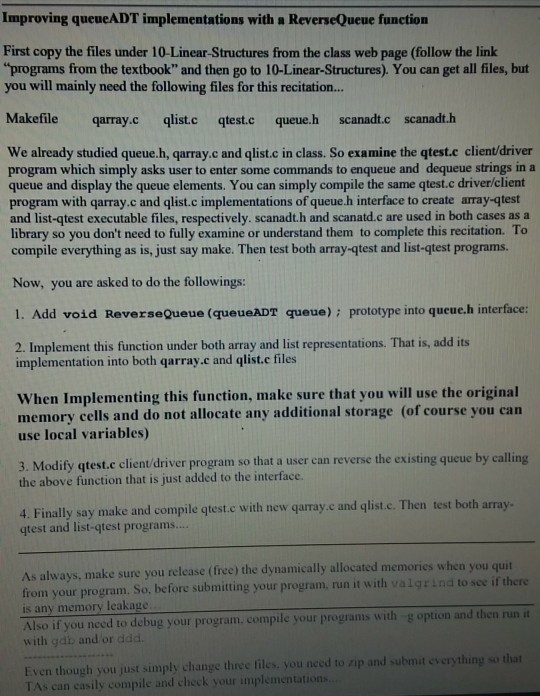
Improving queueADT implementations with a ReverseQueue function First copy the files under 10-Linear-Structures from the class web page (follow the link you will mainly need the following files for this recitation.. programs from the textbook" and then go to 10-Linear-Structures). You can get all files, but Makefile qarray.c qlist.c qtest.c queue.h scanadt.c scanadt.h We already studied queue.h, qarray.c and qlist.c in class. So examine the qtest.c client/driver program which simply asks user to enter some commands to enqueue and dequeue strings in a queue and display the queue elements. You can simply compile the same qtest.c driver/client program with qarray.c and qlist.c implementations of queue.h interface to create array-qtest and list-qtest executable files, respectively. scanadt.h and scanatd.c are used in both cases as a library so you don't need to fully examine or understand them to complete this recitation. To compile everything as is, just say make. Then test both array-qtest and list-qtest programs. Now, you are asked to do the followings: 1. Add void ReverseQueue (queueADT queue): prototype into queuc.h interface: 2. Implement this function under both array and list representations. That is, add its implementation into both qarray.c and qlist.c files When Implementing this function, make sure that you will use the original memory cells and do not allocate any additional storage (of course you can use local variables) 3. Modify qtest.c client/driver program so that a user can reverse the existing queue by calling the above function that is just added to the interface. 4. Finally say make and compile qtest.e with new qarray.c and qlist.c. Then test both array qtest and list-qtest programs. As always, make sure you release (free) the dynamically allocated memories whe from your program. So, before submitting your program, run it with valgrind to see if there is any memory leakage n you quit Also if you need to debug your program. compile your programs with with gdb and or ddd g option and then run it at everything so that Even though you just simply change thre Improving queueADT implementations with a ReverseQueue function First copy the files under 10-Linear-Structures from the class web page (follow the link you will mainly need the following files for this recitation.. programs from the textbook" and then go to 10-Linear-Structures). You can get all files, but Makefile qarray.c qlist.c qtest.c queue.h scanadt.c scanadt.h We already studied queue.h, qarray.c and qlist.c in class. So examine the qtest.c client/driver program which simply asks user to enter some commands to enqueue and dequeue strings in a queue and display the queue elements. You can simply compile the same qtest.c driver/client program with qarray.c and qlist.c implementations of queue.h interface to create array-qtest and list-qtest executable files, respectively. scanadt.h and scanatd.c are used in both cases as a library so you don't need to fully examine or understand them to complete this recitation. To compile everything as is, just say make. Then test both array-qtest and list-qtest programs. Now, you are asked to do the followings: 1. Add void ReverseQueue (queueADT queue): prototype into queuc.h interface: 2. Implement this function under both array and list representations. That is, add its implementation into both qarray.c and qlist.c files When Implementing this function, make sure that you will use the original memory cells and do not allocate any additional storage (of course you can use local variables) 3. Modify qtest.c client/driver program so that a user can reverse the existing queue by calling the above function that is just added to the interface. 4. Finally say make and compile qtest.e with new qarray.c and qlist.c. Then test both array qtest and list-qtest programs. As always, make sure you release (free) the dynamically allocated memories whe from your program. So, before submitting your program, run it with valgrind to see if there is any memory leakage n you quit Also if you need to debug your program. compile your programs with with gdb and or ddd g option and then run it at everything so that Even though you just simply change thre
Step by Step Solution
There are 3 Steps involved in it

Get step-by-step solutions from verified subject matter experts
 Study Help