







Question: Query 2 - Outer Join Enter the following query into Management Studio, and review the output. USE cis111_AP /* Homework for chapter 4 Query 2
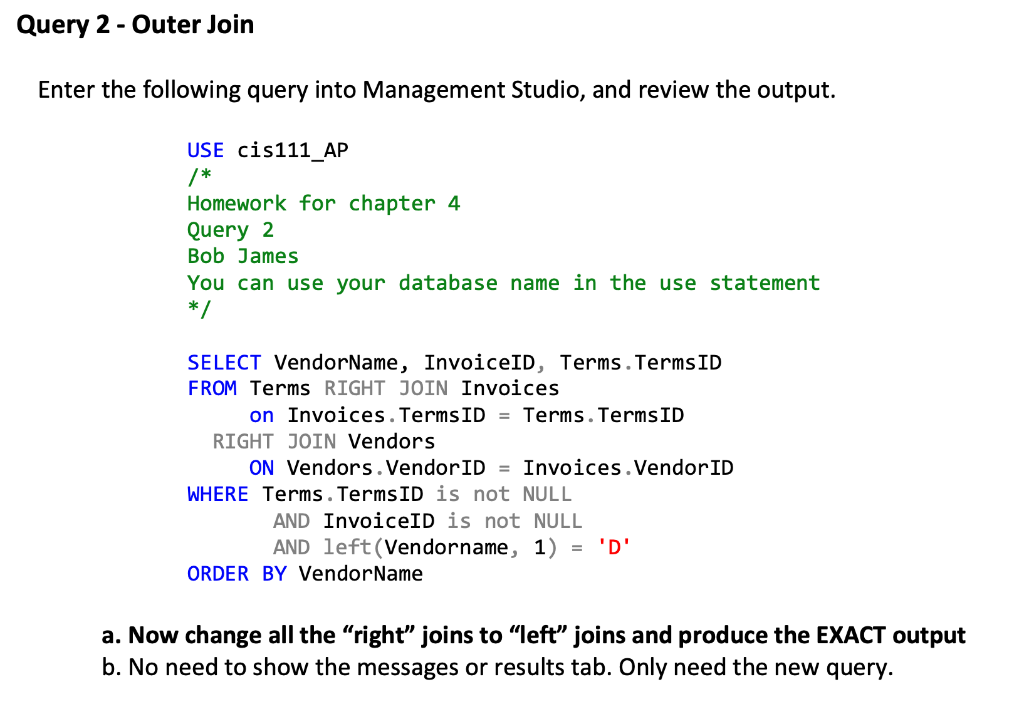
Query 2 - Outer Join Enter the following query into Management Studio, and review the output. USE cis111_AP /* Homework for chapter 4 Query 2 Bob James You can use your database name in the use statement */ SELECT VendorName, InvoiceID, Terms. TermsID FROM Terms RIGHT JOIN Invoices on Invoices. TermsID = Terms. TermsID RIGHT JOIN Vendors ON Vendors. VendorID = Invoices. VendorID WHERE Terms. TermsID is not NULL AND InvoiceID is not NULL AND left(Vendorname, 1) = 'D' ORDER BY Vendor Name a. Now change all the "right" joins to "left" joins and produce the EXACT output b. No need to show the messages or results tab. Only need the new query
Step by Step Solution
There are 3 Steps involved in it

Get step-by-step solutions from verified subject matter experts
 Study Help