







Question: Query 7: How to use SQL join and null in this case. Must Is Null be included in the criteria line? And Query 8: Update
Query 7: How to use SQL join and null in this case. Must "Is Null" be included in the criteria line?
And Query 8: Update Queries 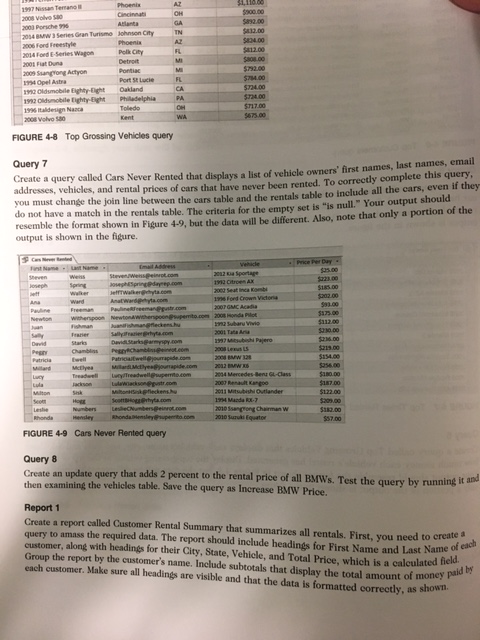
AZ $900.00 832.00 832.00 2003 Porsche s 034 8W 3 Series Gran Turisme 006 Fond Feeestyle Johnson City TN 12.00 24Foed E-Series Wagon Polik City Pontiac a00s Saangyong Actyon 724.00 724.00 T17.00 912 Oldsmobile Eighty-Elight Oakland 19% Italdersign Naca 2008 Volvo 50 FIGURE 4-8 Top Grossing Vehicles query Query 7 addresses, vehicles, and rental prices of cars that have never been rented. To correctly complete this query, you must change the join line between the cars table and the rentals table to include all the cars, even if they do not have a match in the rentals table. The criteria for the empty set is "is null." Your output should resemble the format shown in Figure 4-9, but the data will be different. Also, note that only a portion of the output is shown in the figure. Create a query called Cars Never Rented that displays a list of vehicle owners' first names, last names, email $35.00 $223.00 onephSpring MlardMctyeuapide.com 202 BMW $180.00 187.00 2007 Renault Kangoo a Mitsbishi Outlander 203.00 010 Ssangrong Chairman W 010uru Equator FIGURE 4-9 Cars Never Rented query Query 8 then examining the vehicles table. Save the query as Increase BMW Price. e query that adds 2 percent to the rental price of all BMWs. Test the query by running it and Report 1 Create a report called Customer Rental Summary that summarizes all rentals. First, you need to createa query to amass the required data. The report should include headings for First Name and Last Name o customer, along with headings for their City, State, Vehicle, and Total Price, which is a calculated field Group the report by the customer's name. Include subtotals that display the total amount of money pa each customer. Make sure all headings are visible and that the data is formatted correctly, as shown. AZ $900.00 832.00 832.00 2003 Porsche s 034 8W 3 Series Gran Turisme 006 Fond Feeestyle Johnson City TN 12.00 24Foed E-Series Wagon Polik City Pontiac a00s Saangyong Actyon 724.00 724.00 T17.00 912 Oldsmobile Eighty-Elight Oakland 19% Italdersign Naca 2008 Volvo 50 FIGURE 4-8 Top Grossing Vehicles query Query 7 addresses, vehicles, and rental prices of cars that have never been rented. To correctly complete this query, you must change the join line between the cars table and the rentals table to include all the cars, even if they do not have a match in the rentals table. The criteria for the empty set is "is null." Your output should resemble the format shown in Figure 4-9, but the data will be different. Also, note that only a portion of the output is shown in the figure. Create a query called Cars Never Rented that displays a list of vehicle owners' first names, last names, email $35.00 $223.00 onephSpring MlardMctyeuapide.com 202 BMW $180.00 187.00 2007 Renault Kangoo a Mitsbishi Outlander 203.00 010 Ssangrong Chairman W 010uru Equator FIGURE 4-9 Cars Never Rented query Query 8 then examining the vehicles table. Save the query as Increase BMW Price. e query that adds 2 percent to the rental price of all BMWs. Test the query by running it and Report 1 Create a report called Customer Rental Summary that summarizes all rentals. First, you need to createa query to amass the required data. The report should include headings for First Name and Last Name o customer, along with headings for their City, State, Vehicle, and Total Price, which is a calculated field Group the report by the customer's name. Include subtotals that display the total amount of money pa each customer. Make sure all headings are visible and that the data is formatted correctly, as shown
Step by Step Solution
There are 3 Steps involved in it

Get step-by-step solutions from verified subject matter experts
 Study Help