



Question: Query 7 Orders from Milliways Run a similar query to Orders from 2 6 7 3 6 8 above, but this time let's also list
Query Orders from Milliways
Run a similar query to Orders from above, but this time let's also list the Client
Name ie if you need to use this query for a management report you would need to
include Client names, not just Client IDs Retrieve the client ID client name, and order ID
for Client ID Milliways Tip: the difference between this query and the previous
one above is that you need to join the Orders table and the Clients table so you can get the
client's nameWriting Queries
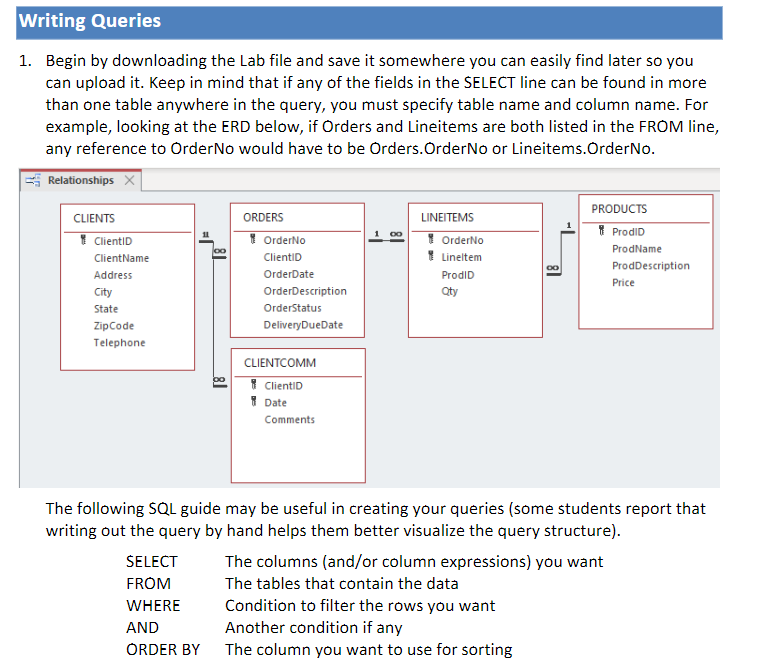
Begin by downloading the Lab file and save it somewhere you can easily find later so you
can upload it Keep in mind that if any of the fields in the SELECT line can be found in more
than one table anywhere in the query, you must specify table name and column name. For
example, looking at the ERD below, if Orders and Lineitems are both listed in the FROM line,
any reference to OrderNo would have to be Orders.OrderNo or Lineitems.OrderNo.
The following SQL guide may be useful in creating your queries some students report that
writing out the query by hand helps them better visualize the query structure
Step by Step Solution
There are 3 Steps involved in it
1 Expert Approved Answer
Step: 1 Unlock

Question Has Been Solved by an Expert!
Get step-by-step solutions from verified subject matter experts
Step: 2 Unlock
Step: 3 Unlock