


Question: Question 1 1. Create a new, blank workbook. 2. Create a first sheet. Please add your name and id at the top as done in
Question 1 1. Create a new, blank workbook. 2.
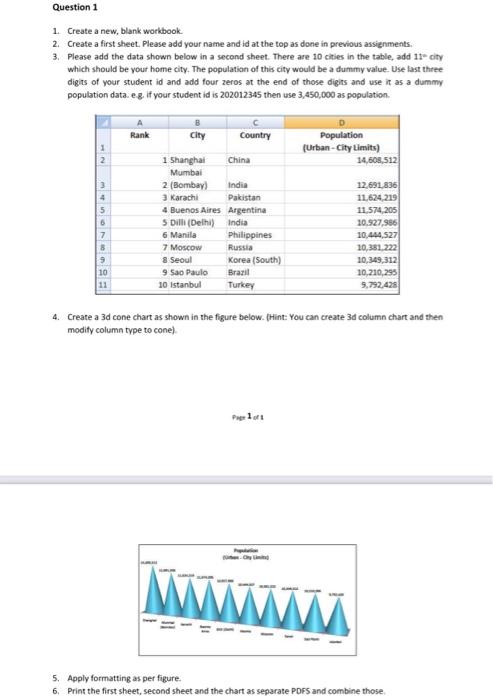
Question 1 1. Create a new, blank workbook. 2. Create a first sheet. Please add your name and id at the top as done in previous assignments 3. Please add the data shown below in a second sheet. There are 10 cities in the table, add 1tcity which should be your home city. The population of this city would be a dummy value. Use last three digits of your student id and add four zeros at the end of those digits and use it as a dummy population data. eg. If your student id is 202012345 then use 3,450,000 as population. A Rank B City Country Population (Urban-City Limits) 34,608,512 India 6 7 8 9 10 1 Shanghai China Mumbai 2 (Bombay) 3 Karachi Pakistan 4 Buenos Aires Argentina 5 Dill (Delhi) India 6 Manila Philippines 7 Moscow Russia & Seoul Korea (South) 9 Sao Paulo Brazil 10 istanbul Turkey 12691.836 11.624,219 11.574 205 10.927,956 10.454527 10,381.222 10,349,312 10,210,295 9,792,428 4. Create a 3d cone chart as shown in the figure below. (Hint: You can create 3d column chart and then modity column type to cone) Page 1 of 1 5. Apply formatting as per figure. 6. Print the first sheet, second sheet and the chart as separate PDFS and combine those

Step by Step Solution

There are 3 Steps involved in it

1 Expert Approved Answer
Step: 1 Unlock blur-text-image

Question Has Been Solved by an Expert!

Get step-by-step solutions from verified subject matter experts

Step: 2 Unlock
Step: 3 Unlock

Students Have Also Explored These Related General Management Questions!