







Question: Question 1 (20 points): Create a table that compares all the similarities and differences in the TCP server and UDP server codes below (and in
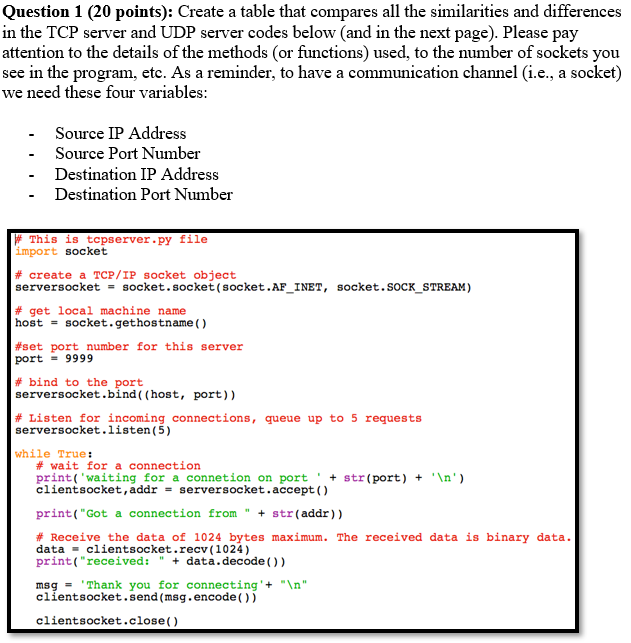
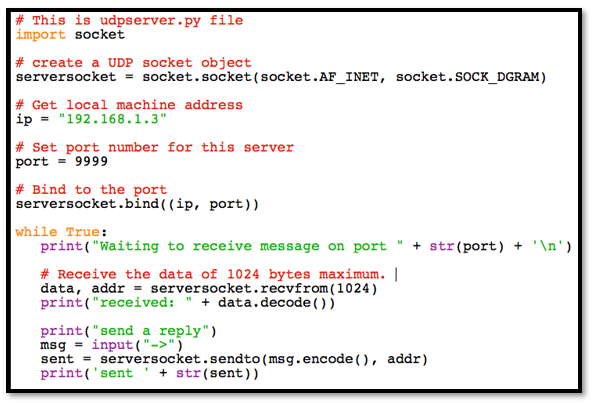
Question 1 (20 points): Create a table that compares all the similarities and differences in the TCP server and UDP server codes below (and in the next page). Please pay attention to the details of the methods (or functions) used, to the number of sockets you see in the program, ete. As a reminder, to have a communication channel (i.e., a socket) we need these four variables: - Source IP Address - Source Port Number Destination IP Address Destination Port Number This is tcpserver.py file import socket # create a TCP/IP socket object serversocket= socket.socket (socket.AF INET, socket.SOCK-STREAM) # get local machine name hostsocket.gethostname() #set port number for this server port-9999 #bind to the port serversocket.bind ( (host, port)) # Listen for incoming connections, queue up to 5 requests serversocket.listen (5) while True: # wait for a connection print( 'waiting for a connetion on port 'str (port)n') clientsocket,addr-serversocket.accept() print( "Got a connection from "str (addr)) # Receive the data of 1024 bytes maximum. The received data is binary data data clientsocket.recv (1024) print("received: data.decode)) msgThank you for connecting+"In" clientsocket.send (msg.encode()) clientsocket.close() # This is udpserver.py file import socket # create a UDP socket object serversocketsocket.socket (socket.AF_INET, socket.sOCK_DGRAM) # Get local machine address ip 192.168.1.3" # set port number for this server port = 9999 # Bind to the port serversocket.bind((ip, port)) while True: print( "Waiting to receive message on port str (port)In # Receive the data of 1024 bytes maximum. I data, addr - serversocket.recvfrom (1024) print("received: " data.decode ()) print("send a reply" ) msg- input("->") sent serversocket.sendto (msg.encode, addr) print( 'sent+ str (sent)) Question 1 (20 points): Create a table that compares all the similarities and differences in the TCP server and UDP server codes below (and in the next page). Please pay attention to the details of the methods (or functions) used, to the number of sockets you see in the program, ete. As a reminder, to have a communication channel (i.e., a socket) we need these four variables: - Source IP Address - Source Port Number Destination IP Address Destination Port Number This is tcpserver.py file import socket # create a TCP/IP socket object serversocket= socket.socket (socket.AF INET, socket.SOCK-STREAM) # get local machine name hostsocket.gethostname() #set port number for this server port-9999 #bind to the port serversocket.bind ( (host, port)) # Listen for incoming connections, queue up to 5 requests serversocket.listen (5) while True: # wait for a connection print( 'waiting for a connetion on port 'str (port)n') clientsocket,addr-serversocket.accept() print( "Got a connection from "str (addr)) # Receive the data of 1024 bytes maximum. The received data is binary data data clientsocket.recv (1024) print("received: data.decode)) msgThank you for connecting+"In" clientsocket.send (msg.encode()) clientsocket.close() # This is udpserver.py file import socket # create a UDP socket object serversocketsocket.socket (socket.AF_INET, socket.sOCK_DGRAM) # Get local machine address ip 192.168.1.3" # set port number for this server port = 9999 # Bind to the port serversocket.bind((ip, port)) while True: print( "Waiting to receive message on port str (port)In # Receive the data of 1024 bytes maximum. I data, addr - serversocket.recvfrom (1024) print("received: " data.decode ()) print("send a reply" ) msg- input("->") sent serversocket.sendto (msg.encode, addr) print( 'sent+ str (sent))
Step by Step Solution
There are 3 Steps involved in it

Get step-by-step solutions from verified subject matter experts
 Study Help