







Question: Question 1: (21 points) DHCP Server DNS Server Internet Switch PCO PCI WebServer - www.CSIT320.com The Connected devices are configured as follows: Device IP Address
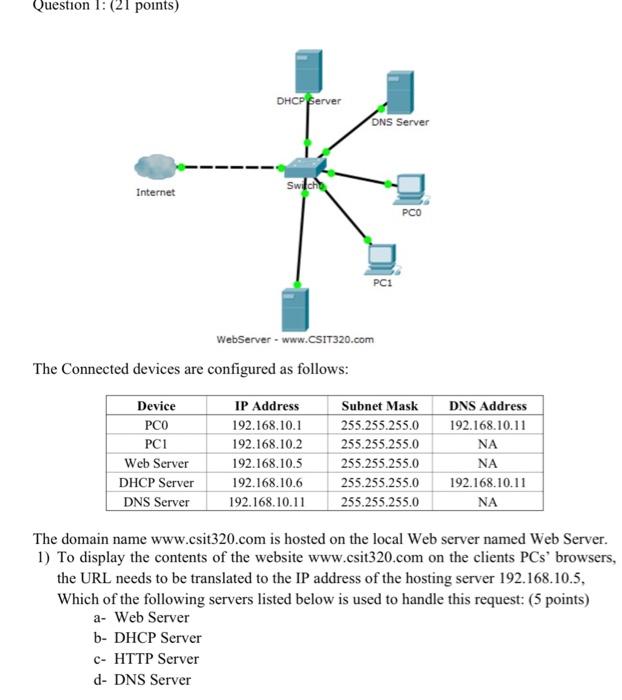
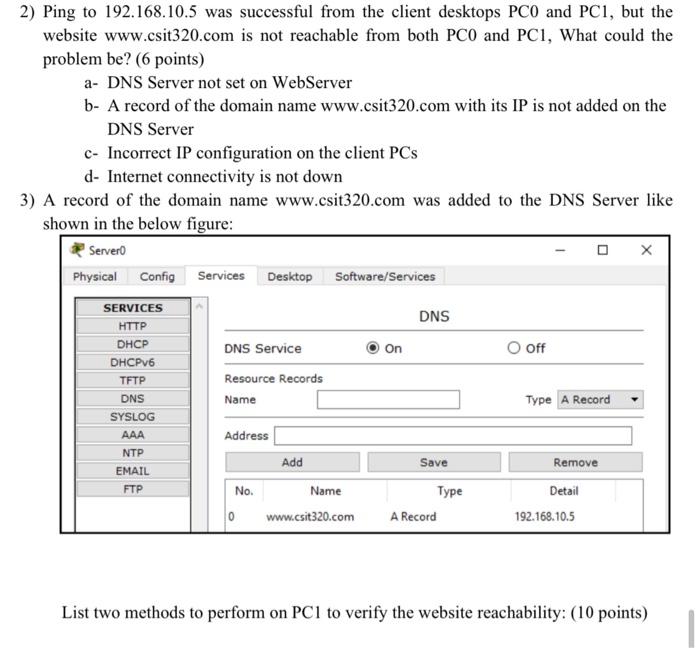
Question 1: (21 points) DHCP Server DNS Server Internet Switch PCO PCI WebServer - www.CSIT320.com The Connected devices are configured as follows: Device IP Address Subnet Mask PCO 192.168.10.1 255.255.255.0 PCI 192.168.10.2 255.255.255.0 Web Server 192.168.10.5 255.255.255.0 DHCP Server 192.168.10.6 255.255.255.0 DNS Server 192.168.10.11 255.255.255.0 DNS Address 192.168.10.11 NA NA 192.168.10.11 NA The domain name www.csit320.com is hosted on the local Web server named Web Server. 1) To display the contents of the website www.csit320.com on the clients PCs' browsers, the URL needs to be translated to the IP address of the hosting server 192.168.10.5, Which of the following servers listed below is used to handle this request: (5 points) a- Web Server b- DHCP Server C- HTTP Server d- DNS Server 2) Ping to 192.168.10.5 was successful from the client desktops PCO and PC1, but the website www.csit320.com is not reachable from both PCO and PCI, What could the problem be? (6 points) a- DNS Server not set on WebServer b- A record of the domain name www.csit320.com with its IP is not added on the DNS Server c- Incorrect IP configuration on the client PCs d- Internet connectivity is not down 3) A record of the domain name www.csit320.com was added to the DNS Server like shown in the below figure: Server Physical Config Services Desktop Software/Services DNS On O Off SERVICES HTTP DHCP DHCPv6 TFTP DNS SYSLOG AAA NTP EMAIL FTP DNS Service Resource Records Name Type A Record Address Add Save Remove No. Name www.csit320.com Type A Record Detail 192.168.10.5 0 List two methods to perform on PCI to verify the website reachability: (10 points)
Step by Step Solution
There are 3 Steps involved in it

Get step-by-step solutions from verified subject matter experts
 Study Help